
ChatGPT Hidden Codes
Automatically translated
 Admin
AdminShort response: There is no official “secret code” list of ChatGPT. Some of the expressions shared on the Internet (such asELI5, TLDR, ACT AS) are actually short prompt patterns and ChatGPT read them as an ordinary instruction. “parameter codes” such as temp, ball p, max tokens, is the settings that developers send in OpenAI API; it does not change the setting of the model in the chat box. If you want to change responses permanently, you use special instructions, memory, personality adjustment and model selection.
Last update: 14.10.2026
These moulds aren’t in vain anyway: a practical way to tell what you want short and clear. OpenAI also says ChatGPT does not require a perfect first prompt or special commands to get good results; clearly write the important purpose, context, and output as expected.
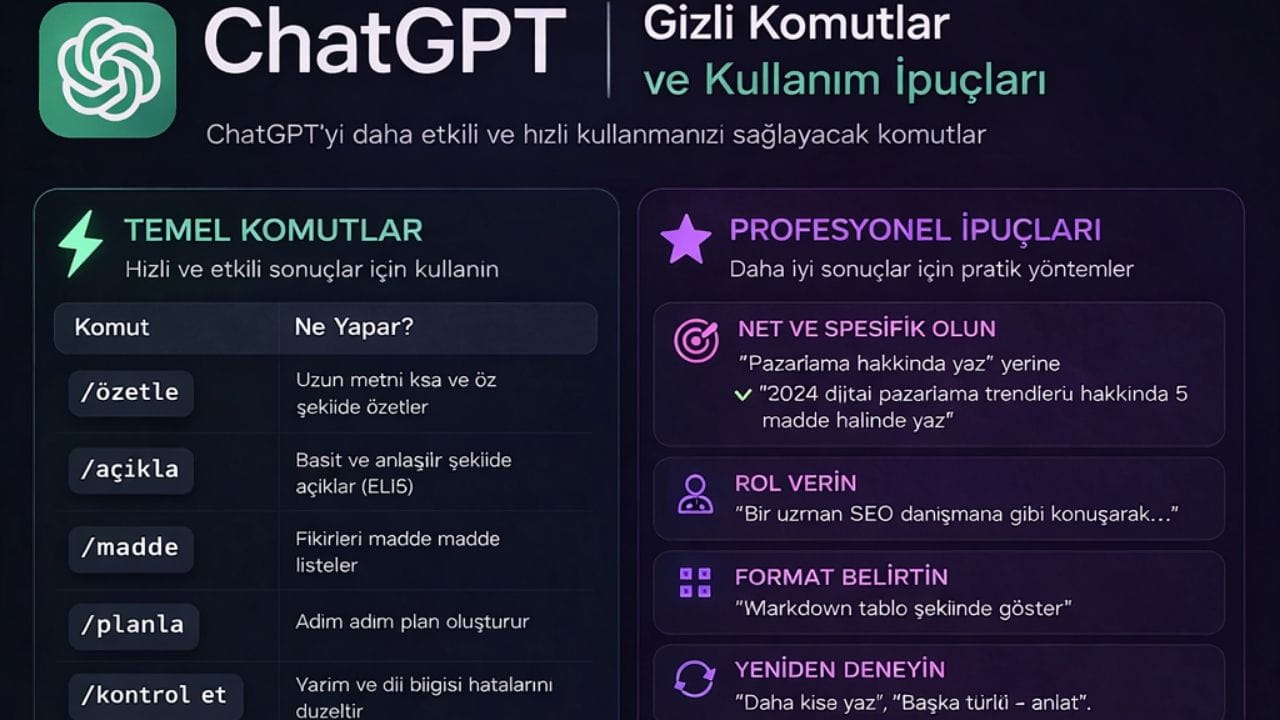
In this guide we took only one of the phrases circulating on the Internet “ChatGPT secret codes” and we mentioned what each is actually: which is a promising mold that works, which is a valid parameter in the only API, which is no adjustment. At the end of the article, you can find the official personalization settings of ChatGPT, oblique line (/) commands and keyboard shortcuts. Plans and prices ChatGPT Go You can also browse.
What is the “secret code” reality?
Type | Samples | Does ChatGPT work in chat? | What should you do? |
|---|---|---|---|
Real API parameter | temperature, ball p, max output tokens | No. The line you write is not a set, but read as plain text. | Write your request with word: “ Become more creative”, “more than 100 words”. |
Old Transmissions API parameter | best of, echo, n, stop, frequency penalty, presence penalty | No. OpenAI API’s old posts are documented at the end point. | “3 write different versions”, use natural instruction such as repeating phrases”. |
Non-expression in OpenAI documents | div penalty, user attributes, system level settings |
No. No such adjustment.
Special instructions for information about yourself, use memory for context from previous chats.
Prompt mold
ELI5, TLDR, ACT AS, SWOT, PRE-MORTEM
Yes; not because it is magic word, because the model understands what he wants.
Add the target audience, length and format to the opposite of shortening.
The true feature of ChatGPT
Special instructions, memory, personality, / commands, keyboard shortcuts
Yes.
See the “The actual settings of theChatGPT” section below.
1. Parameter-Based ChatGPT Hidden Codes (Applies to Your API)
First we know: The names in this section are based on the settings that developers sent in the code in OpenAI API; some of them are written differently, some are no.. ChatGPT does not make a real setting to write a line like “temp: 0.8” in the chat box: ChatGPT reads this line as plain text and if there are comments such as “ Become more creative” request. It is also not supported by temperature and ball p even in the API, when moving logic in current GPT-6 models. We also added what it can write to get a similar result in ChatGPT under each substance.
temp (Temperature):
What Does Work Benefit: Real name temperature in API. It determines how random or oriented the answer will be; it takes value between 0 and 2.
Detailed Description: High values (e.g. 0.9) provide a variety of more unexpected and creative responses. Low values (for example, 0.2) allow you to get more focused, deterministic and repetitive responses. Creativity can be preferred in cases such as high, information removal or abstracting in situations such as idea generation.
Sample Usage: Temperature in API: 0.8. In the chatGPT: “ Write a science fiction story; use unexpected, creative ideas. ”
div penalty (not a real parameter):
What Does Work Benefit: OpenAI API documents have no parameter called div penalty.
Detailed Description: Really used areas in API to reduce repeat frequency penalty and presence penalty (down). If you want this effect on ChatGPT, it is enough to clearly write the request.
Sample Usage: “ Write a paragraph; repeating the same words, diversifying with synonyms. ”
max tokens (Maximum Token):
What Does Work Benefit: The answer limits that the answer will be up to a maximum of tokens. This name goes on the old expansions end point; max output tokens in the current Responses API.
Detailed Description: Tokens may be considered as a representation of words or word particles. This parameter limits the maximum number of tokens of the answer to be produced. When you want short responses, you need to keep this value low, keep it high if you want long analyses.
Sample Usage: In the chatGPT: “Describe with more two phrases.” Token limit cannot be set from chat box.
ball p (Top-p Sampling):
What Does Work Benefit: Set the variety by checking the probability distribution of word selection.
Detailed Description: The ball p value determines the threshold of the accumulation of the possible word set to choose from the next word. Low ball p values (e.g. 0.7) allow higher values to evaluate less possible words when choosing from the most possible words. This makes text both meaningful and sometimes surprisingly creative.
Sample Usage: Ball p in API: 0.7. OpenAI suggests changing one alone from ball p with temperature. This setting can not be made in ChatGPT; you can write a adventure that goes on to a simple and consistent language.
frequency penalty (Frecence Pen):
What Does Work Benefit: It allows less repetitions by penalizing frequently used words in the text.
Detailed Description: frequency penalty (from-2 to 2), reduces the possibility of using frequently used words in the text before. This helps the text is more fluent and not attached to the same word.
Sample Usage: Frequency penalty in API: 1. In the chatGPT: “ Write a sentence without repeating phrases. ”
presence penalty (Varity Penalty):
What Does Work Benefit: In the text, the model leads to new topics by punishmenting past words.
Detailed Description: The actual name in API is inherit penalty; -2 to 2 values. Positive values punish the reuse of past words even once in the text and increase the possibility of mentioning the model from new topics. There is no set in ChatGPT chat.
Sample Usage: In response to ChatGPT: “Exploring the button; referring to a new dimension in each paragraph. ”
best of:
What Does Work Benefit: It produces multiple answers on the server and returns what has the highest potential per token. Only documented API at the old posts end point.
Detailed Description: The models of gpt-3.5-turbo-instruct, davinci-002 and babbage-002 were closed at 28.09.2026. In ChatGPT, the best of never had a chat command. You can choose the best if you want several versions for similar results.
Sample Usage: The counter for ChatGPT: “Open their benefits from 3 different ways, then choose the most understandable one and tell the reason. ”
n:
What Does Work Benefit: The specified number produces different response variation.
Detailed Description: Unlike the best of, the n parameter in the API only instead of choosing the best, it ensures that the specified number is completely different. This is useful when you want to collect different perspectives or various ideas about a topic.
Sample Usage: In response to ChatGPT: “ Give 4 different creative uses advice. ”
echo:
What Does Work Benefit: It controls that input in response (prompt) cannot be repeated.
Detailed Description: In API: When the echo is set, the model also adds the command or query you provide per response. This can be useful especially when processing outputs automatically or sorting by a specific structure.
Sample Usage: It was only at the end of the old posts; there is no equivalent to ChatGPT. If you want to repeat the problem, you can say “write my question first, then answer.”
stop (Durdu Arrays):
What Does Work Benefit: The answer stops production when it comes to certain words or phrases.
Detailed Description: This is a powerful control mechanism to prevent the response from elongation to an unwanted point. Stop the name in the API; the maximum 4 arrays can be given and the rotating text does not contain this directory. According to the document, it is not supported in models that make sense like o3 and o4-mini.
Sample Usage: In response to ChatGPT: “Opens the autosynthesis; adding results or summary section. ”
user attributes (not a real parameter):
What Does Work Benefit: No such adjustment on OpenAI API or ChatGPT.
Detailed Description: If you do not want to write the context of yourself in any chat, ChatGPT special instructions Use the feature: Settings > Author once in the Personalization section, apply to all chats. It is enough to write the interest area for a one-time request with a straight sentence.
Sample Usage: Give recommendations for someone interested in technology and travel. ”
2. 2. Practical and Easy Use Commands
The statements in this section are not the official ChatGPT command; On platforms like Reddit Short prompt patterns that spread to “hid code”. ChatGPT applies them because they understand what they want, not because they are a magic word. So if you write the target audience, length and format to the addition of the abbreviation, you usually get better results.
ELI5 (“Explain Like I’m 5” – Open like 5 Years):
What Does Work Benefit: Complex topics are very simple and understandable.
Detailed Description: As a scientific, technical or abstract topic tells about a five-year-old child, you would like to explain the most basic benzism and simple words. This is ideal for quick gripping the topic.
Sample Usage:ELI5: What is Quantum physics?
Response Example: "Kuantum physics is a science with strange rules that describe how super tiny things behave (such as bedbugs and electrons). Sometimes they can be both here and there at the same time, just like magic! "
TLDR (“Too Long; Didn’t Read” - Very Long; I didn’t read):
What Does Work Benefit: It allows you to get a short and concise summary of long texts or articles.
Detailed Description: Paste a text and then add the command TLDR: you want a brief summary that tells the main idea of the text, the most important points.
Sample Usage:TLDR: ( Paste Long article text here)
Response Example: "An abstract: The article discusses the effects of artificial intelligence into the labor market, says that new skills will require and some work will turn... "
Jargonize:
What Does Work Benefit: Rewrite the given text using a jargon specific to a specific sector or specialty.
Detailed Description: You use this command when you want to repost a text with a more technical, professional or industrial language. This is useful when communicating with experts or you want to understand the terminology specific to a specific area.
Sample Usage:Jargonize: Briefly summarize this project.
Response Example: "This project aims to maximize the operational efficiency of the stakeholders by optimizing the scalability of integrated solutions. "
Humanize:
What Does Work Benefit: Produced text adds more natural, human and friendly tone.
Detailed Description: Produced by artificial intelligence, sometimes more robotics or picture-making texts are used to make a warmer, chatry and empathy. This is especially ideal for personal messages, blog posts or emails.
Sample Usage:Humanize: Make this mail warmer.
Response Example: "Hello [Name], hope you are good. I wanted to consult with you about... "
3. Extra Advanced Settings: Deeply Affect Model Behavior
The setting in this section is shared frequently on the internet, but OpenAI does not take place in API documents or ChatGPT. Below we wrote the real corresponds.
system level settings (System Level Settings):
What Does Work Benefit: Nothing; There is no setting called system level settings in OpenAI API or ChatGPT.
Detailed Description: The real corresponds to what this setting promises are: ChatGPT to carry context from previous chats memory (Settings > Personalization), below the font box for deeper or faster response Home model and reason execution choice Home (ChatGPT Work and desktop application) gives the model permanent directive on API Tags area and reasoning Tags adjustment.
Sample Usage: In the chatGPT: For a deeper analysis, choose a stronger model or higher level of reasoning in the model selector, then “ Analyze the effect of intelligence into the business market.” Summer.
4. Description Commands and Mods: Tools For Learning and Analysis
These commands carry ChatGPT beyond being a source of information, making it a teacher, analyst or discussion partner.
Description and Learning Commands:
ELI5: The simplest description (not detailed in the bottom).
SIMPLIFY: Simplify complex topic.
ANALOGY: Understand using benzoism or metaphor.
TEACH BACK: Want to repeat and fix it.
SOCRATIC MODE: Instead of answering directly, asking questions to allow the user to explore the topic itself. This is effective for deep learning.
CHAIN OF THOUGHT: I want to solve a problem with logical interests, thinking step by step. Note: Recent models are doing this thinking in itself already; OpenAI states that it is unnecessary to say “step by step” in these models, even sometimes the result may aggravate. Instead you can choose higher level of reasoning.
FIRST PRINCIPLES: The most basic description of a topic by downloading undisposable elements. This is used to understand the "neden" of a topic.

Summary, Formatting and Analysis Commands:
TLDR: Summing the long text (not detailed in the bottom).
EXEC SUMMARY: Removing the execution summary that contains the main outputs of a report or document.
BRIEFLY: Short and self-responding.
CHECKLIST: Creating a list of to be done for a specific task.
OUTLINE: Preparation of a draft or plan with main headers and sub-materials about a topic.
SWOT: Strong Directions (Strengths), Poor Directions (Weaknesses), Opportunities (Opportunities) and Threats (Threats).
PROS/CONS: Listing the pros and cons of a specific action, idea or condition.
DRAFT REVIEW REVIEW : PUBLISH: Establishing a text’s crown, then reviewing this draft and managing processes that make it ready to be published last.
3-PASS Analysis: Quickly review a text before, then follow the steps to analyze detailed reading and finally with a critical perspective.
5. Role and Voice Setting Commands: Change Your ID and Ton
These commands diversify your communication by enabling ChatGPT to recognize identity and respond to different shades.
ACT AS / ROLE:
What Does Work Benefit: Provides a response to a specific lens, role or character.
Detailed Description: ACT AS: You may ask the doctor to tell the issue of a health with the general lines (ChatGPT does not hold the location of the doctor examination), ROLE: you may want to analyzes such as a company leader with CEO. This is used to learn from a certain perspective or to revitalize a scenario.
Sample Usage:Act as a doctor: What to do in the cold?
Response Example: "I first recommend to take plenty of liquids and rest as a doctor. More... "
AUDIENCE:
What Does Work Benefit: Determines the target audience to address the answer.
Detailed Description: Do the answer to a child, whether it is a specialist, or you can specify that it will be prepared for a general audience. This adjusts the complexity of the language and the focus of the content.
Sample Usage:Audience: University students. Give time management tips.
Response Example: "Time management tips for college students: Give priority to lessons and assignments, work with small breaks, do not neglect your social life... "
TONE:
What Does Work Benefit: Adjusts the emotional tone of the answer.
Detailed Description: You may want the answer to be official, sincere, humorous, serious or enthusiastic. This greatly affects the general air of the text.
Sample Usage:Tone: Espirili. How would the world be a more beautiful place?
Response Example: "No more chocolates and less markets! Maybe if anyone is a flying carpet? Who knows!
6. Technical and Data-Focused Commands: Powerful Tools For Coding and Analysis
These commands allow ChatGPT to use it as a coding aid, data analyst or template builder.
SQL:
What Does Work Benefit: Creates SQL commands with database query language.
Detailed Description: You may want to write SQL commands such as data drawing, filtering or update from a certain database table.
Sample Usage:SQL: Choose the salary from the “Cases” table to 10,000 high ones.
Response Example: * FROM Calisans WHERE maas > 10000;
REGEX:
What Does Work Benefit: Regular expressions (Regular Expressions) create patterns.
Detailed Description: E-mail addresses allow you to write complex patterns used to verify/ disclose phone numbers or certain text formats.
Sample Usage:Regex: Write pattern to verify email addresses.
Response Example: ^[\w\. -[\w\. -]+\. \w+$
FORMAT AS:
What Does Work Benefit: Restructures the given text in the desired format.
Detailed Description: You may want to format the text according to JSON, Markdown, table, list or a specific template.
Sample Usage:Format: Markdown. “The summer season is beautiful. ”
Response Example: # Summer season is beautiful
LIST:
What Does Work Benefit: Creates a list in ingredients about a specific topic.
Detailed Description: You want to create a list of items you want with a single word or a short expression.
Sample Usage:List: Write computer types.
Response Example: - Desktop - Laptop - Tablet
Home
What Does Work Benefit: Find errors in the given code piece and offer correction recommendations.
Detailed Description: Especially for software developers, it is useful when you want to paste and extract the code lines. It explains where the error is and how to fix it.
Sample Usage:Debug: Find and fix error Python code.
Response Example: "Incomplete parameter in the function of the source 'x'. The line to fix is: function adi(parameter1, parameter2, new parameter)"
7. Advanced Logic, Thinking and Critical Commands: Analysis and Evaluation for Deepening
These commands convert ChatGPT from a tool that only gives information, to a medium that has the ability to think analytical and critical.
SYSTEMATIC BIAS CHECK:
What Does Work Benefit: Produced response analyzes potential social, political or other bias.
Detailed Description: It is used to cover or evaluate whether open bias in the answers given by artificial intelligence. This allows you to get more neutral and balanced information.
Sample Usage:Systematic bias check: Is there social bias in the given proposal?
Response Example: "Cevap can be generalized but in different societies or cultures this proposal may vary, in this regard, additional context may be required. "
REFLECTIVE MODE:
What Does Work Benefit: Want to analyze and evaluate the responses we produce.
Detailed Description: ChatGPT evaluates the quality, qualification or shortcomings of its output. This creates a feedback cycle to make responses better.
Sample Usage:Reflective mode: Is the answer enough?
Response Example: "My shop has been addressed with the basic lines, but it can be enriched with more examples and some technical terms can be explained more simple. "
EVAL-SELF:
What Does Work Benefit: Evaluates whether your own response is logical, accurate and consistent.
Detailed Description: They query the logicalness, accuracy and practicality of the solution generated. This is mainly used in complex problem solving tasks.
Sample Usage:Eval-self: Does the solution make sense?
Response Example: "My method seems logical, but a shorter and practical way can also be said. It is necessary to consider the applicability of this solution. "
FIRST PRINCIPLES:
What Does Work Benefit: It explains by downloading a topic into the most basic, non-disposable elements.
Detailed Description: By considering the origin of a complex mature or technology, it offers a description from the simplest facts. This ensures deep understanding of the topic.
Sample Usage:First principle: Why fly planes?
Response Example: "The blades fly by creating an upward lifting force thanks to the pressure difference caused by the difference between the upper and below air flow rates. The Bernoulli principle explains it. "

8. Creative and Gamed Commands: Learn and Produce Idea
These commands make interaction with ChatGPT more fun and creative.
POEM / HAIKU / STORYTELL:
What Does Work Benefit: In the specified format (chic, haiku, story etc.) produces creative texts.
Detailed Description: You may want to write a short poem, a haiku or a story about a specific topic. This is used to trigger creative ideas or express a specific topic with an artistic language.
Sample Usage:Poem: Write a short poem about Spring.
Response Example: "Tomurcuk opened trees, / Children in the country run. / Sun warms the faces, / Spring came, cheer. "
CHARACTER:
What Does Work Benefit: It responds to the role of a specific character or scenario.
Detailed Description: You may want to have event analysis such as a detective, suggesting like a dad or talk like any fictional character.
Sample Usage:Role: Detective. Analyze the event.
Response Example: "I notice that in the event in a dedective: The traces seem uncertain on the ground, the murder weapon is not next to the victim... "
JESTER / DADMODE:
What Does Work Benefit: Mizahi or fathercan respond to a tone.
Detailed Description: These commands are used for a more comfortable and fun interaction. It allows you to get an understanding of vepri or sweet-hard advice.
Sample Usage:Tone: Dad mode. Give me life lesson.
Response Example: "Evlat, forget that the best lessons are sometimes taken at the most difficult times. And always try to do the best you can do, is it ok?
9. Partial and Simulation Commands: Create Controlled Environments and Scripts
These commands allow you to analyze certain results by running ChatGPT within certain rules or in simulated scenarios.
GUARDRAIL:
What Does Work Benefit: The answer remains within certain rules and limits.
Detailed Description: You want to create answers in predefined limits such as ethical rules, content policies or personal data restrictions. This clears the limits of the output but does not guarantee anything; you should still check yourself.
Sample Usage:Guardrail: The answer must be within certain rules and limits.
Response Example: "There is a response to personal data-free and general ethical standards in accordance with environmental policies. "
CONSTRAINT MODE:
What Does Work Benefit: It allows response to certain logical or contextual limitations.
Detailed Description: For example, you can apply special restrictions, such as not using a particular word, comply with a specific structure or follow a specific logical argument.
Sample Usage: Constraint mode: Using the word 'pay intelligence' in the answer.
FRICTION SIMULATION:
What Does Work Benefit: Simplify challenges and obstacles that can be met.
Detailed Description: When planning a project or developing a strategy, it is used to predict and simulate possible axialities, problems and challenges that the process may encounter.
Sample Usage: Friction simulation: simulate challenges that can be encountered in a product launch.
Response Example: "Pot essential challenges include supply chain accents, market effect of competing products, unexpected technical problems and low acceptance in target audience. "
MULTI-AGENT SIMULATION:
What Does Work Benefit: Creates a dialogue or scenario between multiple roles or characters.
Detailed Description: Used to revitalize different perspectives or interactions. For example, a project manager can create a simulation that a developer and a designer come together and discusses about the project.
Sample Usage: Multi-agent simulation: simulate a project discussion within the team.
Response Example:
Project Manager: "What tools should we use in the next sprint? Our time is restricted. "
Developer: "We are progressing with React, this infrastructure offers faster prototyping. "
Designer: "The flexibility of React in terms of user experience is important for us, but we must also check UI kit compatibility. "
10. Combination and Layer Use
The most advanced use is to get multilayer and customized outputs by combining these commands.

CHAIN OF THOUGHT + ANALYZE:
What Does Work Benefit: It analyzes a problem by stepping and evaluates results.
Detailed Description: First you want to take the problem into small parts (Chain of Thought), then analyze each step and overall result (Analyze). This is ideal for solving complex problems and understanding logical interests.
Sample Usage: Chain of thought + Analysis: Analyze trends in this data set.
CODE FIX:
What Does Work Benefit: Find faulty code and offer correction recommendations.
Detailed Description: When you give a faulty code block in a certain programming language, the model detects the location of the error and offers the corrected code.
Sample Usage: Code fix: Find and fix error Python code.
IDEA PITCH:
What Does Work Benefit: A new job briefs the idea and persuasively.
Detailed Description: Gives the main lines of a business idea and you want to make it a short, effective and persuasive "pitch" to present potential investors or stakeholders.
Sample Usage: Idea pitch: Tell my idea of the AI-supported language learning app.
CHECKLIST:
What Does Work Benefit: Creates a list of what to do for a specific task.
Detailed Description: It prepares a step-by-step checklist for various tasks such as home transport, presentation preparation or project management.
Sample Usage:Checklist: Create list of things to do when moving home.
Response Example:
Package of goods
Address change notice Home
Cleaning of new house
Installation of electricity, water, internet subscriptions u
EXEC SUMMARY:
What Does Work Benefit: Brief summary of a project report or document.
Detailed Description: The main output of a long and detailed report demands a brief summary with its results and recommendations.
Sample Usage:Exec » What is the short summary of the project report?
Response Example: "The main goals in the project are completed in time, the budget was saved by 10%, the team worked efficiently. "
BRIEFLY:
What Does Work Benefit: It explains a topic very short and concisely.
Detailed Description: You get the most basic definition or description of the topic you want to information without entering unnecessary details.
Sample Usage:Briefly: What is climate change?
Response Example: "The change of hope is the increase of the world temperature due to the increase of greenhouse gas in the atmosphere and environmental changes caused by this. "
DEV MODE:
What Does Work Benefit: The software implements the development process by step.
Detailed Description: It mimics the steps of the software development life cycle, such as code writing, testing, debugging and version management.
Sample Usage: Giant mode: How is the software development process?
PM MODE:
What Does Work Benefit: Critical points emphasis on project management.
Detailed Description: Time management in project management responds to the basic principles such as resource allocation, risk assessment.
Sample Usage: PM mode: What are critical points in project management?
REFLECTIVE MODE:
What Does Work Benefit: Analyzes and assesses their own responses.
Detailed Description: Self-evaluating the qualification of the respondents, the aspects to be developed or possible deficiencies.
Sample Usage:Reflective mode: Make evaluation of this conversation.
Response Example: According to "Reflective fashion, the subjects were well processed but some details remained missing, more examples and explanation may be required. "
NO AUTOPILOT:
What Does Work Benefit: Avoiding automatic and superficial responses, proceeds with careful and in-depth thinking.
Detailed Description: The model provides not only information from the first mind, but more in-depth analysis, to produce an attentive and thoughtful response.
Sample Usage: No autopilot: Be careful and attentive when responding.
PRE-MORTEM:
What Does Work Benefit: Predict the causes of failure of a project or event.
Detailed Description: By having a project will fail, the potential risks and problems that may lead to this failure.
Sample Usage:Pre-mortem: Why would a project fail?
Response Example: The lack of in-house communication between "importable risks, lack of resources, unexpected technical disruptions and sufficient support from stakeholders. "
3-PASS Analysis:
What Does Work Benefit: Analyze a text in three different stages (fast reading, detailed reading, critical reading).
Detailed Description: Used to understand complex documents in-depth. The first pass gives the general idea, examines the second pass details, while the third pass makes a critical assessment.
Sample Usage: 3-pass Analysis: Quick before an article, then in detail, finally criticically read and summarize.
The real settings of ChatGPT: Use them instead of “Gizli code”
If you want to change responses without typing mold on each message, ChatGPT’s official features give more lasting results.
Special instructions (Custom Instructions)
Special instructions allow ChatGPT to write information and preferences once you want to take into account in every response: profession, response length, üslup. Settings on the web and desktop > Personalization (Personalization), iOS and Android Settings > Customize ChatGPT (Customize ChatGPT), written in the “Enable Customized” key. There are all plans: You can write up to 5,000 characters in Free and Go plan.
Sample special instruction: “Require English. Short answer first, then write the ground. When technical terms first pass, explain with a sentence.” So you don’t need to write ELI5 or BRIEFLY to each message.
Privacy note: OpenAI states that the information on the special instructions (if you have not covered the use of the data) can be used to improve models. Write sensitive personal data such as identification number, health information in this field.
personality: basic style and tone
You can choose ChatGPT’s response style from Settings > Personalization > “Base style and tone” section on the web. According to OpenAI, the personality only changes the cuticle and tone, does not change the skills of the model. This is the permanent equivalent of writing “TONE:” or “JESTER”.
Memory (Memory)
The memory allows ChatGPT to move to the next chats in the previous chats. Settings on the web > managed in the Personalization section. You can also choose whether a chat with /memories command on the ChatGPT desktop application.
Tilt line (/) commands
ChatGPT opens a script list in the chat box/write on the desktop app; you can narrow the list by continuing to write. That’s what we can say “comut” really. Seen commands vary according to environment and access. Those who can work with:
/model: Selects the model of this chat.
/reasonin g: Selects the level of mental execution.
/memories: Settings that the chat will not use memory or contribute to memory.
/project: Select project for new chats.
Home: Open and close plan mode for multi-step jobs.
/side: It opens a temporary side chat from the main chat compartment.
/renameTags /pinTags /archive: Renames chat, fixeds or archives.
Keyboard shortcuts
You can open the list of all shortcuts on ChatGPT desktop app with . + / (Ctrl + / on Windows). Most useful ones:
Home | Home | Windows |
|---|---|---|
New month Tags | + N | Ctrl + N |
New temporary sohbe Tags | + Shift + N | Ctrl + Shift + N |
Open model selector | Control + Shift + M | Ctrl + Shift + M |
Open the command menu | + K | Ctrl + K |
Search in chat | + F | Ctrl + F |
Open/off the sidebar Tags | + B | Ctrl + B |
Open settings | +, | Ctrl + , |
Bring back the previous prompt (when the box is empty) | ↑ | ↑ |
Model and reason execution choice Home
Instead of writing “temp” or “max tokens” you can change the depth of response with model selection. As of October 2026, OpenAI’s featured models GPT-6 Astra (the strongest), GPT-6.1 Left (power and cost balance) and GPT-6 Luna (en efficient). In ChatGPT, GPT-6.1 Left, GPT-6 Left and GPT-6 are offered on the side of Luna, Work and Codex, not on the Chat side; which model varies according to the plan of the lens. GPT-5.5 is removed from ChatGPT on 14.10.2026. Start with default logic level, upgrade level in complex analysis.
You can choose Work when you ask questions, produce ideas or want a reviewable result like text draft; presentation, report or table.
The prompt structure that works instead of secret code
You often get better results if you write the request with the following four parts:
Purpose: Write what you want with the only sentence.
Context: For whom, in which case will be used?
Format: List, table, how many words?
Limit: What to avoid?
Example: “ELI5: Kuantum computer” instead of “Kuantum computer, with 5 sentences to a non-technical school student, and a benzoism from everyday life.” For ready samples ChatGPT prompts for college students to meet people who try artificial intelligence together Masqot communities You can browse.
Frequently Asked Questions
Is there a hidden code on ChatGPT?
No, there is no official “secret code” list published by OpenAI. On the Internet, those shared with this name are either prompt mold (ELI5, TLDR, ACT AS) or API parameter (temperature, ball p) or no phrases (div penalty, system level settings). ChatGPT’s real customization tools are special instructions, memory, personality adjustment, model selection and/reads on desktop application.
Can the temperature (temperature) setting be made on ChatGPT?
ChatGPT cannot be done on the chat interface; writing “temp:0.8” does not change a real setting. The temperature is set only on OpenAI API, and the current GPT-6 models are not supported when they are turned out. " Become more creative" or "cut and short summer" is enough.
Does ELI5 work commands like TLDR?
Yes, but not because they are official commands; ChatGPT is because they know what common abbreviations mean. You get more hit results if you write the target audience and length.
How do I respond to ChatGPT in the same style in every chat?
Use special instructions: Settings > Once you write preferences in the Personalization section, apply to all chats. You can also open memory to move the personality (amel style and tone) setting for Üslup, context from previous chats.
Where are the oblique line (/) commands in ChatGPT?
ChatGPT opens the script list in the chat box/write on the desktop application. /model contains commands such as /reasoning, /memories, /project and /plan; the commands appear vary depending on the account and environment.
AdminVideoyu Animasyona Çeviren Yapay Zeka Araçları


Perplexity Plaid Entegrasyonu ile Finansın Yeni Çağı