




Claude Code Agent Teams Setup and Usage Guide
Automatically translated
 Writer
Software development is at a turning point where AI is moving from a tool that writes code to a teammate that manages projects. Anthropic’s Claude Code takes this shift a step further with its new Agent Teams feature. With this feature, Claude does not just act as a single assistant that carries out commands one after another. It breaks complex tasks into parts, assigns them to specialized roles, and runs them in parallel, working like a digital engineering team.
This feature was added to the system partly inspired by the experimental multi-agent capabilities the OpenClaw community developed earlier. If you are wondering how to bring this pioneering approach into your project as a built-in standard, you are in the right place. In this article, starting with the Claude Code Agent setup steps, we cover a broad range of topics, from automation workflows to debugging scenarios, on how teams can use this technology efficiently!
What Are Claude Code Agent Teams?
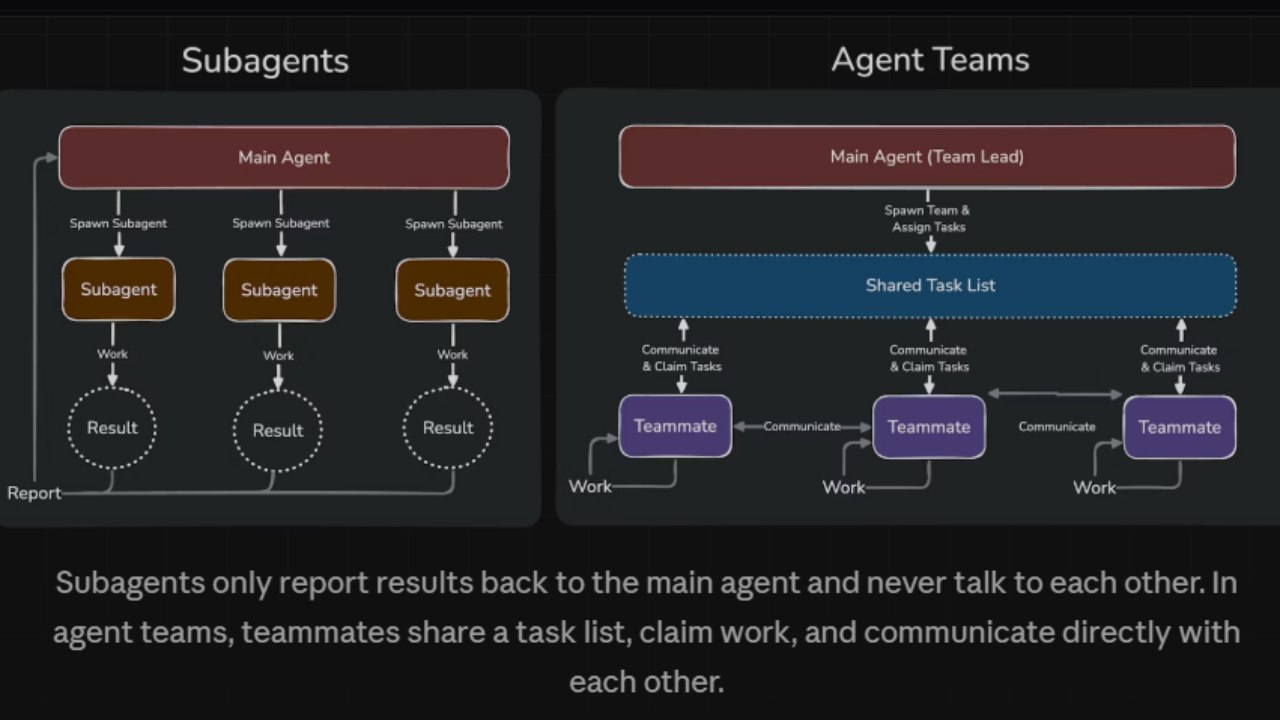
When it comes to using Claude AI in teams, the first thing that may come to mind is simple subagents. However, Agent Teams offers a much more advanced coordination mechanism than the familiar subagent structure. A standard subagent performs a specific, small task and reports the result back to the main agent. This process is linear and interaction is limited. Agent Teams, on the other hand, consists of full-fledged Claude Code sessions, each with its own context window, that operate independently but can communicate with each other.
In this structure, there is a lead agent. The lead understands the overall goal of the project, breaks the work into a task list, and creates specialized teammates. For example, one team member might review code, another might prepare documentation, and a third might write test scenarios. These teammates do not only communicate with the lead. They can also message each other to share findings and review each other’s work. This is similar to bringing in a fully staffed software team led by an experienced project manager, rather than working with a single freelancer.
Step-by-Step Claude Code Agent Setup
The Claude Code Agent setup process is actually quite simple. However, because this feature is currently in research preview, it is turned off by default. To enable it, you need to make a small change in your terminal or configuration files. You should also make sure you are running the latest version of Claude Code.
Configuring and Enabling Agent Teams
There are two main ways to configure Agent Teams. The first and most persistent method is to add the relevant environment variable to the settings.json file of your project or system. If you open the file and add the line "CLAUDE_CODE_EXPERIMENTAL_AGENT_TEAMS": "1" under the env block, team capabilities will be active every time Claude Code starts. This is the most preferred approach because it keeps the settings across sessions.
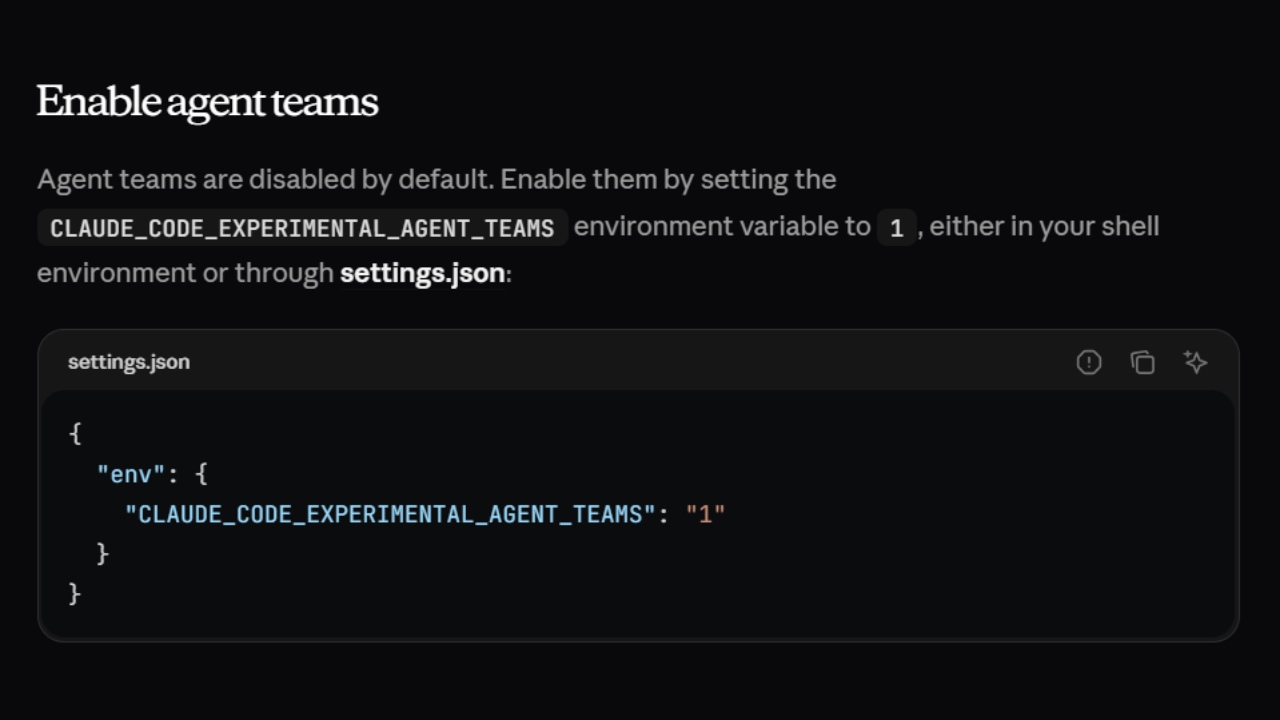
The second method is to define a temporary environment variable directly in the terminal or shell. Once setup is complete, you do not need to learn any special syntax. Simply telling Claude, “create a team,” is enough. For example, while building a new CLI tool, you can start the process with a natural language command such as “Set up a team to review this from different angles: one focused on architecture, one on user experience, and one on security vulnerabilities.” After you make this change, Claude Code will start recognizing team creation commands, and once the team is set up, you will see dedicated panel layouts in your terminal where you can monitor each team member’s output.
Code Review and Debugging
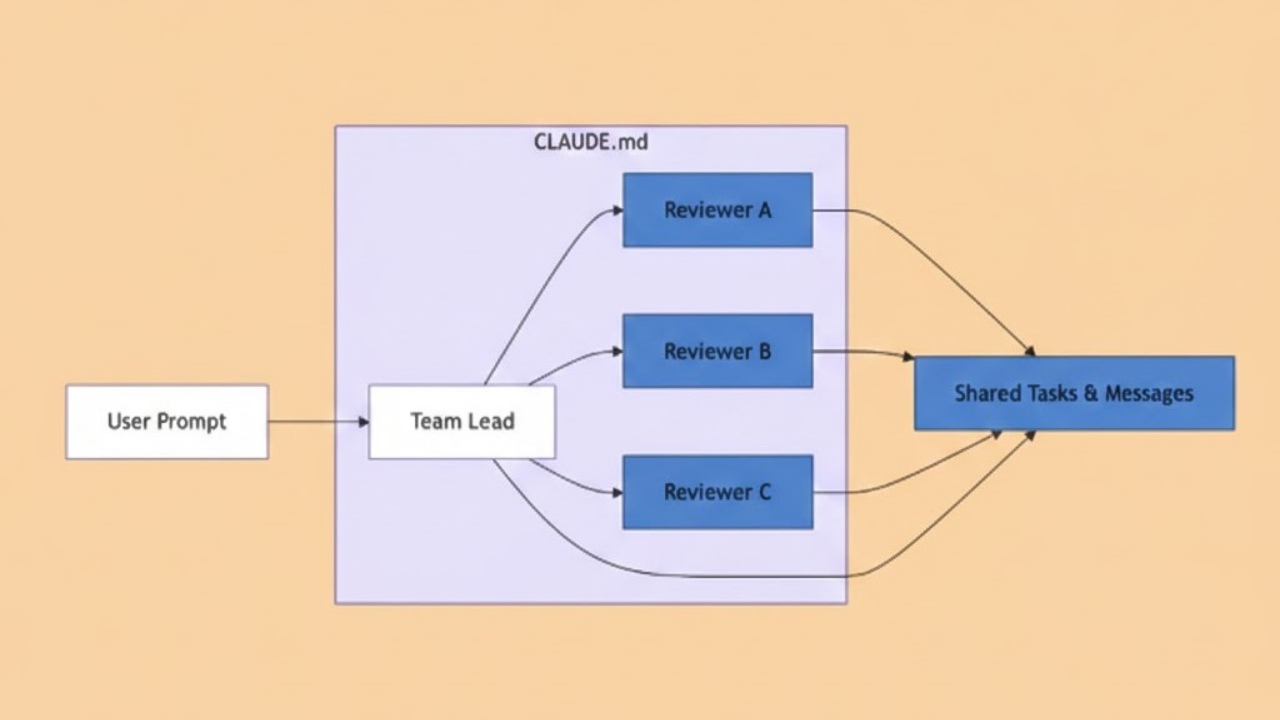
Using Claude AI in teams allows multiple developers on a project to stay in sync through CLAUDE.md, which serves as a shared knowledge hub. For example, when a developer finds a critical bug during a complex debugging session, they can ask Claude to set up an investigation team. In this setup, the lead agent distributes the work according to the rules defined by the developers, which speeds up the process.
Parallel Debugging: When a developer reports a bug, the lead agent assigns different investigators. One agent may examine memory leaks while another analyzes network latency. Developers can follow the process in real time through the shared task list, so they do not duplicate work on the same bug.
Multi-Layered Code Review: During PR reviews, Claude works like a review committee. One agent can act as a security expert, another as a performance optimizer, and a third as a checker for compliance with project standards. You can even assign an agent the role of devil’s advocate, so it offers a critical view of how the proposed solution might fail in edge cases.
Automatic Documentation and Parallel Development
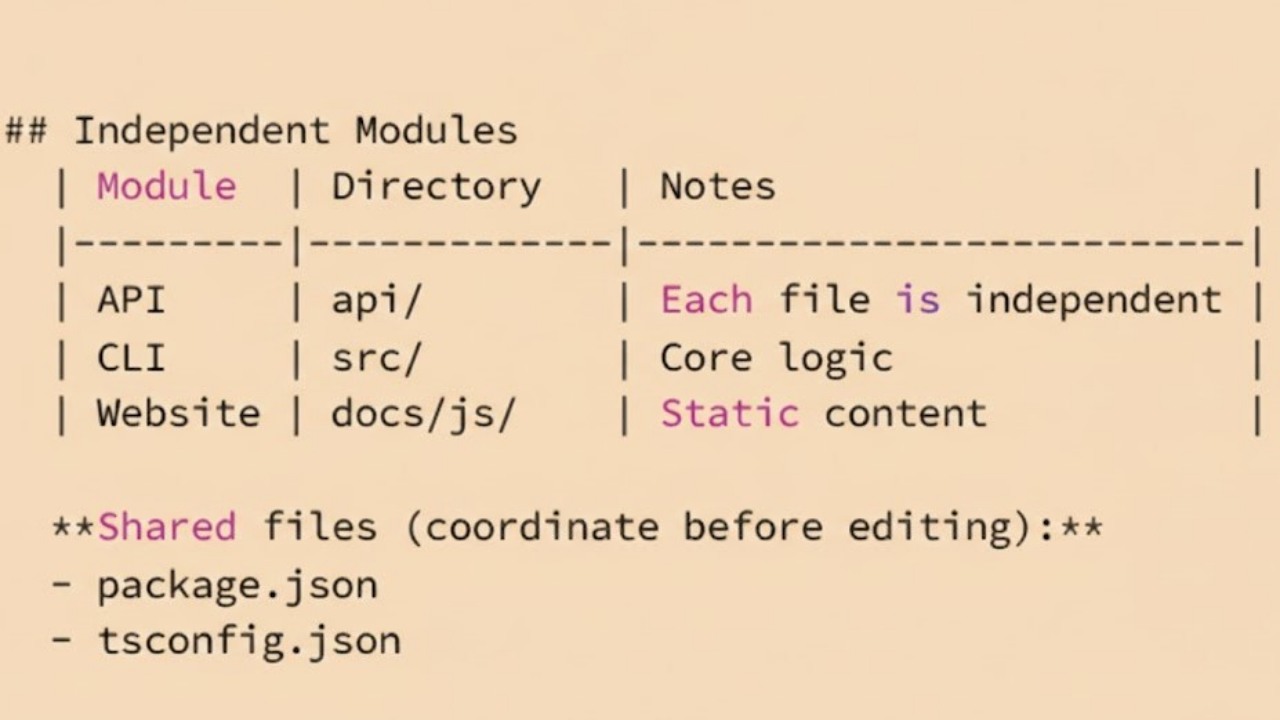
Documentation and parallel progress, which are among the biggest pain points for software teams, can be addressed with the principles in the Claude Code automation guide. In scenarios where multiple developers work on different modules at the same time, synchronization is handled through shared context. While developers work on different modules, AI agents keep the flow of information uninterrupted.
Live Documentation: While one developer writes backend functions, another agent tracks these changes and updates the documentation. When the backend is finished, the API documentation for the teammate working on the frontend is already prepared by Claude. This kind of automation reduces the time teams spend waiting for each other.
Layered Development: In parallel development scenarios, a layered and shared approach is applied. For example, when a new feature is to be added, developers divide the work. With this approach, one developer can have the AI team build the interface while another has it prepare the database schema.
Conflict Management: Among the most important Claude Code usage tips is ownership management, which prevents agents and humans from working on the same set of files. The lead agent uses the shared task list to coordinate which file is locked by which agent or developer. Thanks to this synchronization, teams can build different layers of the project at the same time without the risk of overwriting each other’s code.
Claude Code Usage Tips for Better Efficiency
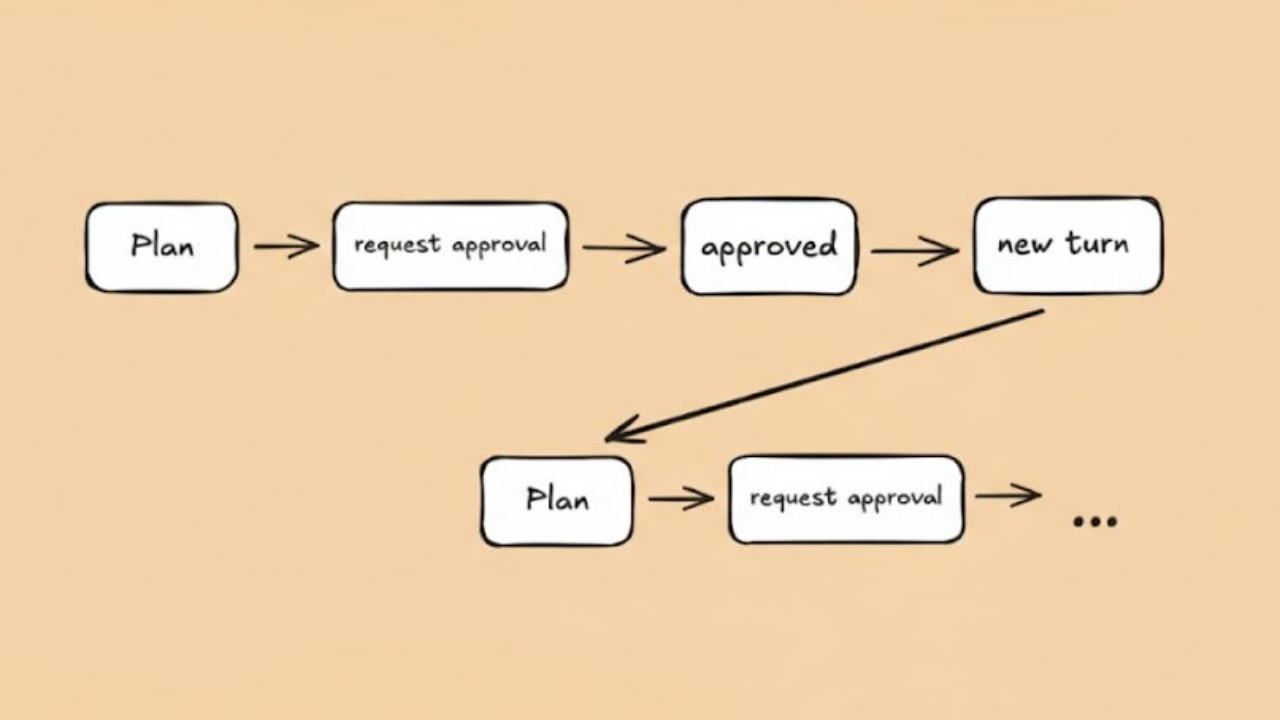
To optimize token costs and processing time while using the team feature, a few strategic steps should be taken. Because Agent Teams opens a separate session for each member, it uses more resources than standard usage. For this reason, teams should be used not for every small task, but for complex work that truly requires parallel research or different areas of expertise.
Key Success Factors
Clear Task Definitions: The first prompt you give when starting a team is very important. Each agent’s role, boundaries, and expected output should be clearly defined. Vague instructions cause the lead agent to spend excess tokens during the planning phase.
Delegate Mode: If you want to prevent the lead agent from writing code itself and focus it only on coordination, the “Delegate Mode” feature should be used. Activated with Shift+Tab, this feature limits the lead agent to coordination and task management, keeping teammates within their own areas of responsibility. This improves the quality of project management.
Context Management: Team members read the general information in the project’s CLAUDE.md file, but they do not know the lead’s previous conversations. For this reason, it is important to provide each member with the specific context they need at the start of their task.
File Ownership: To prevent conflicts, a split file ownership model should be applied. One agent might be responsible only for test files, while another is responsible only for business logic.
Current Limitations and Things to Keep in Mind
Since this technology is still in research preview, being aware of some technical constraints is critical for the user experience. In the current version, session resumption does not fully work for team members. This means that when you return with /resume, you may need to ask the lead agent to create new members instead of bringing the previous ones back to life.
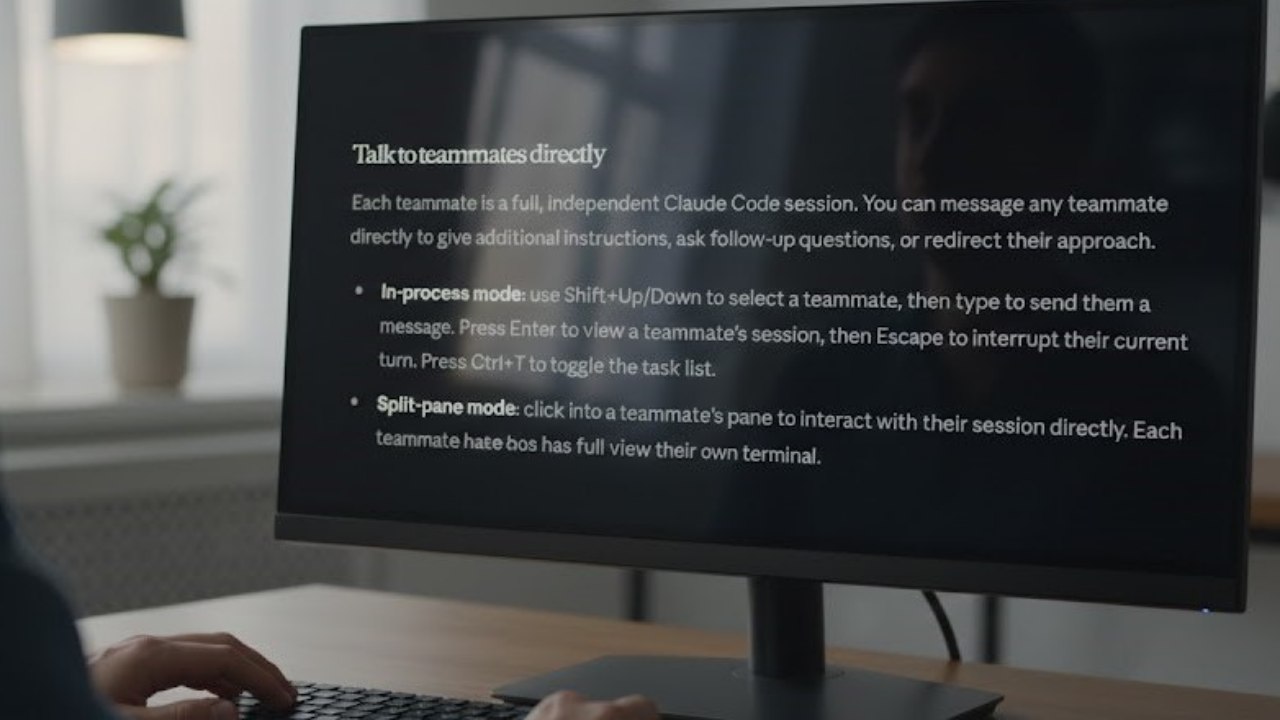
Terminal support also varies depending on your display preferences. If you want to see the output of all team members at the same time, you should use the “split-pane” mode. However, this mode is currently supported only in specific terminals such as tmux or iTerm2. If you use the VS Code integrated terminal or the standard Windows Terminal, you can follow the process in “in-process” mode by switching between members with Shift+Up/Down keys.
This journey that begins with the Claude Code Agent setup represents a shift from individual coding to collective AI collaboration. Agent Teams is a powerful multiplier that saves you time when designing complex architectures, conducting in-depth security reviews, or refactoring large codebases. As the technology evolves and these experimental features become standard, developers who adopt these workflows today appear poised to gain a significant advantage in the industry!
WriterOpenAI Codex Yazılım Aracı

Google Gemini ve "Personal Intelligence" Devrimi: Yapay Zekada Kişiselleştirme Çağı


