
Claude Code Agent Teams Setup and Use Guide Home
Automatically translated
 Writer
The world of software development is now a critical partner that the AI has become a teammate that manages the project from a helper who writes code.Anthropic developed byClaude CodeWith the new Agent Teams feature, this conversion has moved to one step further. This is especially Claude is a single assistant that performs the commands given in the following place, and works like a digital engineering team that divides complex tasks into pieces, separating expertise and conducting these tasks simultaneously.
This feature is actually added to the system inspired by the experimental multiple agent capabilities developed earlier of the OpenClaw community. If you’re wondering how you’re going to incorporate this leading structure into your project as a built-in standard, because in this article,Claude Code Agent installation u Starting from the stages, we presented a wide perspective from automation processes to debugging scenarios, how teams can use this technology efficiently.
What is Claude Code Agent Teams?
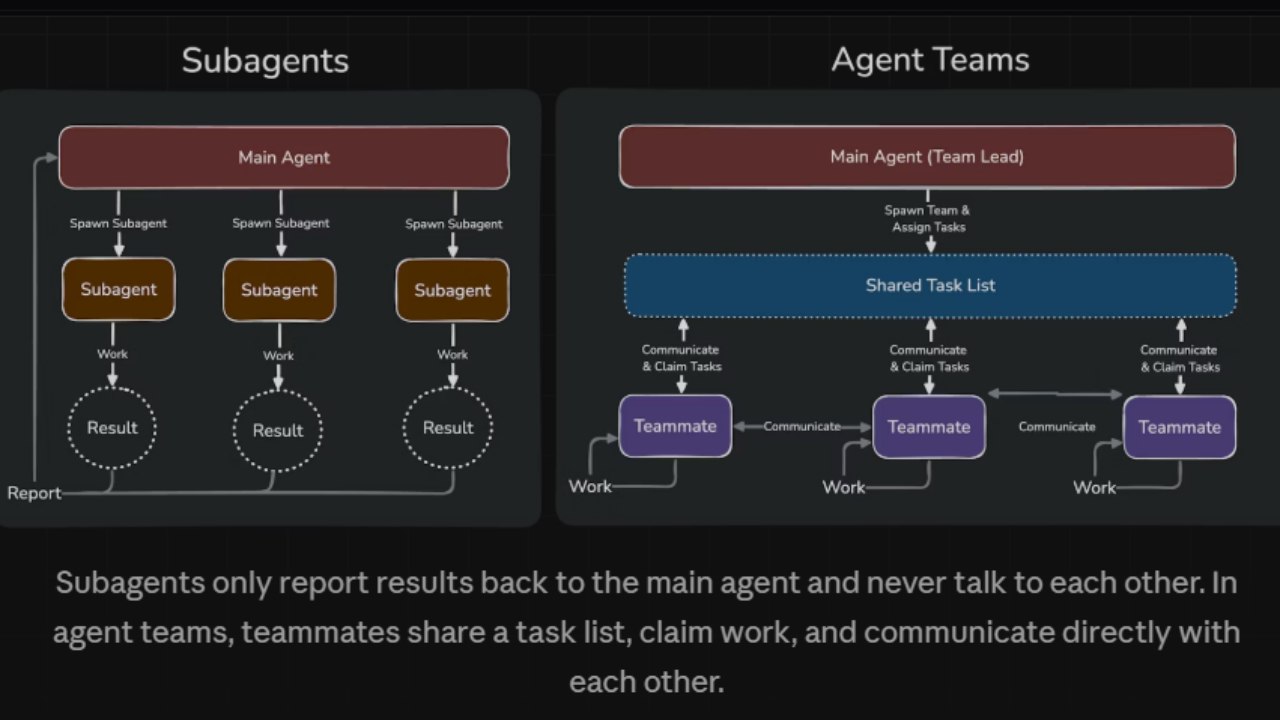
Claude AI team use When said, the first thing to mind can be simple sub agents. However, Agent Teams offers a much more advanced coordination mechanism than its known sub agent structure. A standard sub agent makes it a specific and small task given to him and reports to the main agent. This process is linear and the interaction is restricted. Agent Teams is full-fledged that each member has its own context window but can communicate with each otherClaude Code sessions.
This structure has a leading agent. Leader understands the general goal of the project, pours things to a task list and creates expert teammates. For example, when a team member code review, the other can prepare documentation, the third may write test scenarios. This team members can share their findings not only by leadership, but also by message between them and they can control each other’s work. This is similar to recruiting a fully equipped software team with a professional project manager at the beginning instead of working with a single freelancer.
Step by Claude Code Agent Setup u
Claude Code AgentThe installation process is actually quite simple, but this feature is now closed by default because it is at the stage of research preview. To activate the feature, you need to make a small change in your terminal or configuration files. You should also be sure that you have the latest Claude Code version to use this feature.
Agent Teams Configuration and Activation
Agent Teams has two main methods for configuration. The first and most persistent method, your project or system Homesettings.json add the corresponding environment variable to the file. Open your file pHome block"CLAUDE CODE EXPERIMENTAL AGENT TEAMS": "1" When you add the line, the Claude Code will be active in every time. This method is the most preferred way to ensure that the settings are permanent between sessions.
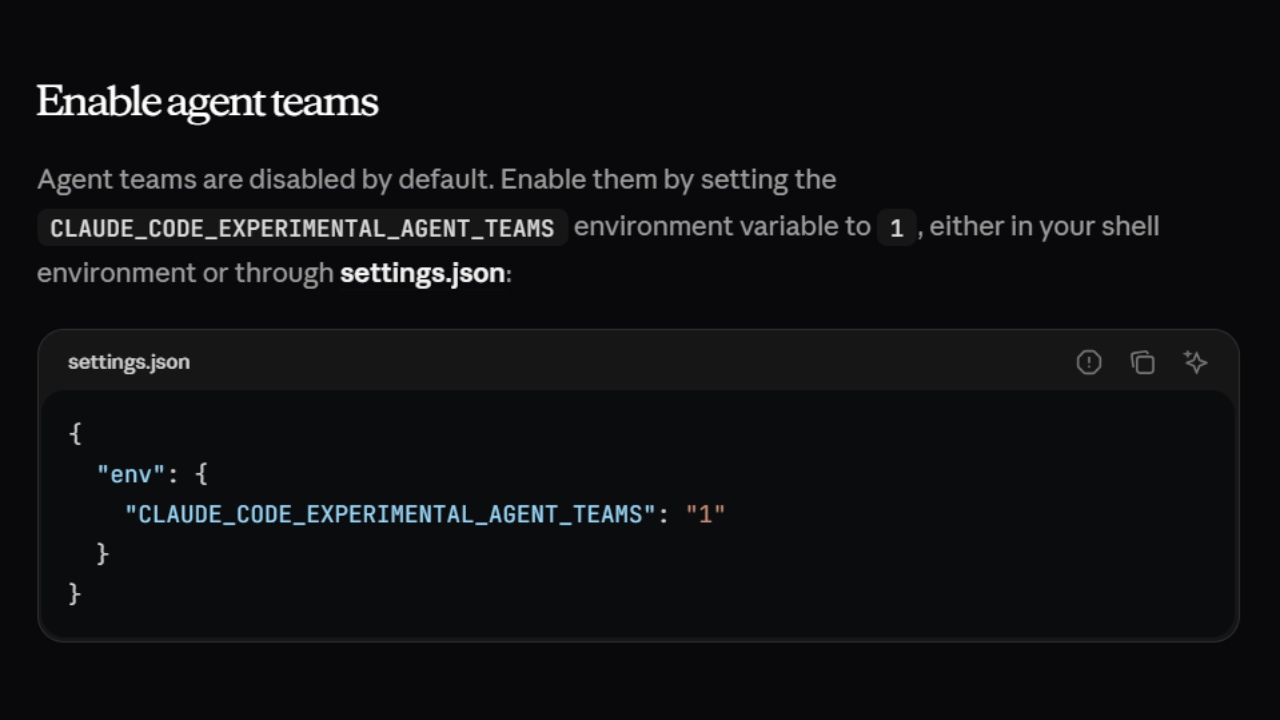
The second method is to identify a temporary environment variable directly through the terminal or shell. After the installation is completed, you don’t need to learn any special syntax, just need to call Claude “Create a team,” For example, a new CLI tool When developing "Create a team to examine the word from different angles: one can start the process by giving commands in natural language, such as architecture, one user experience, one focus on security open." After you have made this setting, Claude Code will begin to recognize team-building commands, and then you will come across special panel structures that you can track the output of each team member in your terminal.
Code Review and Debugging
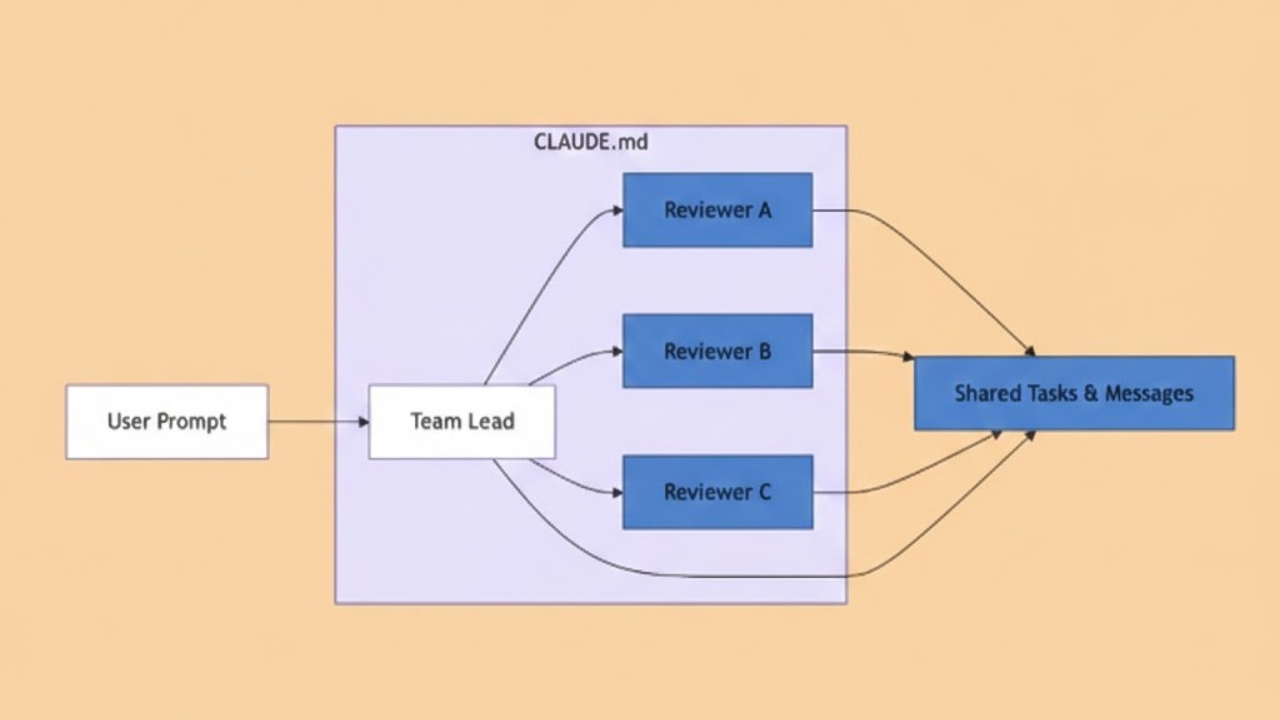
Claude AI team use is a common mind center of multiple developers in the projectCLAUDE. Home makes it synchronized over. For example, when a developer detects a critical error in a complex debugging process, Claude tells him to build a research team. The leading agent in this structure accelerates the process by making business distribution according to the rules defined by developers.
- Parallel Debugging: When a developer reported error, the leading agent throws different inspectors. A agent analyzes other network delays while examining memory leaks. Developers do not do conflicting studies on the same error by following the process instantaneously through the shared task list.
- Multilayer Code Review: Claude in PR processes works like a review commission. A agent can be assigned as a security specialist, other performance optimizationcus, third of which adapt to project standards. Even to data the role of a devil to an agent, it can even be achieved to present a critical perspective that the solution written may fail in end cases.
Automatic Documentation and Parallel Development
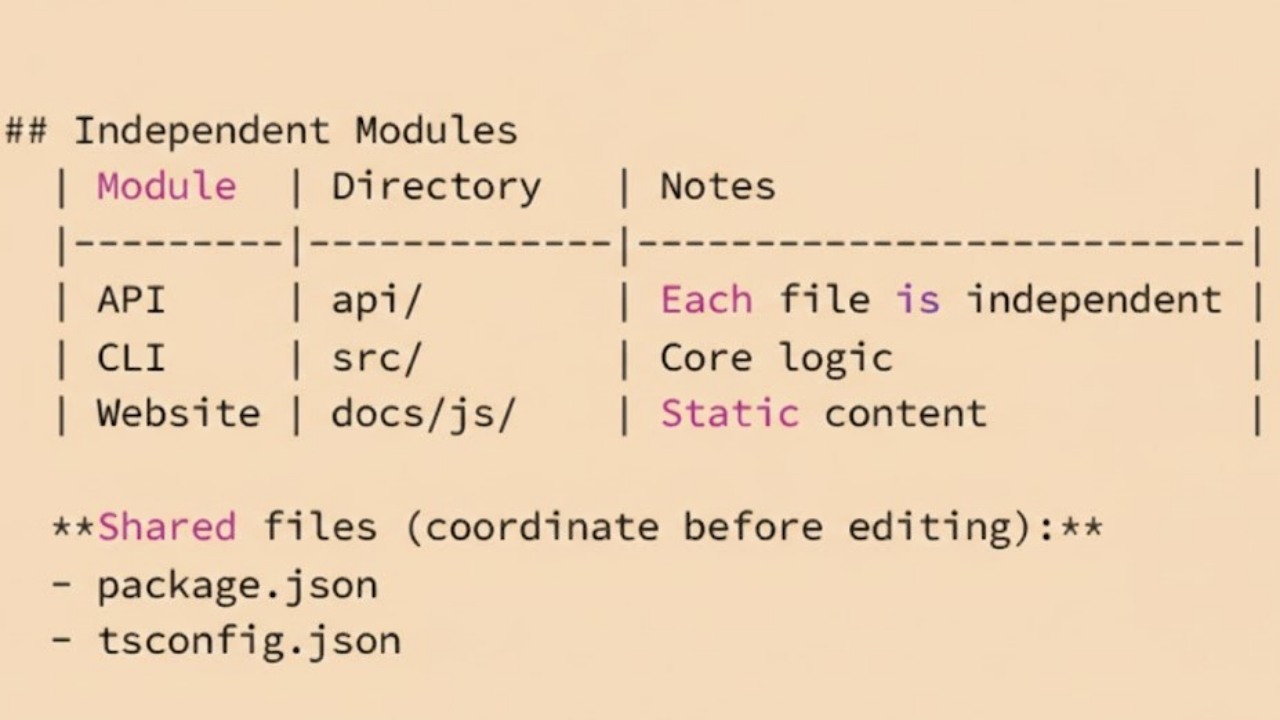
The documentation and parallel progress, the largest sensation of software teams, Claude Code automation guide principles. Multiple developers are simultaneously provided with synchronization, context sharing in scenarios that work on different modules. When developers work in different modules, AI agents keep the flow of information without interruption.
- Instant Documentation: When writing a developer backend functions, another agent will update the documents by following these changes. When backend is finished, the API documents for teammates working on frontend are prepared by Claude. This kind of automation minimizes the waiting time of the teams.
- Layer Development: Layered and shared working principle is applied in parallel development scenarios. For example, when the team will add a new feature, the developers work partition. With this working principle, when editing the interface to a developer AI team, the other is ready to database chart.
- Conflict Management: Among the most critical Claude Code usage tips, it is the ownership management that allows agents and people to work on the same file group. The leading agent coordinates which file is locked by the agent or developer through the shared task list. Thanks to this synchronization, teams can build different layers of the project at the same time without the risk of writing each other on the code.
Claude Code Use Tips For Efficiency
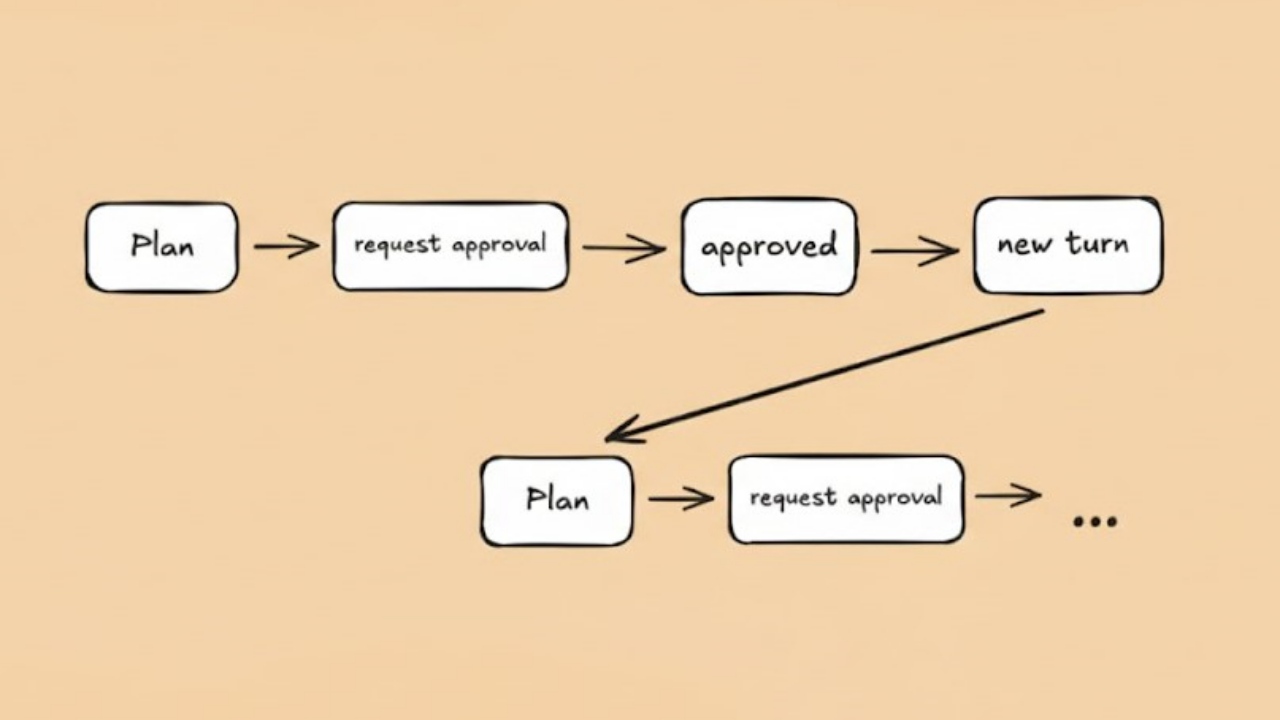
Some strategic steps should be taken to optimize token costs and transaction time when using the team feature. Agent Teams consumes more resources than standard use as a separate session for each member. Therefore, teams should be used for complex tasks that require truly parallel research or different expertise, not for every small business.
Critical Success Factors
- Net Duty Definitions: The first prompt given when starting the team is very important. The role of each agent should be clearly defined as the output required to deliver limits and deliveries. Unspecified instructions cause the leading agent to spend more tokens in the planning phase.
- Delegation Mode: The "Delegate Mode" feature should be used if the leader agent intends to prevent and only focus on coordination.Shift+Tab This feature, which is active with, allows the leading agent to remain in their responsibilities areas by limiting only coordination and task management. This increases the management quality of the project.
- Context Management: Team members projectCLAUDE. Homeread general information in the file but they do not know the past conversations of the leader. That’s why it’s important to ensure the special context needed for each member at the beginning of the task.
- File Sharing: The split file host model should be applied to prevent conflicts. A agent should only be responsible for the test files, the other is only for the business logic.
Required Limitation and Attention
Since this technology is yet at the stage of research preview, it is critical to the user experience to be aware of some technical restrictions. The ability to log in at the current version is not fully working for team members. So/resume When you return with the command, you may need to tell the leading agent to create new members instead of revitalizing the previous team members.
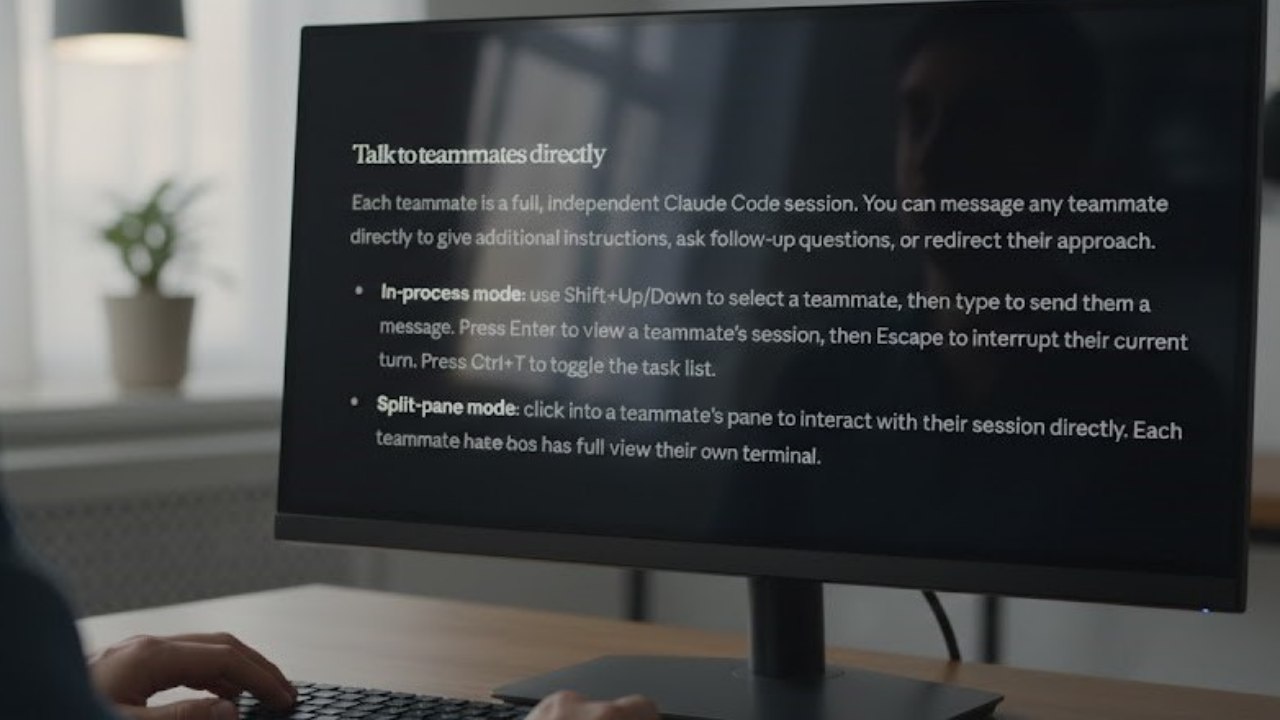
Also, terminal support according to your visual interface preferences also differ. If you want to see the outputs of all team members at the same time, you should use the "split-pane" mode, but this mode is currently supported in certain terminals such as tmux or iTherm2. If you are using VS Code integrated terminal or standard Windows Terminal, in "in-process" modeShift+Soft/Short You can follow the process by switching between keys and members.
Starting with Claude Code Agent installation, this journey represents the transition from individual code writing to collective artificial intelligence business union. Agent Teams is a gigantic power multiplier that saves you time when designing complex architectures, doing in-depth security reviews or refactoring huge code bases. As technology evolves and these experimental features become standard, the developers who adopt these workflows from today seem to get a huge advantage in the industry!
WriterOpenAI Codex Yazılım Aracı

Google Gemini ve "Personal Intelligence" Devrimi: Yapay Zekada Kişiselleştirme Çağı