Skip to content
Back to blog list
Google Workspace Studio ile kodsuz otomasyon gücü
AI Tools

Codeless automation power with Google Workspace Studio

Automatically translated
Samet Aynihan
Samet Aynihan
4 min read

Codeless Automation Power With Google Workspace Studio

The automations we have developed from the old were always included hundreds of lines of codes. If someone in the past said that we will develop uncoded automation in the future, we probably didn’t believe but no longer Google Workspace Studio with an uncoded automation. This is provided with artificial intelligence agents.

Today we use artificial intelligence as a support tool, we want to help us in a matter, which brings information that can be injured to our job by scanning the wide database, or can create a photo can give a code thread that we want to create, but the initiative does not do a transaction. Worksapace AI Agents that can process our name to itself.

Artificial intelligence agents are not only used as a support tool, they can design a agent in such a way that personal or corporate is preferred without the need for technical information. These agents are able to process our name just like a virtual partner.

Google Workspace simgesi

What Can The Codeless Artificial Intelligence Agent Do?

Workspace artificial intelligence agents designed without the need of technical information, they provide workflow as detection, thinking, priority throwing, decision making and monitoring automation to our place. We can work in Google applications that we use daily: Gmail, Google Docs, E- Tables, Meet meetings, etc.

These agents not only apply the commands given from the outside, they create a business flow automation that decides to themselves. What is more important and you can identify priorities and manage the process from start to finish.
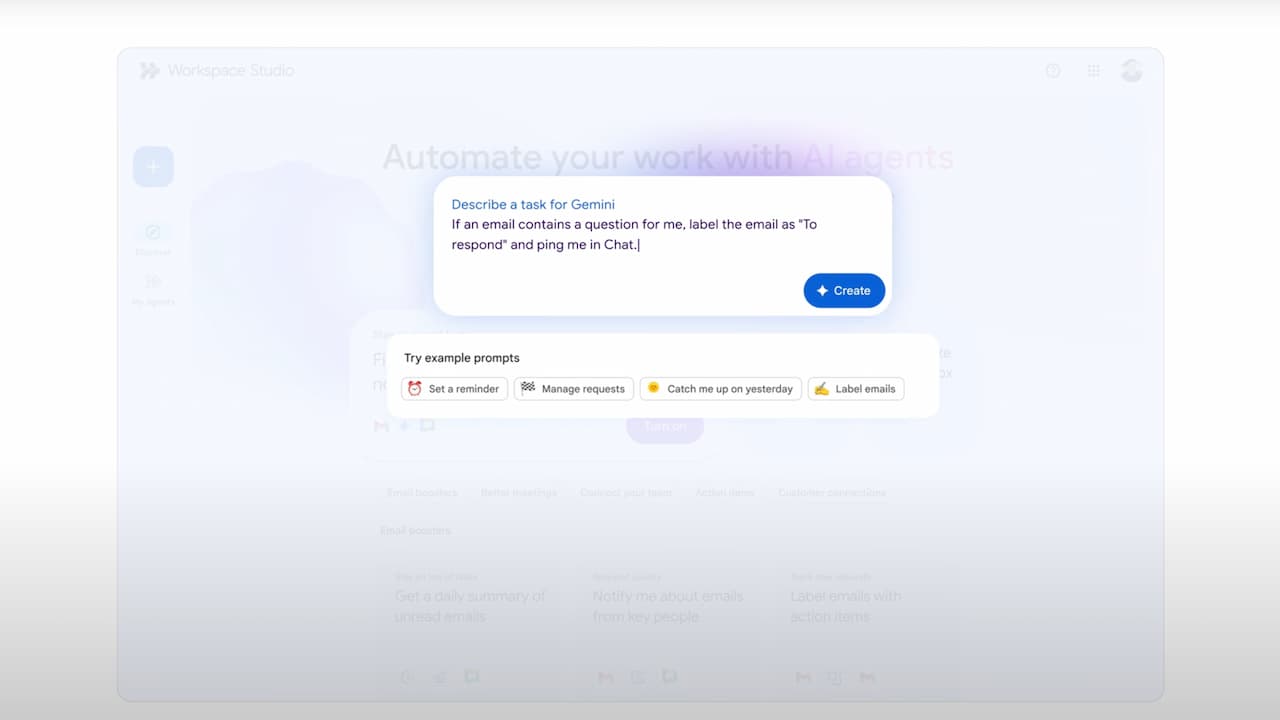
Kodsuz Yapay Zeka prompt alanı

How Does Artificial Intelligence Agent Work?

A agent firstly detects the event in automation. Evaluates incoming data and that momentary status by side. He decides to action that will do at the time of the past. They design a ranking and perform action or actions that will do in this order, then follow the result. Any error or unusual situation interferes with or notify the user.

For example, you are asked to create a meeting via Google Meet on a mail from your 6th account,

  • The agent reads this mail.
  • “ Create a meeting with Google Meet today” perceives expression.
  • Google Calendar is a meeting for 13:00 hours.
  • Copys Google Meet link.
  • Meet sends the link to the required people or from the mail.

Google’s artificial intelligence model Gemini an agent prepared by the infrastructure; it can understand the context, decide. On Workspace side, these agents are undertaken operational tasks such as organizing meetings or sending email.

What is the Difference of Traditional Automation?

Although traditional automations are flexible, they work in a certain line. They perform certain transactions in predefined rules. We identify possible scenarios and reactions to automation, automation also performs them. An error is inevitable if there is a data outside the values defined by automation.

A agent firstly detects the event in automation. Evaluates incoming data and that momentary status by side. He decides to action that will do at the time of the past. They design a ranking and perform action or actions that will do in this order, then follow the result.
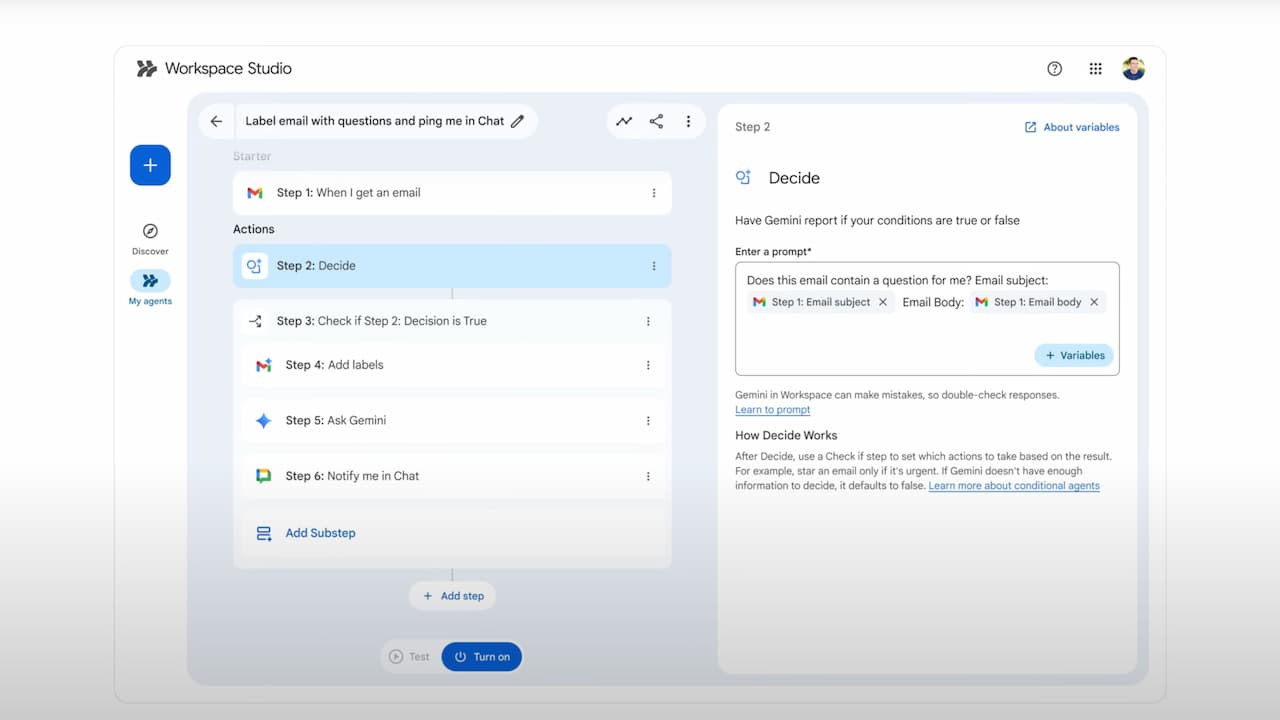
legacy 917463d3c20a9e52db42fd2077803ec3c1a50823 evrWmDnPFlNYslmi7rcZVIAMdKHh0yhVgwD5Mqd0

Can be used in the sector?

Industry, digital transformation with artificial intelligence When you go correctly, the agents in this digital transformation can be included in various fields.

E-Mail Agent

If we think that a Google Workspace Automation is an organized agent that regulates and organizes your existing box in your place, this agent is constantly working in the background when dealing with other works. Combs your Gmail, understands which from incoming emails are important, distinguishes, and creates them folder and self-location.

Report Agent

You wanted to receive data from the report and presentation agent designed for those interested in data, for example, from 14:00 to 14:00 every Friday. It collects and analyzes the data per hour you set the agent, removes important points and prepares and previews all the decomposing data as a presentation in Google Slides.

Meeting Agent

During the meeting of Google Meet, this agent listens and analyzes everything spoken. Depending on the design of the agent, you can save people in a database to a sheet. When the meeting is finished, the meeting takes a summary. Who is talking about what to do is able to capture important moments and can note these tasks.
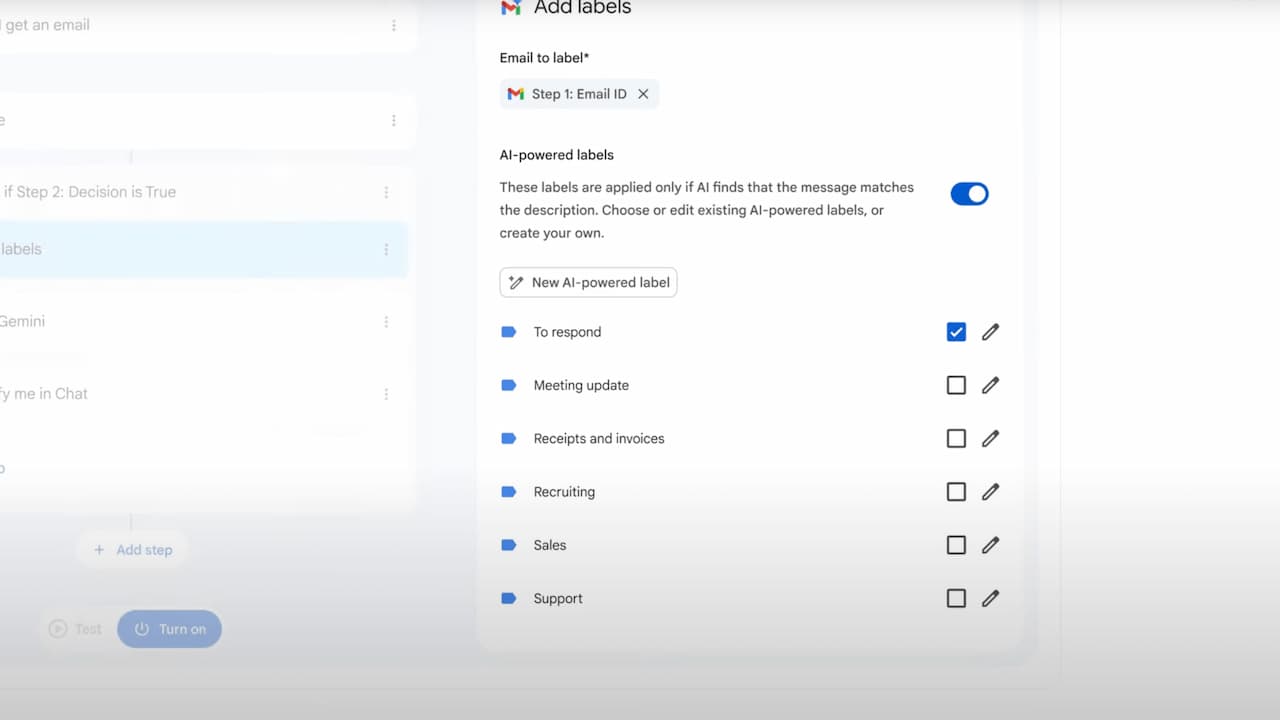
Gemini Workspace entegrasyon

Google Workspace Studio agents with technical information-free structure have accelerated sectoral adaptation thanks to ease of use. Only one month in the trial process of the platform More than 20 million evidence that artificial intelligence agents will gradually increase their role in the automation world

Codeless Automation Power With Google Workspace Studio The automations we have developed from the old were always included hundreds of lines of codes. If someone in the past said that we will develop uncoded automation in the future, we probably didn’t believe but no longer Google Workspace Studio with an uncoded automation. This is provided with artificial intelligence agents. Today we use artificial intelligence as a support tool, we want to help us in a matter, which brings information that can be injured to our job by scanning the wide database, or can create a photo can give a code thread that we want to create, but the initiative does not do a transaction. Worksapace AI Agents that can process our name to itself. Artificial intelligence agents are not only used as a support tool, they can design a agent in such a way that personal or corporate is preferred without the need for technical information. These agents are able to process our name just like a virtual partner. What Can The Codeless Artificial Intelligence Agent Do? Workspace artificial intelligence agents designed without the need of technical information, they provide workflow as detection, thinking, priority throwing, decision making and monitoring automation to our place. We can work in Google applications that we use daily: Gmail, Google Docs, E- Tables, Meet meetings, etc. These agents not only apply the commands given from the outside, they create a business flow automation that decides to themselves. What is more important and you can identify priorities and manage the process from start to finish. How Does Artificial Intelligence Agent Work? A agent firstly detects the event in automation. Evaluates incoming data and that momentary status by side. He decides to action that will do at the time of the past. They design a ranking and perform action or actions that will do in this order, then follow the result. Any error or unusual situation interferes with or notify the user. For example, you are asked to create a meeting via Google Meet on a mail from your 6th account, The agent reads this mail. “ Create a meeting with Google Meet today” perceives expression. Google Calendar is a meeting for 13:00 hours. Copys Google Meet link. Meet sends the link to the required people or from the mail. Google’s artificial intelligence model Gemini an agent prepared by the infrastructure; it can understand the context, decide. On Workspace side, these agents are undertaken operational tasks such as organizing meetings or sending email. What is the Difference of Traditional Automation? Although traditional automations are flexible, they work in a certain line. They perform certain transactions in predefined rules. We identify possible scenarios and reactions to automation, automation also performs them. An error is inevitable if there is a data outside the values defined by automation. A agent firstly detects the event in automation. Evaluates incoming data and that momentary status by side. He decides to action that will do at the time of the past. They design a ranking and perform action or actions that will do in this order, then follow the result. Can be used in the sector? Industry, digital transformation with artificial intelligence When you go correctly, the agents in this digital transformation can be included in various fields. E-Mail Agent If we think that a Google Workspace Automation is an organized agent that regulates and organizes your existing box in your place, this agent is constantly working in the background when dealing with other works. Combs your Gmail, understands which from incoming emails are important, distinguishes, and creates them folder and self-location. Report Agent You wanted to receive data from the report and presentation agent designed for those interested in data, for example, from 14:00 to 14:00 every Friday. It collects and analyzes the data per hour you set the agent, removes important points and prepares and previews all the decomposing data as a presentation in Google Slides. Meeting Agent During the meeting of Google Meet, this agent listens and analyzes everything spoken. Depending on the design of the agent, you can save people in a database to a sheet. When the meeting is finished, the meeting takes a summary. Who is talking about what to do is able to capture important moments and can note these tasks. Google Workspace Studio agents with technical information-free structure have accelerated sectoral adaptation thanks to ease of use. Only one month in the trial process of the platform More than 20 million evidence that artificial intelligence agents will gradually increase their role in the automation world

Etiketler:Google Workspace otomasyon
Samet Aynihan
Samet Aynihan
@sametaynihan

Comments (0)

Log in to comment.

Log in
No comments yet. Be the first to comment!