



5. OpenAI Innovations Day: ChatGPT Meets Siri in iOS 18.2!
Automatically translated
 Creator
Apple's iOS 18.2 update, OpenAI's ChatGPT integration is a lot new Apple Intelligence The feature has been used. ChatGPT Meets Siri in iOS 18.2! In this article, iOS 18.2’s most remarkable features, Apple Intelligence integration and "12 Daily Event" of OpenAI We will examine deeply the updates introduced within the scope.
iOS 18.2 and Apple Intelligence: Summary of Innovation
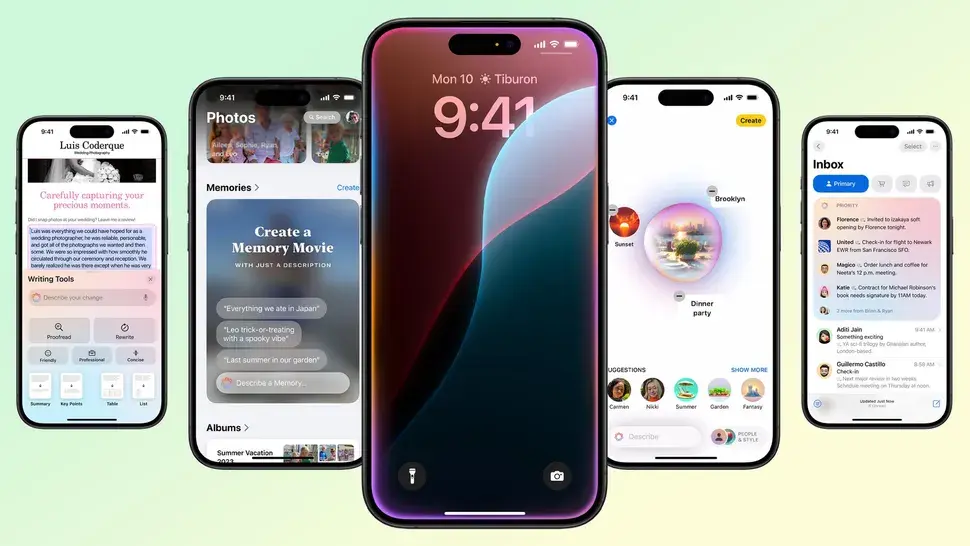
Apple, Apple Intelligence iPhone, iPad and Mac experience with artificial intelligence features provided under the name to another level. iOS 18.2, not only Siri and ChatGPT integration, but also Visual IntelligenceTags HomeTags Writing Tools and Image Playground As well as the tools that attract attention bring together with users. With this update:
- HomeWith ChatGPT support, you can respond to more questions.
- Visual IntelligenceInstant information about objects and venues using the camera of iPhone.
- Homeallows you to create personalized emojis.
- Writing ToolsIt supports in the production of content by rewrite your text.
- Image PlaygroundBased on text inputs, it can create fun and creative visuals.
1. ChatGPT and Siri Integration: Artificial Intelligence Aided Intelligent Auxiliary
iOS 18.2, OpenAI ChatGPT model By integrating directly with Siri, Siri makes Siri the smartest ever. Here are the main features of this integration:
- Advanced Answers: Siri detects questions outside its scope and identifies these questions ChatGPT responds with the help. After receiving approval from the user, the transaction takes place.
- User Control: A safe and transparent experience is provided for each transaction with user permission.
- Creative Contents: Text creation and editing requests via Siri are performed smoothly with ChatGPT.
This integration of Siri offers quick and smart solutions to users’ complex questions while making everyday life easier.
2. 2. Visual Intelligence: Instant Information with iPhone Camera
Visual IntelligenceiOS 18.2 is one of the most innovative tools. This feature, special for iPhone 16 series, Google LensIt offers a more advanced artificial intelligence solution that is similar to:
- Camera Control: Scan objects using the camera of iPhone and get instant information. For example, you can learn opening hours by scanning a restaurant signboard or display a summary by scanning a book.
- Calorie Calculation: You can make calorie calculation by scanning your food and contribute to your healthy diet.
- Translation and Abstracting: You can convert or receive short abstracts to other languages instantly.
Visual Intelligence accelerates access to daily life by bringing your iPhone into a "AI glasses".
3. Genmoji: Create Your Own Emoji
HomeWith iOS 18.2 as one of the fun and innovative AI features of Apple. This feature, personalized emojis lets you create.
- Emoji with Text Input: Do you want to put banana on a pizza slice? Or get a emoji version that plays guitar? This is possible with Genmoji.
- Uses: You can share Genmojis that you create in messages, notes or group chats.
This technology that works entirely on the device offers a quick and fun experience while keeping your data safe.
4. Writing Tools: Improve Your Texts
Apple Writing ToolsWith iOS 18.2, it is an AI-supported tool that helps users improve and convert their posts.
- Text Editing: The text you write is available in recommendations to make it more professional, fluent or dynamic.
- Style adjustments: Do you need a formal tone? Or a more intimate language? Writing Tools converts your text to your needs by making ton adjustments.
This feature saves a big time for users who write particularly professional texts.
5. Image Playground: Convert Your Creativity to Visuals
Image Playgroundallows users to create creative visuals through text inputs.
- Fun Styles: Visuals, Drawing and Animation can be created in two different styles.
- Personal Touch: Apple offers the opportunity to personalize visuals by processing personal data on the device.
This feature is a great option for users who need quick and fun visual creation tools.
iOS 18.2: Who Can Use?
The use of Apple Intelligence features is limited to certain devices:
- iPhone 16 series and iPhone 15 Pro/Pro Max
- iPad models (A17 Pro or M1 and above)
- Mac models (M1 and above)
Language Support: Apple Intelligence can be used in different polishes of English. In this context, full access is provided in areas such as USA, U.K., Canada, Australia. Other languages are expected to be added at the beginning of 2025.
Conclusion: Catch Artificial Intelligence Experience with iOS 18.2
Apple’s iOS 18.2 update is a revolutionary step in the integration of artificial intelligence technologies into everyday life. Siri and ChatGPT cooperationTags Visual IntelligenceTags Home and Writing Tools innovations such as making things faster and smart while enriching user experience.
Install iOS 18.2 immediately and start exploring these exciting Apple Intelligence features. Don’t forget to follow us for the latest developments in the technology world!
HomeCreatorYapay Zeka ve Çocuk Güvenliği Webinarı - ÜCRETSİZ WEBINAR

Yapay Zeka Dünyası 2025 Yılında Bizlere Ne Sunacak?