
Opera Paste Protect: How It Blocks New Cyber Threats
Automatically translated
 Writer
The tactics cybercriminals use to trap us keep changing. We used to encounter a ".exe" file hidden in an email attachment or a suspicious download link. Now, instead of dealing with complex software code, a brand-new social engineering method is on the rise that directly targets human psychology, momentary carelessness, and our habit of acting quickly: the ClickFix attack.
"Complete the CAPTCHA verification to watch the video" or "The page could not load. Run the following code to fix it": if you have seen fake warnings like these, this will sound familiar.
This method tricks the user into copying malicious code and pasting it into the terminal (macOS Terminal) themselves. Used to deliver information-stealing software such as Lumma Stealer or Stealc, this technique has become one of the most popular social engineering traps of recent times.
As social engineering traps grow more complex every day, verifying data and keeping it secure in the digital world has become one of the most critical issues, not only for individual users but also for academic and institutional structures. Indeed, the need to protect information and filter out fake content or code structures is now at the top of every platform's agenda. Just as in arXiv's ban on AI-generated academic papers, preventing manipulation in digital environments and preserving the authenticity of data have become a vital necessity. We now see a similar set of measures, taken to protect user data from distortions like ClickFix, in the browser world as well.
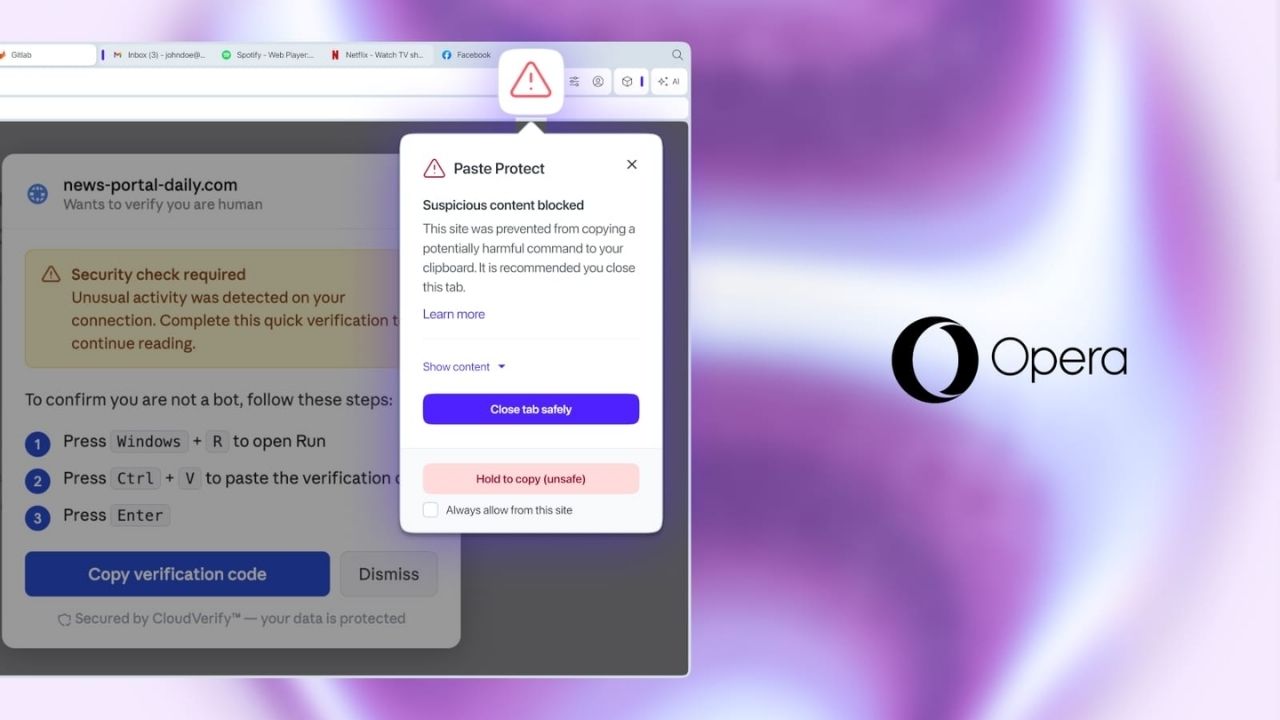
At this point, a critical and highly innovative step has been taken in browser security. The desktop web browser Opera announced the Opera Paste Protect feature, which builds a built-in line of defense against these dangerous mechanisms that tamper with the clipboard and deceive users into running commands on their operating system. So how does this system work behind the scenes, how does it protect users from momentary mistakes, and how does it turn the clipboard into a safe zone?
Why Are ClickFix Traps So Effective?
Traditional cybersecurity software is generally designed to scan physical files downloaded to a computer, email attachments, or known security vulnerabilities in the system. However, in ClickFix-style attacks, the process falls entirely outside traditional patterns and proceeds very cunningly:
Creating a Fake Need:
On a compromised legitimate website or a specially crafted fake platform, you are shown an ordinary verification or error screen that looks very official.
Making the User an Accomplice:
The instructions and buttons on the screen suggest that you copy a specific command and paste it into your operating system's command line to solve the problem.
Clipboard Manipulation:
The moment you click the "Copy Code" or "Fix the Issue" button, an obfuscated PowerShell or Bash command hidden in the background is automatically written to your clipboard.
Breaking Into the System:
As soon as you paste that command into the terminal window and press "Enter", your operating system, using your own permissions, starts downloading malicious software from a remote server and quietly running it in the background.
Antivirus and security software often struggle to recognize these commands as threats, since the user runs them manually, with their own consent, from an authorized terminal window. Given the deep impact of artificial intelligence on cybersecurity today, attackers' clever use of the human factor and automation to get past security barriers pushes the threat completely beyond the limits of traditional cybersecurity tools.
What Exactly Does Opera Paste Protect Do?
Opera aims to block this new generation of threats before the malicious code reaches the user's terminal, or even enters the computer's clipboard. Without requiring any third-party browser extension, Opera Paste Protect is integrated directly into the browser's core and works with a two-layer protection structure:
1. Hijack Protection (Clipboard Hijacking Protection):
This basic infrastructure, which we already know from earlier Opera versions, prevents malicious software running in the background or accessing from outside from altering clipboard data. It was an effective shield especially against scams that replace copied cryptocurrency wallet addresses or IBAN numbers with the attacker's own addresses.
2. Injection Protection (Injection Protection):
This brand-new module added with Paste Protect examines in depth the attempts by websites to automatically add commands to the clipboard, as well as suspicious code patterns in copied text. By running dynamic detection rules developed specifically for Windows, macOS, and Linux, all suspicious script structures containing PowerShell, Bash, or dangerous command-line parameters are detected instantly.
What Happens When the System Detects a Risk?
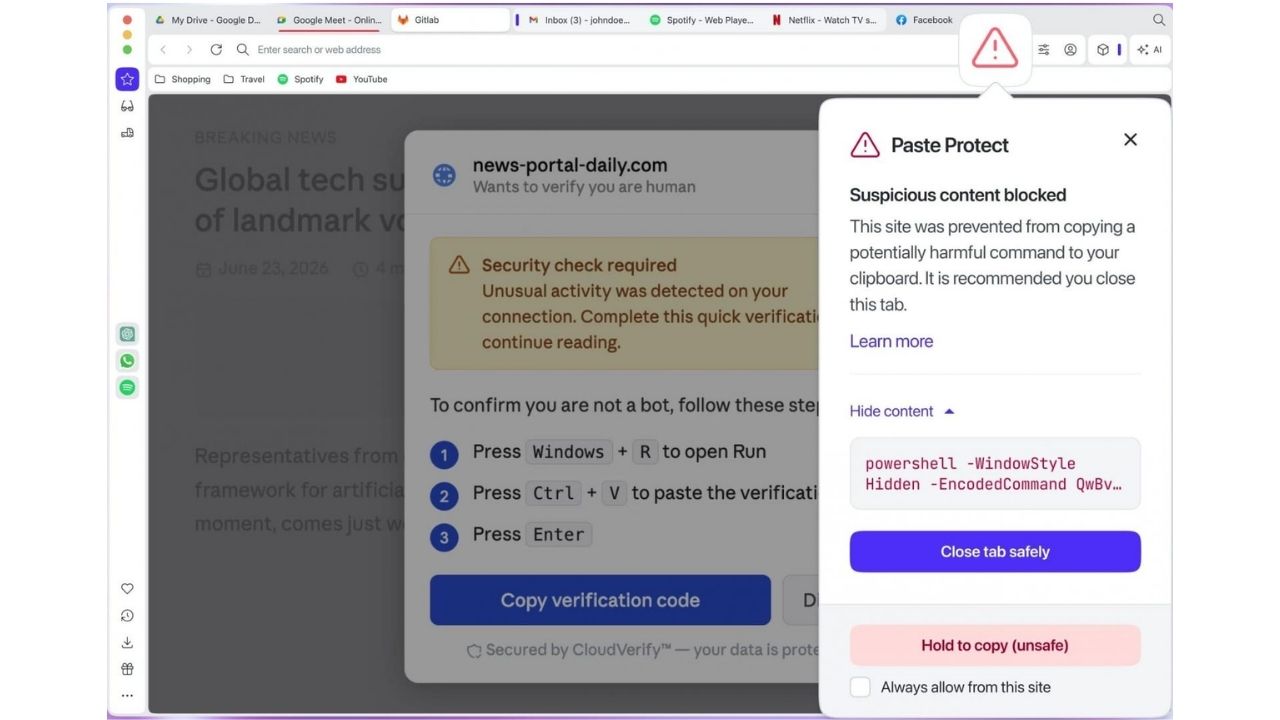
When a code block suspected of ClickFix or containing direct terminal commands is detected on a website, the security process proceeds through these steps:
Immediate Blocking:
Writing the malicious command to the clipboard is prevented.
Visual Warning:
A red security icon appears in the address bar, and a pop-up opens explaining the situation.
Controlled Preview:
To prevent false alarms and to avoid disrupting the workflow of technical users such as developers or system administrators, the first 120 characters of the detected code are shown to the user in a preview panel. If you are certain that the command you want to copy is completely safe, you can manually allow the copy operation after a 5-second security countdown.
Allowlist (Whitelist):
For people working on code platforms such as GitHub, site-based exceptions can be defined in the "Settings - Privacy and Security - Paste Protect" section, in that order.
Is This a New Era in Browser Security?
Clipboard security and clipboard manipulation have long been a very troublesome area, typically addressed through complex operating system-level security policies or external browser extensions. Opera's move is one of the first and most concrete examples of a browser shipping a built-in protection shield against new-generation cyber threats like ClickFix and clipboard injection, enabled by default on a desktop browser.
In today's digital world, where cybercriminals target the human factor rather than system vulnerabilities, it is essential that browsers become active security layers, not just page viewers. Although other major browser makers are also reportedly working on similar dynamic clipboard scanning systems, the fact that Opera is the first platform to respond to this widespread threat could reshape security standards across the industry.

No cybersecurity tool or software in the world can offer a 100% protection guarantee on its own. Understanding exactly what it does, which parameters it triggers in the background, and never pasting into your operating system's terminal any command line whose source you are not sure of, remains the most basic rule of digital hygiene and personal cybersecurity. Still, when a momentary lapse of attention, distraction, or a busy work pace occurs, built-in and intelligent systems like Opera Paste Protect quietly step in and interrupt the process, forming a critical safety net to prevent user data theft and possible major financial or personal losses.
Writer