



Skip to content
Back to blog list
PowerPoint ile Web de Altyazılı Video Eklemek Çok Kolay!
Tech World

Add Video with PowerPoint to Web with Subtitles is Very Easy!

Automatically translated
Masqot Community
Masqot CommunityCreator
2 min read

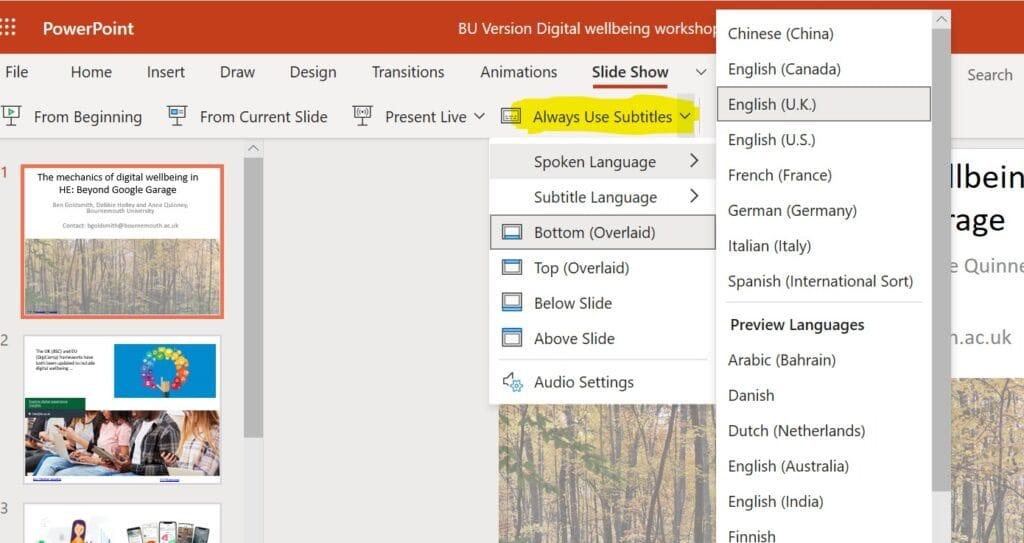
Hello dear Masqot readers. Today I have a great news. For Web Microsoft PowerPoint is a bit easier update to our lives! Now, Microsoft 365 users can add subtitled videos to their presentations. This feature makes presentations more accessible for those who have difficulty hearing impaired individuals and hearing. But stand, this feature is not only for them, but it offers incredible benefits for us!

If you think, you can connect with people around the world by adding subtitles in multiple languages. Or in a noisy cafe, you can watch that video quietly without distributing anyone's attention. Moreover, when subtitle support is increasing in applications such as TikTok, Netflix and Zoom, this feature is now becoming a requirement.

So, How To Use This Great Feature?

First step, prepare your closed subtitle files in WebVTT format. For this, a subtitle creation tool or a simple text editor is enough. Then, login to PowerPoint for your Web with your Microsoft account, create a new presentation and add your video. After adding the video, you can choose your subtitle file by clicking "Add Video and Subtitle" option.

If you want to add subtitles in multiple languages, you will need to add separate subtitle files for different languages. Remember, do not neglect adding language code to the end of the file name; for example, "MyClosedCap.tionsen.vtt for English".

Objectives of Microsoft

Microsoft is located in the forefront of accessibility by calling Windows 11 as "en inclusive version". With features such as creating live subtitles and logging in with voice, it aims to make technology accessible for everyone. In addition, "Accessibility Assistant", introduced in March, innovations such as 3D printed inserts and holding places for Surface Pen are also remarkable.

As a result, these steps of Microsoft show that technology is not only for a few, not for all. These advances in Accessibility make technology more inclusive and convenient for everyone. So, remember to try this new feature in your next presentation! Also more unknown than microsoft; 5 Artificial Intelligence Feature You Did Not Know Microsoft Copilot Be ready to leave your mark on the use of copilot!

Source

Hello dear Masqot readers. Today I have a great news. For Web Microsoft PowerPoint is a bit easier update to our lives! Now, Microsoft 365 users can add subtitled videos to their presentations. This feature makes presentations more accessible for those who have difficulty hearing impaired individuals and hearing. But stand, this feature is not only for them, but it offers incredible benefits for us! If you think, you can connect with people around the world by adding subtitles in multiple languages. Or in a noisy cafe, you can watch that video quietly without distributing anyone's attention. Moreover, when subtitle support is increasing in applications such as TikTok, Netflix and Zoom, this feature is now becoming a requirement. So, How To Use This Great Feature? First step, prepare your closed subtitle files in WebVTT format. For this, a subtitle creation tool or a simple text editor is enough. Then, login to PowerPoint for your Web with your Microsoft account, create a new presentation and add your video. After adding the video, you can choose your subtitle file by clicking "Add Video and Subtitle" option. If you want to add subtitles in multiple languages, you will need to add separate subtitle files for different languages. Remember, do not neglect adding language code to the end of the file name; for example, "MyClosedCap.tionsen.vtt for English". Objectives of Microsoft Microsoft is located in the forefront of accessibility by calling Windows 11 as "en inclusive version". With features such as creating live subtitles and logging in with voice, it aims to make technology accessible for everyone. In addition, "Accessibility Assistant", introduced in March, innovations such as 3D printed inserts and holding places for Surface Pen are also remarkable. As a result, these steps of Microsoft show that technology is not only for a few, not for all. These advances in Accessibility make technology more inclusive and convenient for everyone. So, remember to try this new feature in your next presentation! Also more unknown than microsoft; 5 Artificial Intelligence Feature You Did Not Know Microsoft Copilot Be ready to leave your mark on the use of copilot! Source

Masqot Community
Masqot CommunityCreator
@masqot

Comments (0)

Log in to comment.

Log in
No comments yet. Be the first to comment!