



Suno Prompt Examples: Ready-to-Use Prompts by Genre
Automatically translated
Artificial intelligence is transforming the world of music: Suno AI allows users to create songs with prompts consisting of just a few words. Designed for both amateurs and professionals, this tool makes the music production process easier and more accessible, enabling everyone to create their own compositions.
What Is Suno AI?
Suno AI is an AI-powered music generation platform. Users can create songs in their preferred genre, language, and mood through simple commands known as prompts. For example, a prompt such as “an acoustic guitar-based song for a happy summer evening” can be analyzed by Suno AI's algorithms and transformed into an original song within minutes. This feature gives people, especially those without formal music education, the opportunity to express their emotions and stories through melodies.
Suno AI works with deep learning models trained on large datasets. These models analyze different music genres, vocal styles, and instrumental arrangements to create new compositions based on users' requests. The platform can also generate lyrics. In other words, users get a complete song with both lyrics and music, rather than just a melody. One of Suno AI's most remarkable features is its ability to produce a wide variety of musical styles inspired by different cultures and languages, thanks to its continuously evolving database.
What Is a Prompt and How Do You Write a Good One?
A prompt is a short, guiding text provided when interacting with artificial intelligence. These texts determine the style, tone, and scope of the content AI generates. Whether you're creating music, writing, or generating images, a good prompt should be both clear and detailed. This helps AI better understand the user's expectations and produce content that meets their goals. When writing an effective prompt, keep the following points in mind: clearly define the type and format of the content to be generated, specify details such as style and tone, and include examples and references where applicable.
For Suno AI specifically, prompts determine the music genre, instrumentation, vocal style, and atmosphere. Good prompt examples are central to this process. For instance, adding relevant details to a prompt when generating a lo-fi instrumental track or a Turkish pop song inspired by the 90s helps AI create music that better matches your goals. This makes prompts an essential tool for creative control and production accuracy, both in general AI applications and on music platforms such as Suno AI.
Using Prompts Effectively
Using the right prompts plays a critical role in Suno AI's success. Users can generate songs that match their goals by entering short instructions describing the desired atmosphere and style. Example prompts include instrumental music to listen to while studying in a lo-fi style, an energetic song inspired by 90s Turkish pop, or a slow love song accompanied by a melancholic piano melody. The flexibility of prompts makes Suno AI a powerful tool not only for individual use but also for advertising, film soundtracks, and the gaming industry.
The Purpose and Advantages of Prompts
Prompts are essential tools for personalizing the music production process. Users can do more than simply define a song's style; they can also guide its emotional tone, tempo, and instrumentation. This allows Suno AI to serve professional use cases such as advertisements, film soundtracks, gaming projects, and social media content. By automatically creating songs that match the provided prompts, the platform saves users both time and money.

Additionally, the ability to modify and rearrange individual sections of tracks during production offers flexibility throughout the creative process.
How Suno AI Contributes to the Music Production Process
Suno AI is revolutionizing the industry by speeding up the production process. A song that could take weeks to create using traditional methods can now be produced in minutes with artificial intelligence. This reduces studio costs for independent artists while supporting the creative process in professional productions. The platform also generates lyrics, providing users with a complete musical experience. Its database, inspired by different cultures and languages, enables it to synthesize various musical styles and offer a global perspective.
How to Use Suno AI Step by Step
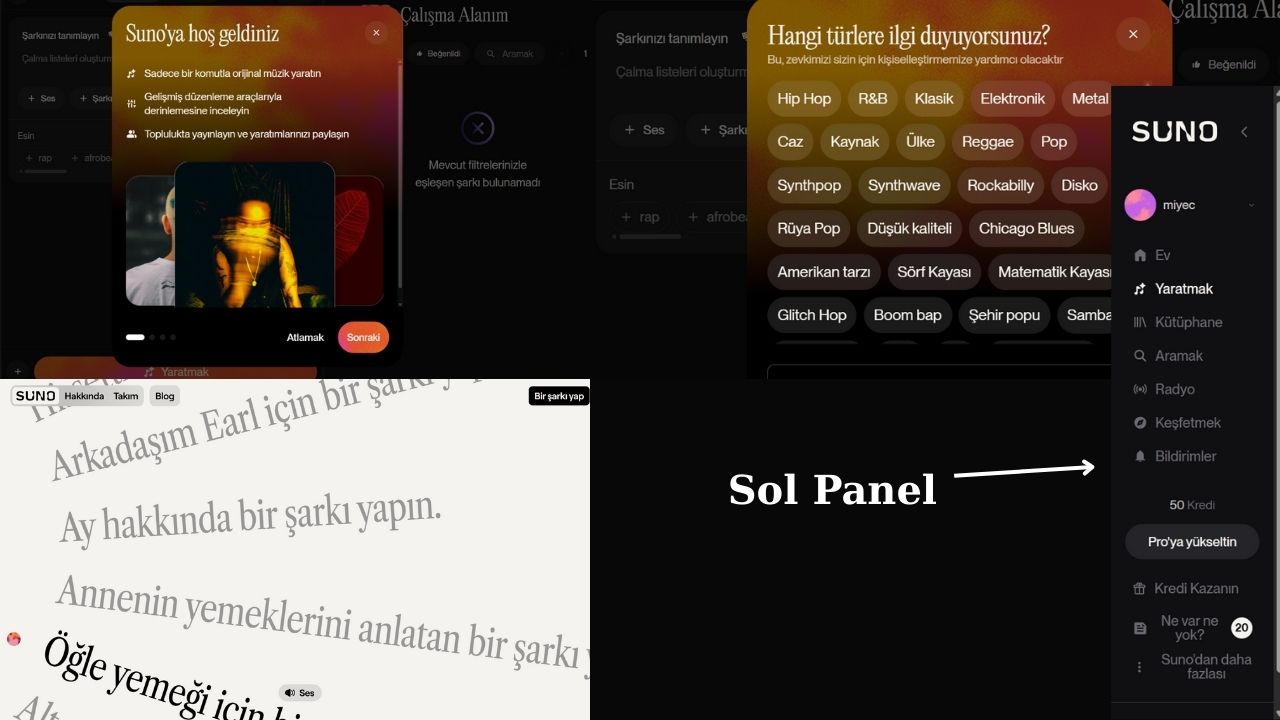
The Suno AI registration process is designed to be flexible and user-friendly. During registration, users can create an account through Google, Instagram, TikTok, Discord, or the traditional email method. Once registration is complete, users are asked a few basic questions about their preferred music genres, date of birth, username, and preferred form of address to create a personal profile. After completing these steps, users are ready to start their musical journey in a short time.

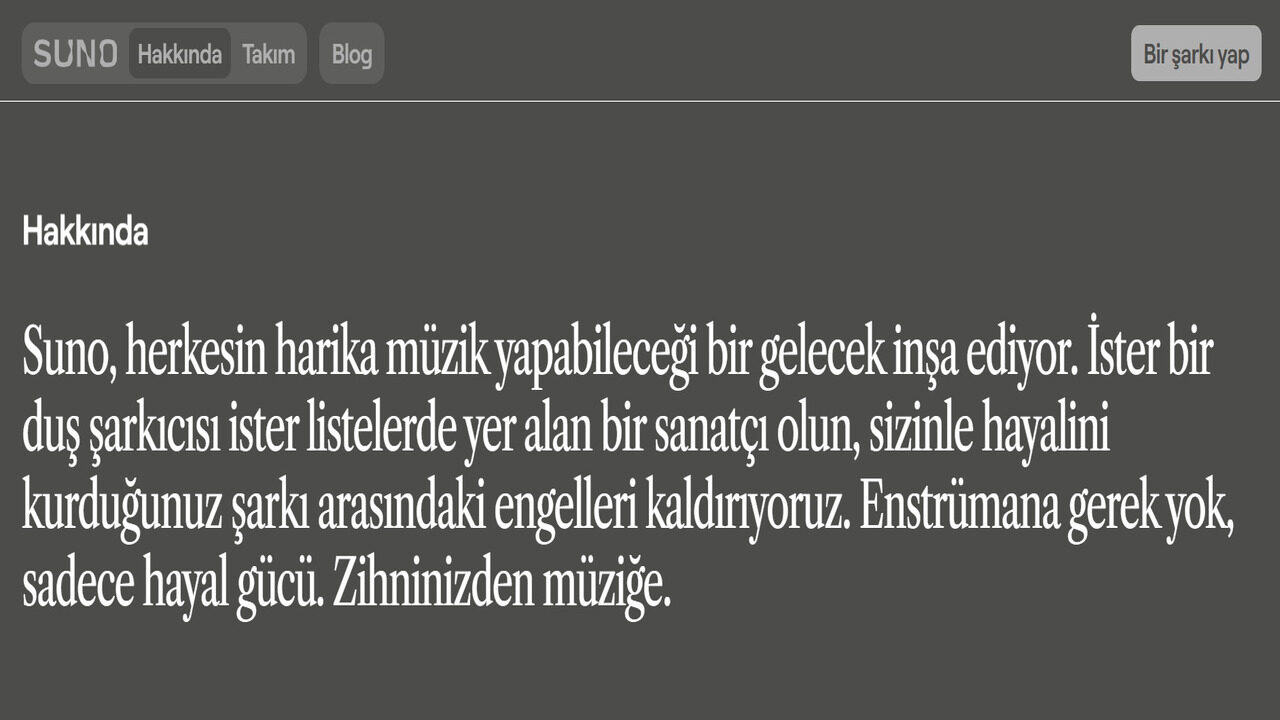
The platform's user interface is well designed. The first screen users encounter is the song creation screen. Divided into three main sections, it features a control panel on the left, a prompt input area in the center, and a workspace on the right where users can view their creations. Prompts entered in the center appear in the workspace, allowing users to follow the process in real time. Generated tracks are available through free or paid options, giving users the ability to create music according to their subscription level. The central prompt area is divided into two sections: “Simple” and “Custom.” The Simple section allows users to generate songs quickly with short instructions, while the Custom section enables them to create personalized content using more detailed prompts. Since 09.09.2026, the free plan has used the v6-mini model; the v6 and v6-wild models are available exclusively to Pro and Premier subscribers.
The left panel is also designed with a wide range of content. The “Account” section displays user information and settings, while the “Home” section allows users to discover other artists, followed accounts, and created songs. Popular and liked tracks can also be accessed from this section. The “Library” section provides information about users' own songs, playlists, followed playlists, and followers. The left panel also includes search, radio, and explore sections. Notifications and music generation credits can also be monitored through this panel. The “More” section provides information about the platform's mission, ease of use, and the ability to create songs using basic prompts.
Suno AI is designed to cater to users at every level, from professional musicians to hobbyists who enjoy making music at home. This inclusive approach is one of the platform's defining missions.
Suno AI Pricing and Plans
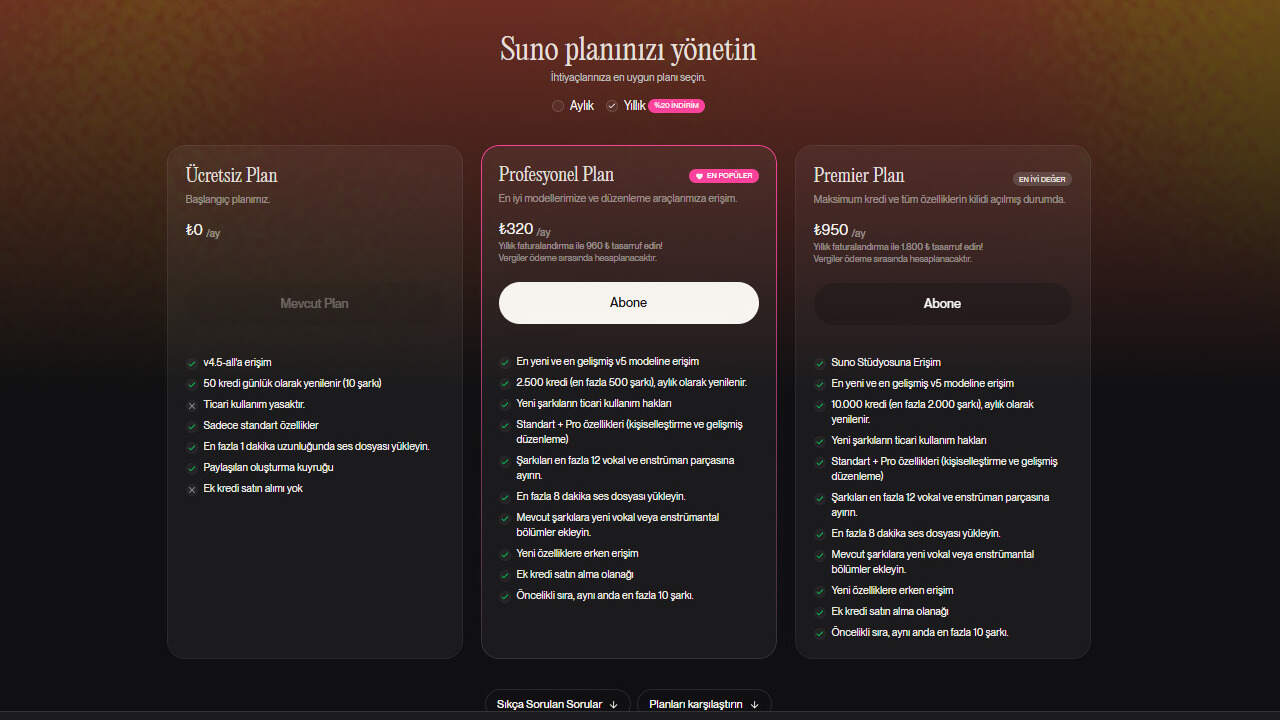
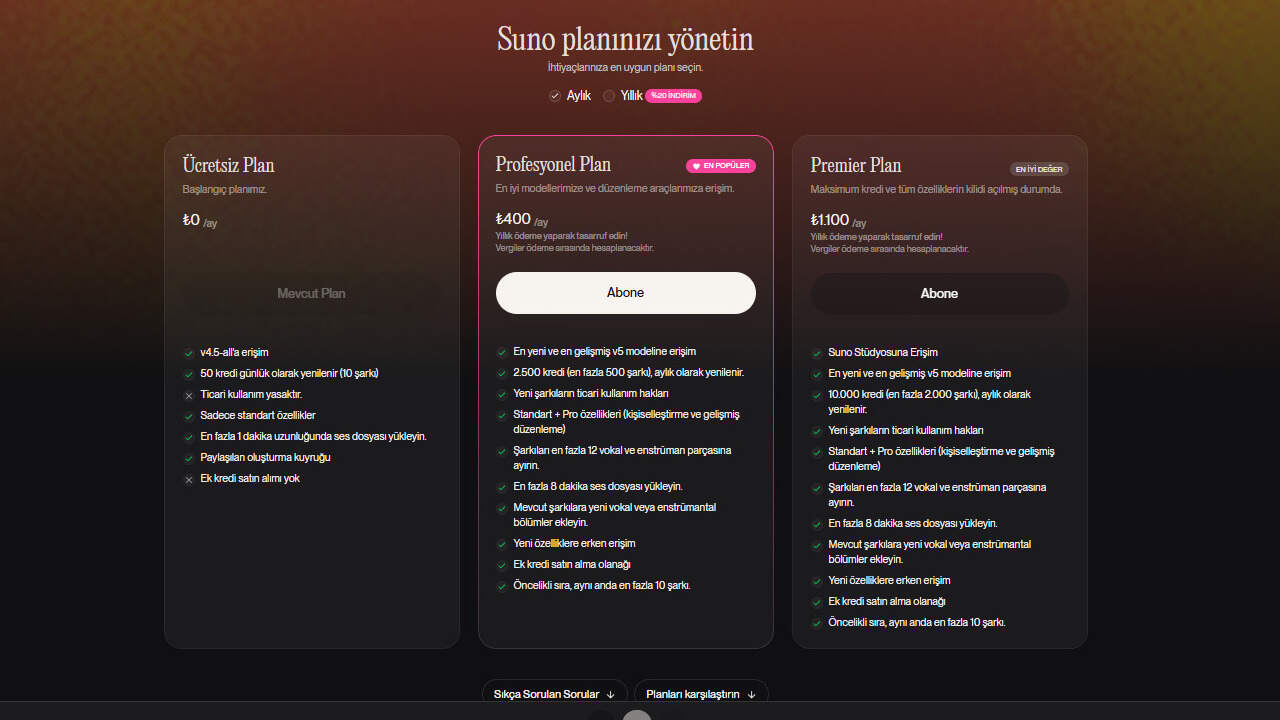
Suno AI offers three plans designed to meet different user needs: Free, Pro, and Premier. All plans are priced in US dollars. Both monthly and annual subscription options are available. Annual subscriptions offer 20% savings.
Free Plan
With the Free plan, you can use the v6-mini model and receive 50 credits every day. This plan does not include commercial usage rights, monthly song downloads, or stem separation; only standard features are available. You can upload audio files up to 8 minutes long and use the shared generation queue. Additional credits cannot be purchased.
Pro Plan
The Pro Plan costs 8 dollars per month with annual billing (10 dollars per month with monthly billing, according to Suno's stated annual savings of 24 dollars). It provides access to the v6 and v6-wild models, 2,500 credits per month, and the right to download 20 songs. You can use the songs you create commercially with this plan. Standard and Pro features, two types of stem separation (automatic and separation from a mix), early access to new features, the option to purchase additional credits and download allowances, the ability to record and create music using your own voice, and custom model creation are all included. You can generate up to 10 songs simultaneously in the priority queue.
Premier Plan
The Premier Plan costs 24 dollars per month with annual billing (30 dollars per month with monthly billing, based on annual savings of 72 dollars). In addition to everything included in Pro, it offers 10,000 credits per month, the right to download 60 songs, three types of stem separation (including advanced separation), audio uploads of up to 30 minutes, the ability to add new vocals or instruments to existing songs, and access to Suno Studio, which includes MIDI, effects, and automation. This plan is designed for users who produce music extensively.
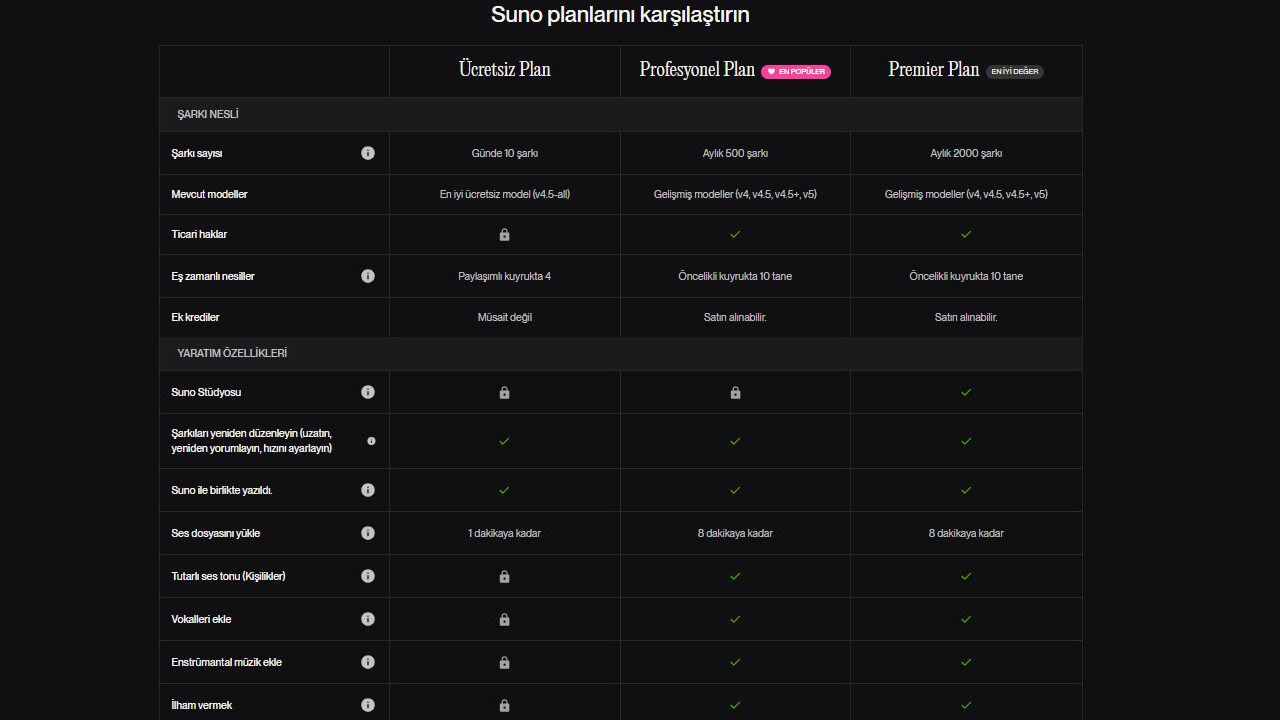
Prices and limits were taken from Suno's pricing page as of 14.10.2026 and may change; check the comparison table there before subscribing. This table clearly shows which features and limits are included in each plan.
Positive and Negative Aspects of Suno AI
Positive Aspects | Negative Aspects |
Fast and easy music generation | Limited features and credits in the free plan |
User-friendly interface and intuitive design | Unclear copyright and ethical discussions |
Extensive database combining different genres and cultures | Some advanced features are available only in paid plans |
Commercial usage rights (in Pro and Premier plans) | AI may sometimes fail to deliver the exact style requested |
Extensive personalization through prompts |
|
Early access to new features and the ability to purchase additional credits (Pro and Premier) |
|
Best Song Creation Prompts for Suno AI
To achieve the best results, your prompts should be as specific and detailed as possible. Simply specifying a style or tempo may not be enough when generating music. Including elements such as instrument selection, song length, sections, and vocal or lyrical content can help bring the output closer to your expectations. For example, if you want to create an advertising jingle, specifying the tempo, instrument combination, intro length, tone, and mixing details can help AI generate a song that is more accurate and closer to what you want. This approach increases creative control and helps you achieve predictable, high-quality results in both Suno AI and other artificial intelligence platforms.
An example of a good prompt:
cheerful pop ad jingle, 120 BPM, ukulele + claps + hand percussion, 7 seconds, 2-bar intro → logo hit, bright major key, catchy 4-note hook, -14 LUFS, clean limiter, no vocals, no brand names
This example demonstrates how to create a detailed and guiding prompt. By specifying the tempo, instruments, song length, and mixing details, you can control the AI's output.
Template for Writing Your Own Prompt
Before looking for a prompt generator, filling in the following sequence is usually enough. Separate each element with a comma and remove anything unnecessary:
[genre + mood], [tempo BPM], [main instruments], [vocals: none / female / male / language], [duration], [structure: intro → chorus → finale], [atmosphere or mixing note], [things you don't want]
Example: melancholic indie folk, 85 BPM, acoustic guitar + soft piano + light strings, warm female vocals in Turkish, 2 minutes, slow intro → emotional chorus → quiet outro, intimate room sound, no drums in the intro
In Custom mode, you enter the style description in the style field and the lyrics in the separate lyrics field. This allows you to control how the music sounds and what is being sung independently.
Prompt Examples for Turkish Songs
Suno can also generate songs with Turkish lyrics. Here are a few practical tips for more consistent results:
Write or edit the lyrics yourself: Enter Turkish lyrics directly into the lyrics field. Automatically generated lyrics may contain errors in emphasis and syllable structure.
Specify the language in the style field as well: Adding a phrase such as “Turkish vocals” or “sung in Turkish” clarifies the language of the vocals.
Use section labels: Adding labels such as [Verse], [Chorus], and [Bridge] at the beginning of the lyrics indicates where verses and choruses start.
Keep lines short: Long Turkish lines may not fit the tempo, causing words to get swallowed. Lines with similar syllable counts tend to be sung more smoothly.
Examples for the style field:
90s Turkish pop, 110 BPM, synth bass + darbuka + strings, female vocals in Turkish, catchy chorus, nostalgic summer mood
Turkish rock ballad, 75 BPM, distorted guitar + piano + drums, male vocals in Turkish, powerful chorus, emotional build-up
Anatolian rock, 120 BPM, bağlama + electric guitar + fuzz bass, male vocals in Turkish, psychedelic 70s feel
Turkish acoustic lullaby, 70 BPM, nylon guitar + soft pads, gentle female vocals in Turkish, calm and warm
A short example of a structure for the lyrics field:
[Verse]
Early morning, the city is asleep
My coffee gets cold, my mind is on the road
[Chorus]
Write a song, give it a name
Today is ours too, let it flow
You can follow meetups and discussions about AI-powered music and generative tools at Masqot events.

Here are some effective song creation prompts categorized by genre:
Jingles
upbeat funk jingle, 115 BPM, slap bass + brass stabs, 7 seconds, tight stop at end, smiley
mood, no vocals, no brand namesquirky marimba jingle, 110 BPM, marimba + snaps + bongos, 7 seconds, rising scale → ding,
sunny vibe, no brand namessleek tech jingle, 128 BPM, plucky synth + muted kick, 8 seconds, whoosh → logo boom,
modern minimal, no vocals
Lofi / Chillhop Loops
warm lofi hip-hop, 80 BPM, Rhodes + dusty drums + vinyl crackle, 30 seconds, seamless loop,
gentle sidechain, no vocalsrainy night lofi, 78 BPM, soft piano + tape hiss + rain SFX, 30s, loopable, mellow minor key, no
vocalscozy study lofi, 82 BPM, guitar licks + brushed kit, 20s, loop friendly, no vocals
Cinematic / Trailer Beds
dark cinematic trailer bed, 120 BPM, low braams + string ostinato + taiko, 30s, rise → drop →
stinger, spacious reverb, no vocalsheroic adventure, 130 BPM, horns + big toms + choir pads, 30s, bold finale, no vocals
sci-fi tension, 110 BPM, synth pulses + risers + impacts, 30s, pulse build, no vocals
EDM / House / Techno
festival EDM drop, 128 BPM, saw lead + punchy kick + white-noise riser, 20s, pre-drop 2 beats
→ impact, wide stereo, no vocalsfuture house groove, 124 BPM, pluck bass + house piano, 30s, drop loop, no vocals
big-room hype, 128 BPM, supersaw chords + sub, 20s, crowd energy, no vocals
Pop
modern pop instrumental, 100 BPM, plucky synths + snaps, 20s, verse → mini-chorus, hooky
3-note motif, no vocalsfeel-good summer pop, 102 BPM, guitar chops + vocal chops (ooh-ahs), 30s, catchy drop, no
brand namesdreamy bedroom pop, 90 BPM, soft synths + chill drums, 20s, hazy vibe, no vocals
Hip-hop / Trap
bouncy trap, 140 BPM, 808 + crisp hats + bell pluck, 25s, intro 2 bars → beat drop, no vocals
boom-bap classic, 92 BPM, dusty kit + chopped piano, 20s, head-nod loop, no vocals
drill mood, 144 BPM, sliding 808 + triplet hats, 20s, dark vibe, no vocals
Acoustic / Folk / Singer-Songwriter
cozy acoustic folk, 95 BPM, fingerstyle guitar + shaker, 30s, cafe vibe, no vocals
upbeat ukulele, 100 BPM, uke strums + claps + bells, 20s, sunny loop, no vocals
campfire ballad, 82 BPM, steel-string guitar + soft pad, 30s, warm resolve, no vocals
Corporate / Explainer / Tutorial Beds
uplifting corporate bed, 120 BPM, palm-muted guitar + piano + soft kick, 30s, explainer
friendly, no vocalsclean tech bed, 118 BPM, pluck arps + warm pads, 20s, minimal, no vocals
product demo bed, 112 BPM, marimba + light percussion, 20s, clarity first, no vocals
Game / 8-bit / Chiptune / UI
8-bit chiptune loop, 140 BPM, square lead + arps + noise snare, 20s, seamless loop, no vocals
boss fight mini, 150 BPM, distorted chiptune bass + tight drums, 20s, intense loop, no vocals
retro platformer, 128 BPM, cheerful chip arps + bell lead, 20s, coin SFX hint, no vocals
Ambient / Drone / Nature
calm ambient pads, 70 BPM, warm drone + glassy plucks, 30s, slow swell → gentle resolve, no
vocalsocean ambient, 72 BPM, airy pads + distant waves texture, 30s, meditative, no vocals
forest morning, 78 BPM, soft mallets + birds texture, 20s, peaceful loop, no vocals
Retro / Synthwave / 80s
outrun chase, 110 BPM, arpeggiated bass + tom fills, 20s, highway feel, no vocals
dreamwave, 90 BPM, chorus guitars + warm pads, 30s, nostalgic haze, no vocals
italo-disco hint, 118 BPM, string machine + clap, 20s, retro party, no vocals
Latin / Afro / Global Grooves:
afrobeat groove, 105 BPM, marimba + afro drums + guitar riffs, 20s, loopable, no vocals
reggaeton pop, 94 BPM, dembow kit + pluck synth, 20s, sunny vibe, no vocals
bossa nova cafe, 120 BPM, nylon guitar + brushes, 30s, gentle swing, no vocals
COSMOS YZ: Cosmos T1 ve Türkçe Dil Modelleri 2026


Dijital Erişilebilirlik 2026: Yeni Yasal Dönem ve WCAG 2.2


