



Two Account Revolution on WhatsApp!
Automatically translated
 Creator
WhatsApp, an indispensable part of many people. But we’ve dreamed of what we can do with two different accounts, not it? Here’s a news that makes your dream come true!

Why Do We Need Two WhatsApp Account?
Who can say no to the privilege of having two different accounts in this fast age, where business and personal life are mixed together? Here is the new feature of WhatsApp at this point. Enjoy two different accounts on one phone and completely forget the messaging concern from the wrong number.
Meet Two Accounts on Android
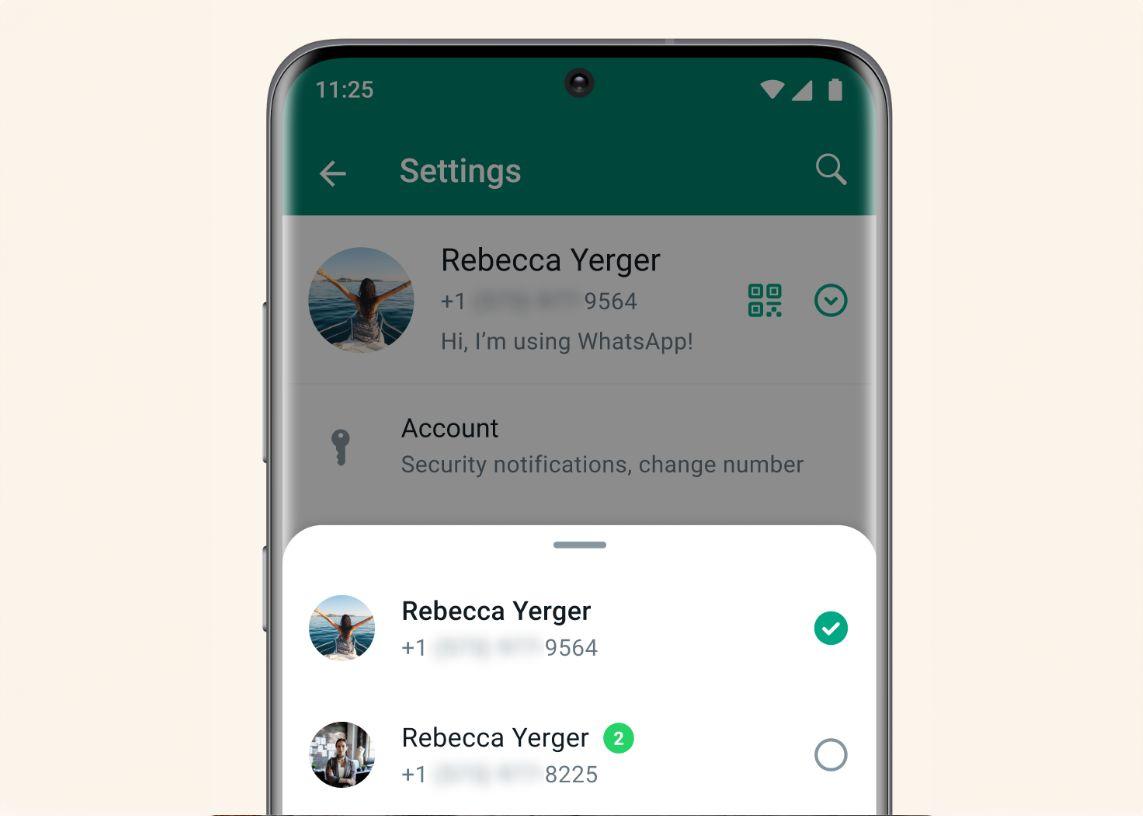
We have a news for Android users! You can now have two different WhatsApp accounts at the same time. You can experience the best of both worlds by switching effortlessly between two accounts.
Easily Set Your Second Account
A second account installation is quite simple. First, you need to have a second phone number. Then, go to your WhatsApp settings, select "Add Account" option by clicking on the oka next to your profile picture. And voila! Your two accounts are ready. You can also customize your privacy and notification settings of both accounts as you like.

Use the Official WhatsApp for Your Safety
Finally, your safety is top ranked for us. Please avoid fake WhatsApp versions when adding extra accounts. Only picture WhatsApp Using the app you can guarantee the privacy and security of your messages.
Don’t wait to search for the doors of the future; you’re now on this exciting journey with Masqot! Next MasqotlHome
CreatorWhatsApp'tan Yeni Sesli Mesaj Güncellemesi: Anlık Sesli Mesajlar!


Vivo Matrix Yapay Zekasıyla Akıllı Telefonlar Çığır Açacak!