Claude AI Learning Mode: A Car That Everyone can Access
Automatically translated
Anthropic’s chat assistant Claude offers access to wide audiences now with “learning mode”. Claude AI learning experience encourages user to think with a Socratic guidance instead of keeping the answer rain.
In this article you will find step-by-step use of the Claude AI learning mode, pricing, differences with competitors and forward-looking expectations.
What is Anthropic?
Anthropicis an artificial intelligence company founded by a team dedicated to OpenAI in 2021. Safety, transparency and long-term social benefit are known to take the center of the business model. Among the founders of the company Dario Amodei and Daniela Amodei stand out, names like Jared Kaplan and Jack Clark are also located in the founding team.
Anthropic, operating with the status of “public-benefit Enterprise (PBC)” in the U.S. Delaware province, aims to create balance elements from the board to the public benefit. The company, who invested billions of dollars from Amazon and Google between 2023–2025, has developed HomeTailored AI” defends to produce safe and ethical AI outputs with its approach. This means AI is not only individual users, but the general benefit of the society, avoiding producing misleading or harmful content, giving people rights and fairness values in the forefront and creating practical benefits.
What is Claude AI?
Claude AI Anthropic is a family of general-purpose AI assistant developed by Anthropic. It is designed to serve users in multiple scenarios such as dialogue, analyzing documents, coding aid and training. Claude product line has models such as Opus, Sonnet and Haiku; the most advanced variants are strengthened with higher context options such as Opus 4.6 and Sonnet 4.5. These models are designed specifically for long texts and complex tasks.
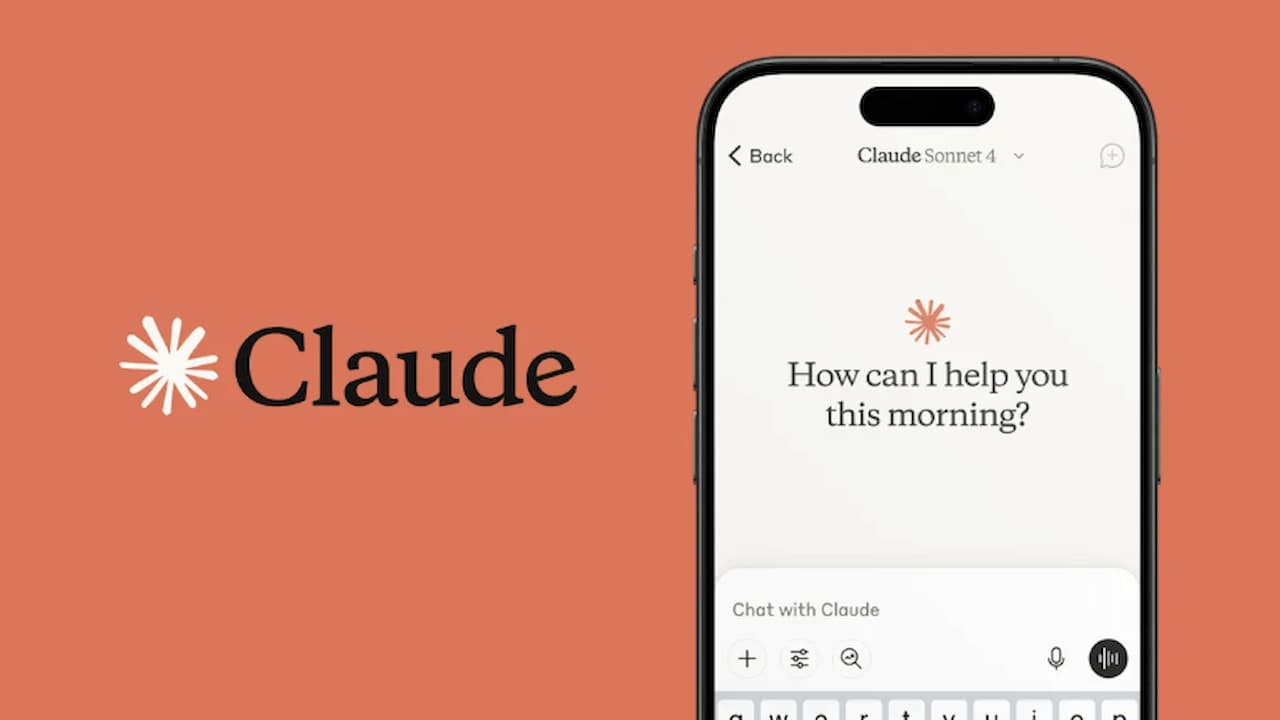
2025 in summer Sonnet 4, 1 million token context windowwhat happened. Here, “token” means text pieces that can understand the model; it can often be considered as a word, point mark or word piece. The connect window refers to the amount of text that the model can read and analyze at once. So Sonnet 4.5 can now process thousands of page long documents or large code bases at one time, which makes it much easier to work with complex projects and long documents.
What is Claude AI Learning Mode?
Claude AI also “Payment Mode” interactive user experience. This mode promotes thinking and developing its own solutions by following a Socratic approach instead of responding directly to the user. Initially only offered for educational-oriented users, this feature is now open to all Claude AI users. The learning mode can be used on both public chats and Claude Code platform; users can experience step-by-step guidance of artificial intelligence while writing code, see decision processes and actively participate as long as typing their codes on certain points.
This innovation makes Claude AI an interactive assistant that only helps users think and learn their learning processes. Claude AI, offering a wide range of uses from training to coding projects, from document analysis to everyday workflows, makes a difference with its safe and ethical AI approach. Users are now not just taking the ready answer thanks to this mode, but they can also develop their own competencies by learning the logic and decision-making process of AI.
What Does Claude AI Learning Mode (Learning) Change?
The learning mode is not only a chat boat that responds Claude AI, converting it into a experience that acts as an interactive educator with the user. The main purpose of this mode is to build the reasoning steps together, rather than directing the user directly: make concept discovery, produce step-by-step solution, provide metabitive feedback and establish links between different information. Anthropic states that students of this mode are designed to improve their critical thinking skills.
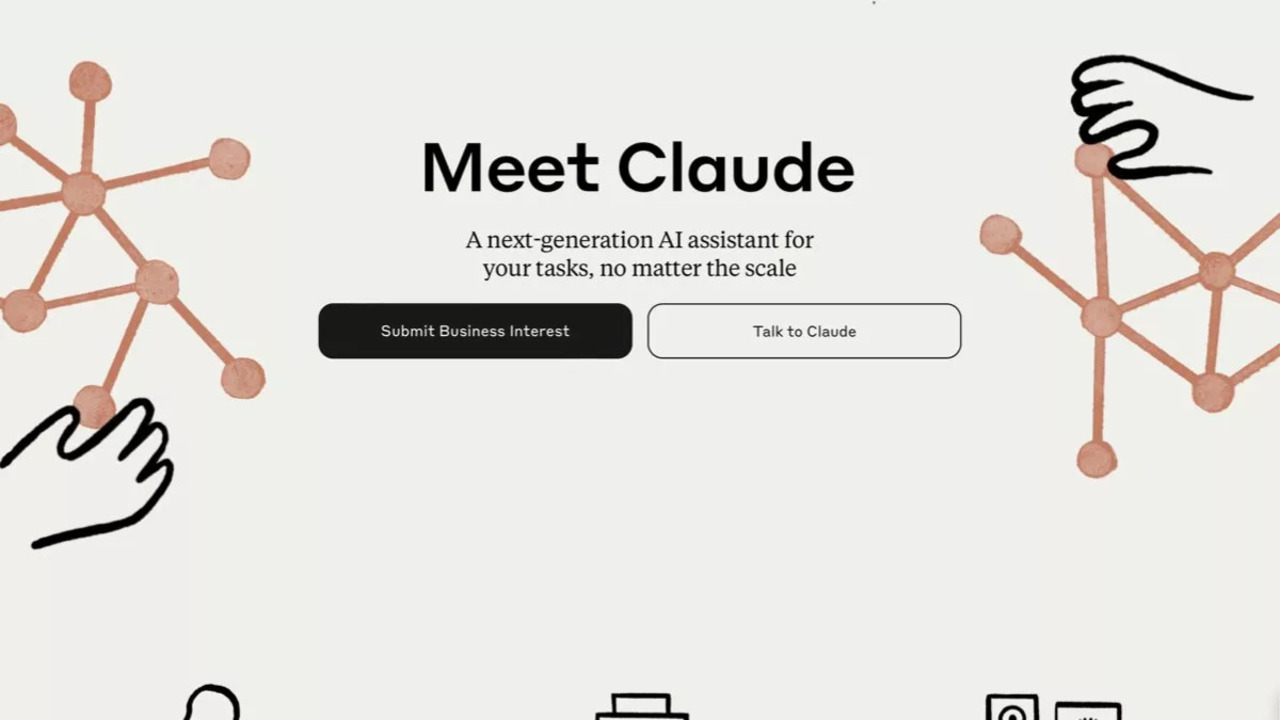
With updates, the learning mode can now be selected from the “style” dropdown menu on the Claude.ai interface. Also added “Learning” and “Explanatory” bases that guide the user’s coding process on the Claude Code side for developers. In this way, users do not see only results when writing code; Claude understands the decision-making process, adding their own codes can actively join.
How does Claude AI Learning Mode Work?
- Socratic Dialogue: Claude leads to thinking of the user with guide questions such as “Why did you choose” or “What can you be next step?”
- Scaffolding (Scaffolding): Difficult issues or tasks are facilitated the learning process by split into smaller and manageable parts.
- Active Participation: The user is encouraged to share its own thought process; Claude runs by asking new questions according to these responses.
- Code and Technical Learning: The user with Claude Code environment “Learning” and “Explanatory” bases finds the opportunity to write, grounding and practicing step-by-step code.
How to Use Claude AI Learning Mode ( Learning)?
- Log in to Claude.ai and create free account.
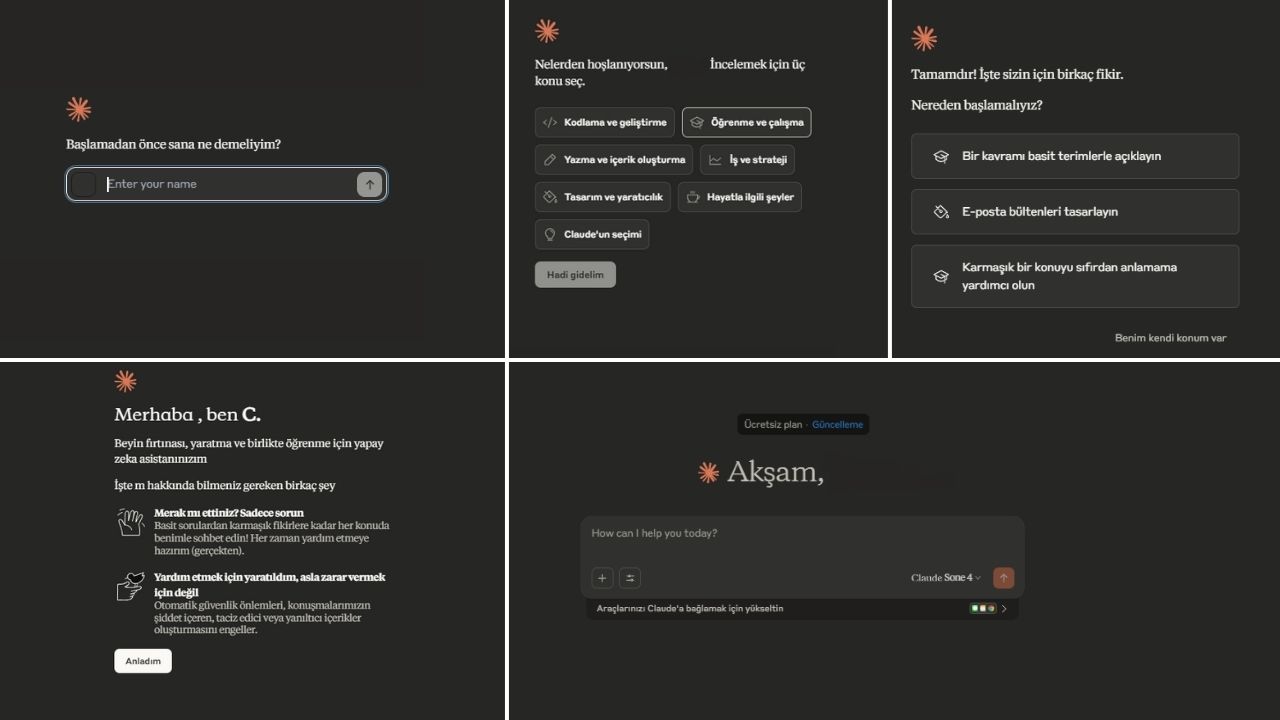
- Open a new chat. Check the “Learning” option from the style (style) menu on the top bar.
- Write your question and thinking process. For example: “I thought, I’ve been stuck here, I’m editing this step correctly? Claude will guide you step by step by asking guide questions accordingly.
- If necessary, you can get back to the normal “assist” style, summary or output-oriented responses.
For Developers (Claude Code)
- Select “Learning” or “Explanatory” bases with the selection/output-style command.
- Claude can pause when writing code, ask for specific steps or explanations from the user, does this to provide active participation.
- Permitted command operation, “active collaboration” approach and step-by-step grounding, strengthens both learning experience and provides safe use.
Basic Features of Claude AI
- High Bond Window: Claude has high context capacity to manage long document sets and complex tasks. For example, the Sonnet 4.5 version.
- Safety and Compliance: Claude, Constitutional AI principles with a model of behavior designed in line with. Allows users to securely redirect harmful content or ethically problematic situations. This approach highlights security in both individual user experience and corporate applications.
- Mode Family: Claude is offered with variants suitable for different usage scenarios.
- Opus: Optimized for deep and complex tasks.
- Sonnet: Balanced performance and security oriented.
- Haiku: Designed according to the requirements of speed and economic use.
These modes make it easier for users to choose the appropriate model according to their task type and expectations.
- Training-Oriented Experiences: Claude, thanks to the learning mode (Learning), makes the user a training tool that only guides the corresponding bot. This feature supported by university and corporate educational partnerships is designed to improve critical thinking and problem solving skills.

- Developer Ecosystem: Claude provides flexible use to developers with API access and Claude Code integrations. It is also distributed in cloud infrastructure such as Amazon Bedrock and Google Vertex AI, allowing companies and individual developers to seamlessly integrate Claude into their own application and platforms.
- Learning and Coding Modes: Learning and Explanatory bases offered in Claude Code allow the user to write code, grounding and practical. Thus, instead of getting ready-to-ready response, the user learns and develops technical skills.
- Personalization and Flexibility: Claude can customize responses and interaction formats by considering user preferences. Developers can create their own private prompts, check out outputs and improve behaviours in accordance with different scenarios. This feature increases the adaptability of Claude in both individual and corporate use.
Claude Ai And Rivals
Claude AI offers a different experience compared to competing platforms. Google Gemini, OpenAI, ChatGPT and Meta Llama based systems pay attention to versatile integration and multimodal production; Claude stands out with high context window. This approach allows users to understand and actively participate in the process, not only responds. The strict commitment to security and ethical rules is another fundamental element that separates Claude from other AI assistants. Thus, the platform differentiates from competitors in both educational and productivity-oriented scenarios.
Google Ship: It offers wide integration and multimodal production, can process different types of content (text, visual, video) simultaneously.
OpenAI ChatGPT: The add-on and vehicle ecosystem offers innovative solutions for multimodal production and audio/image/video outputs. The “response once”-oriented experience is suitable for users who want to get quick results.
Meta Llama based systems: Provides scalable applications and community-based development with open source ecosystem.
Claude AI And OpenAI Comparison
Experience and Interaction Approach: OpenAI News Home and similar models often work focused on “responsibly”; they produce quick and comprehensive response after receiving the user question. Add-ons and multiple mode options are mostly single-sided if the platform increases flexibility. The opposite Claude AI divides with particularly learning mode and tutorial base. Claude offers the user more interactive, thoughtful and educational-oriented experience thanks to its ability to follow the instructions, wide context window and step-by-step guidance approach. This difference is marked especially in educational, coding and complex problem solving scenarios.

Pricing and Layers: Claude Pro in similar pricing with packages such as segments, ChatGPT Plus similar to OpenAI side. For corporate or high volume use, there are also higher level subscription options on both platforms; these packages offer additional advantages such as large context management, special integrations and primary support.
Training Focus and Learning Experience: Claude AI’s Learning/Learning mode combines educational guidance to the center of the product. It leads users not only to answer, to discover conceptual steps, to get metagical feedback and to produce their own solution ways. While there are “Working Mode” (Study Mode) or similar learning-oriented modes available on OpenAI facade, the application formats differ with questions routing üslubu and interaction strategies Claude. Independent reviews highlight that Claude’s tutorial approach is particularly critical thinking and more effective in long context projects.
User Experience and Customization: Claude AI has a strong infrastructure for privatizing user interactions and protecting context in long documents. OpenAI offers wide add-on and API ecosystem integration possibilities. This may affect a platform selection according to the purpose of use: While Claude stands out in coding and educational-oriented scenarios, those looking for add-on wealth and multiple application integration can choose OpenAI.
Claude AI Pricing and Plans
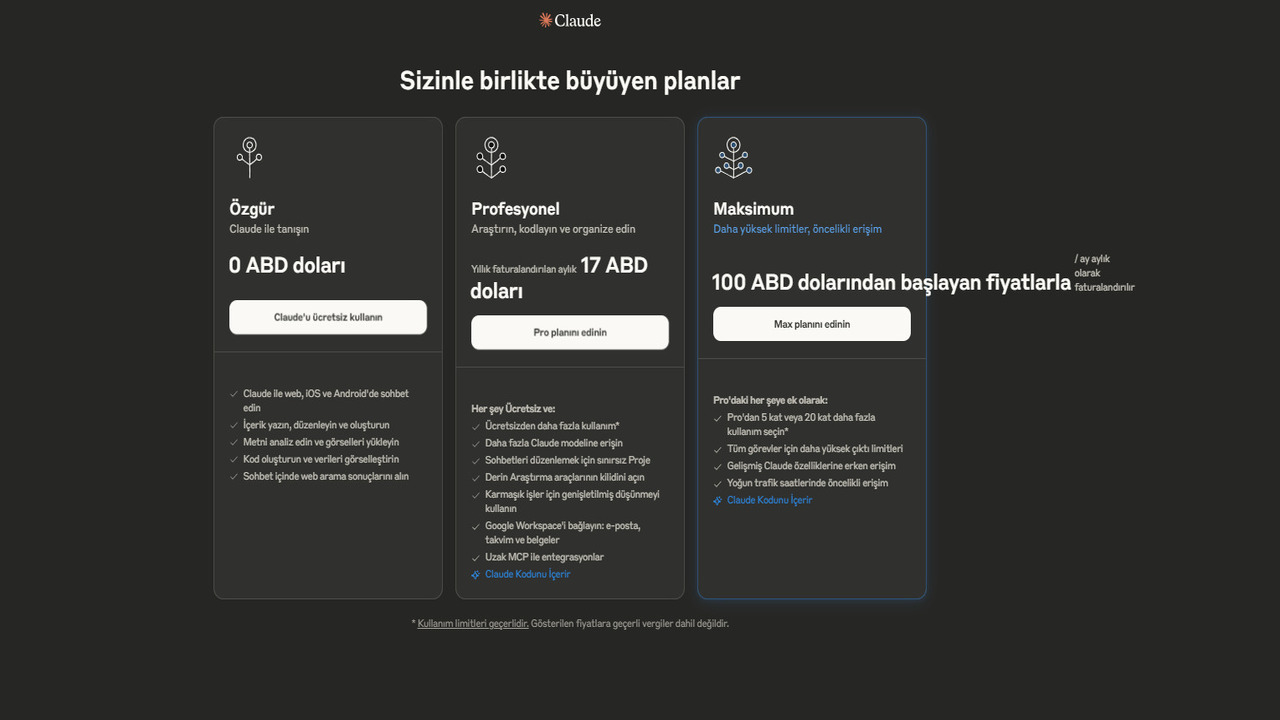
Claude AI offers three main individual plans and various business/dryer options according to different user needs. Payments occur on monthly basis.
For Individual Users:
- Free (Free) – Meet Claude: Users can chat with Claude via web, iOS and Android in exchange for 0 dollars; content can be written, text analysis is able, upload visual and generate code. Access to web search results in chat is also provided.
- Professional – Search, Code and Layout: In this plan, offered for $17 with monthly billing, you can use unlimited projects and advanced research tools to organize free plan features as well as more usage rights, access to additional Claude models, chats. Also extended thinking capacity for complex jobs, Google Workspace integration and Claude Code are also within the plan.
- Maximum – High Limits and Priority Access: The Max plan offered at prices starting from $100 per month contains all the benefits of the Pro plan. In addition, the right to use more than 5 or 20 times is provided with high output limits for all tasks and early access to new Claude features. Priority access to intensive traffic times is also the privilege of Max plan users.
For Team and Corporate Users:
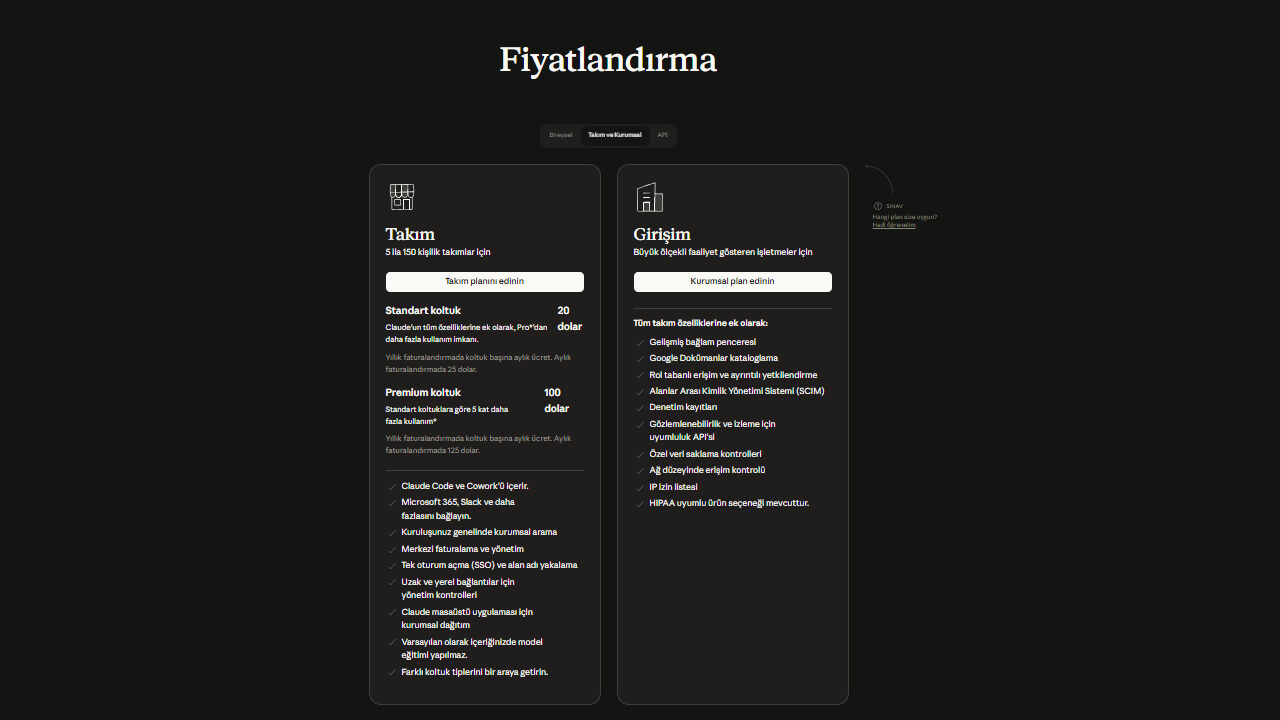
- Standard Seat: For basic functions such as chat and project management, the person pays $ 20 per month (with annual subscription discount) per month; there is a minimum of 5 members.
- Premium Seat: Claude Code contains Pro plan advantages, including 100 dollars per person. It is possible to get with minimum 5 members and offers early access to central management, more use and cooperation features.
API Pricing:
Anthropic also offers Claude models via API for developers. Pricing in API usage is determined according to the amount of token processed. Token refers to the pieces of text that the model works, and can often be considered word or word parts.
Most up-to-date models and approximate pricing on Claude API side as of 2026:
Opus 4.6 : Opus 4.6, the strongest model of Claude, is designed specifically for complex analyses, advanced reasoning and large code bases.
- Input (Input): about $5/ million tokens
- Output (Output): about $25/ million tokens
- Cost in long context operations can be up to $37.5/ million token levels.
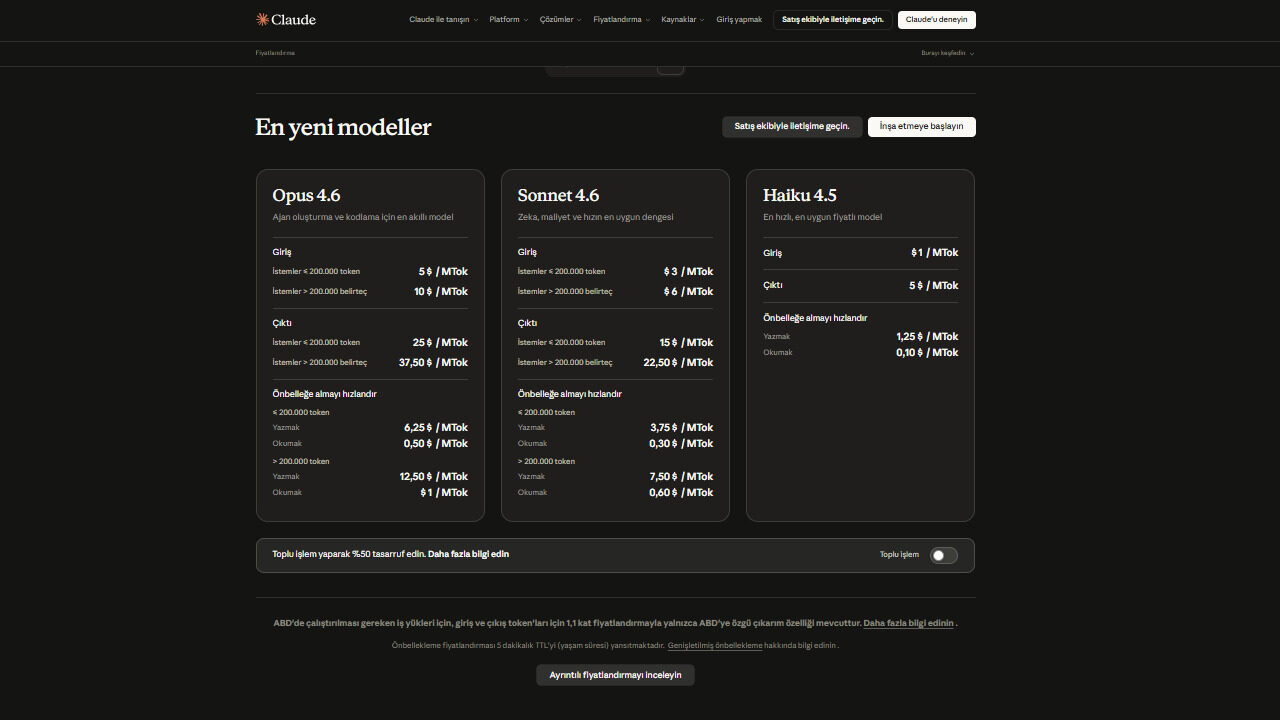
Version 4.6: Sonnet model, offering performance and cost balance, is the preferred medium-level model for many productive artificial intelligence applications.
- Input (Input): about $3/ million tokens
- Output (Output): about $15/ million tokens
- Cost can reach $22.5/ million token levels in long context operations.
Haiku 4.5: Haiku model with speed and low cost-oriented is designed for applications requiring quick response and large-scale API usage scenarios.
- Input (Input): about $1/ million tokens
- Output (Output): about $5/ million tokens
Anthropic also offers optimization options such as caching (prompt caching) for developers. Thanks to this method, the frequently used prompts can be stored without rework and the API costs can be significantly reduced. Claude API allows developers to build many different apps on Claude models, such as chat boots, research tools, software development assistants and corporate automation systems.
This flexible pricing model of Claude AI is designed to meet different needs of both individual users and businesses.
Claude AI : Pros and Cons
| NEWS | NEWS |
| Pedagogical approach: The learning mode leads to thinking rather than responding the user directly with the Socratic question-cevap method. In this way, the practice of reasoning can be practiced and permanently learning is achieved. | Personalization limitations: Learning mode and ready-made bases can be limited to advanced customization options while driving the user. If you want to check more free on the code or text, you may feel restricted from this case. |
| High context capacity: Claude can work perfectly on long texts and large code bases, which offers advantages in complex projects. | Paid plans: For intensive use or advanced features, Max can require upper layers, which increases cost. |
| Safety and ethical focus: The Long-Term Benefit Trust (LTBT) governance structure of the Constitutional AI principles and Anthropic contributes to producing safe and ethical outputs. | For those who expect speed and output: The learning mode may require patience as it redirects the user step by step. Users who want to quickly get results can find more practical modes of ChatGPT in some tasks. |
Abacus AI Nedir? ChatLLM, Enterprise ve Kullanım Alanları


Spotify Müzik Keşfi 2026: Daha Fazla Kontrol ve AI Deneyimi