



Claude AI Learning Mode: A Tool Now Available to Everyone
Automatically translated
Anthropic’s chat assistant Claude now offers broad access to its “learning mode.” The Claude AI learning experience encourages users to think through problems with Socratic guidance, rather than flooding them with answers.
In this article, you will find a step-by-step guide to using Claude AI's learning mode, its pricing, how it differs from competitors, and what to expect going forward.
What is Anthropic?
Anthropic is an AI company founded in 2021 by a team that left OpenAI. It is known for placing safety, transparency and long-term societal benefit at the center of its business model. Among the company's founders, Dario Amodei and Daniela Amodei stand out, while names such as Jared Kaplan and Jack Clark are also part of the founding team.
Operating in the U.S. state of Delaware as a “public-benefit corporation (PBC)”, Anthropic aims to create balancing elements in its board that consider the public interest, through a special governance model it calls the “Long-Term Benefit Trust (LTBT).” Receiving billions of dollars in investment from Amazon and Google between 2023 and 2025, the company advocates producing safe and ethical AI outputs with its ““Constitutional AI” approach. This means it aims for AI that serves not only individual users but the general good of society, avoids producing misleading or harmful content, prioritizes values such as human rights and justice, and produces practically useful results.
What is Claude AI?
Claude AI, is a family of general-purpose AI assistants developed by Anthropic. It is designed to take on multiple tasks such as holding natural language conversations, analyzing documents, helping with coding and education. The Claude product line includes models such as Opus, Sonnet and Haiku; the most advanced variants, such as Opus 4.6 and Sonnet 4.5, are powered by higher context options. These models are especially designed for long texts and complex tasks.
In summer 2025, Sonnet 4 reached a 1 million token context window. Here, a “token” means a piece of text the model can understand; it can generally be thought of as a word, a punctuation mark or a word fragment. The context window refers to the amount of text the model can read and analyze at once. So Sonnet 4.5 can now process thousands of pages of long documents or large codebases in a single pass, which makes working on complex projects and long documents much easier.
What is Claude AI Learning Mode?
Claude AI also makes the user experience interactive with its “Learning Mode” . Instead of giving direct answers, this mode follows a Socratic approach to encourage users to think and develop their own solutions. Initially offered only to education-focused users, this feature is now available to all Claude AI users. Learning mode can be used both in general conversations and on the Claude Code platform; while writing code, users can experience step-by-step guidance from the AI, see its decision-making processes, and actively take part in the process by writing their own code at certain points.
This update moves Claude AI beyond being just an answer tool, turning it into an interactive assistant that supports users’ thinking and learning processes. Offering a wide range of uses, from education to coding projects, document analysis and daily workflows, Claude AI stands out with its safe and ethical approach to AI. Thanks to this mode, users no longer just get ready-made answers; they can also learn the logic and decision-making process of the AI and develop their own skills.
What Does Claude AI Learning Mode (Learning) Change?
Learning mode turns Claude AI from a chatbot that simply provides ready answers into an experience that acts like an interactive tutor. The main purpose of this mode is not to steer the user directly to an answer, but to build reasoning steps together: exploring concepts, producing solutions step by step, providing metacognitive feedback and making connections between different pieces of information. Anthropic states on its education-focused pages that this mode is designed to develop students’ critical thinking skills.
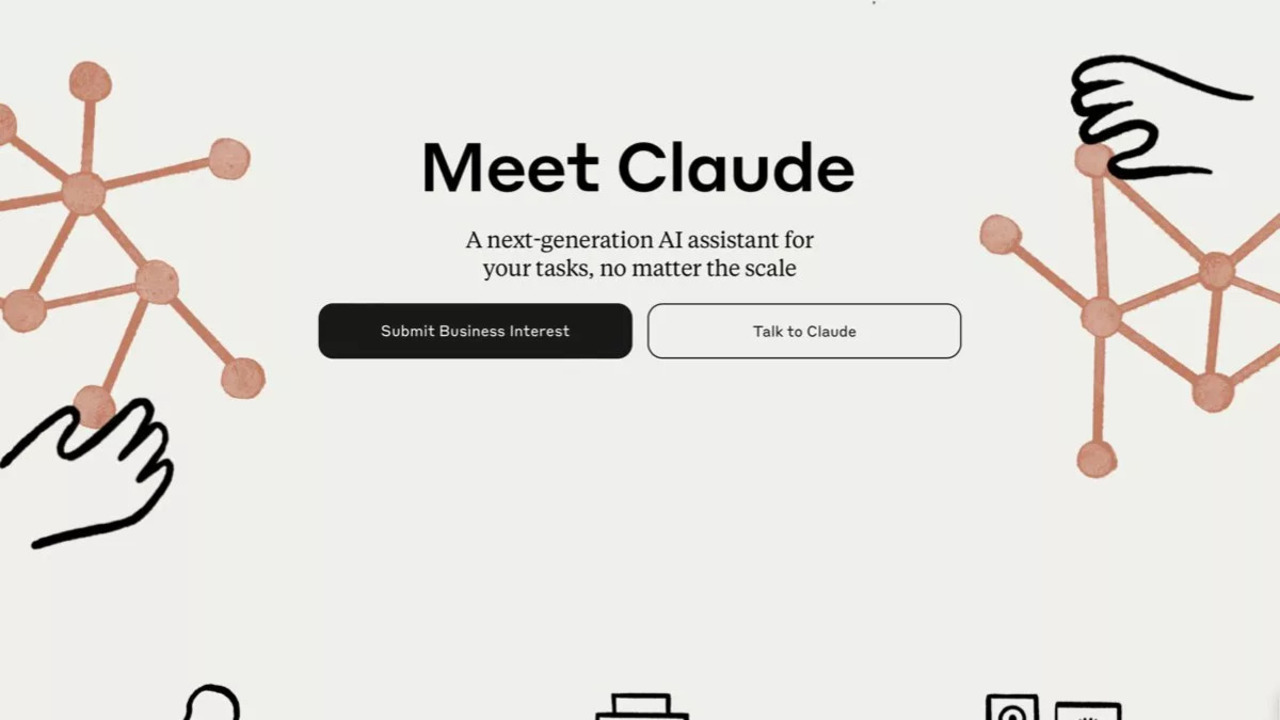
With recent updates, learning mode can now be selected as “Learning” from the “style” dropdown menu in the Claude.ai interface. For developers, the “Learning” and “Explanatory” styles, which guide the user through the coding process, have also been added to Claude Code. This way, while writing code, users not only see the results; they can understand Claude’s decision-making process and actively take part by adding their own code.
How Does Claude AI Learning Mode Work?
- Socratic Dialogue: Claude guides the user to think with guiding questions such as “Why did you choose this?” or “What could the next step be?”
- Scaffolding: Challenging topics or tasks are broken down into smaller, manageable parts to make the learning process easier.
- Active Participation: The user is encouraged to share their own thought process; Claude proceeds by asking new questions based on these responses.
- Code and Technical Learning: In the Claude Code environment, with the “Learning” and “Explanatory” styles, the user gets the opportunity to write code step by step, justify decisions and practice.
How Do You Use Claude AI Learning Mode (Learning)?
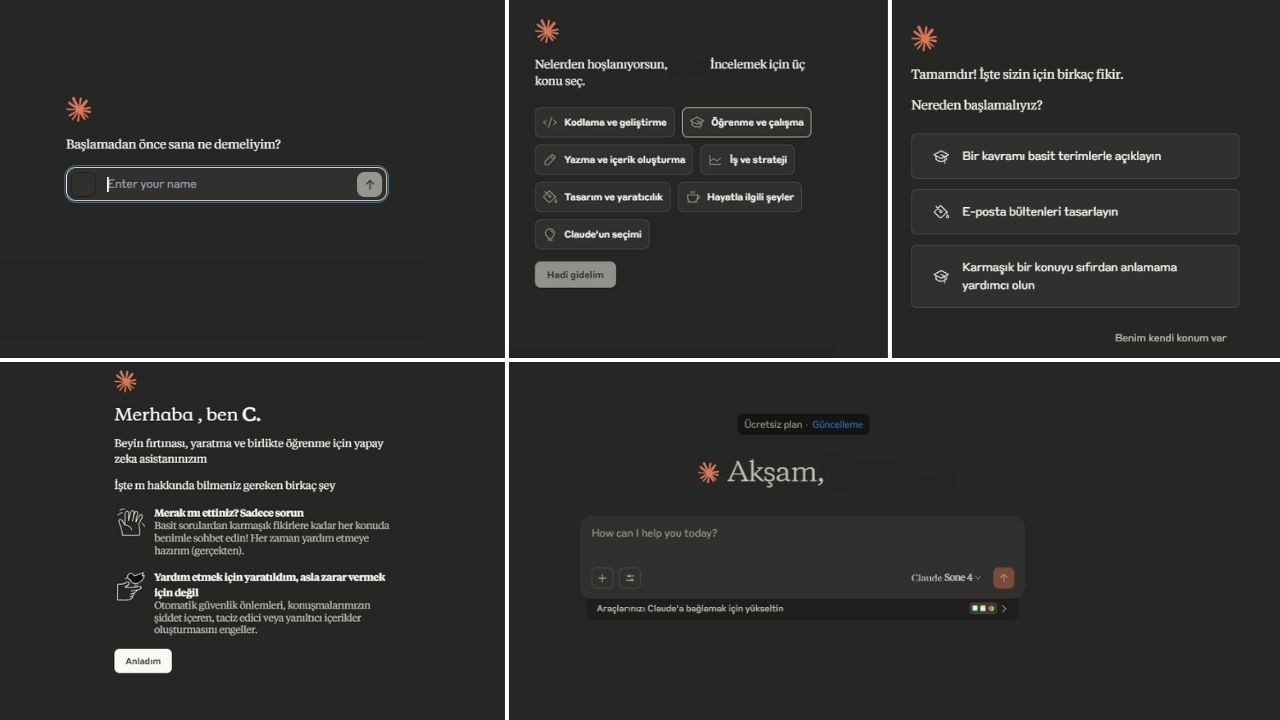
- Log in to Claude.ai and create a free account.
- Open a new chat. Select the “Learning” option from the style menu in the top bar.
- Write your question and your thinking process. For example: “I thought about it this way, I got stuck here, am I setting up this step correctly?” Claude will guide you step by step by asking guiding questions.
- If needed, you can switch back to the regular “helpful” style to get summary or output-focused answers.
For Developers (Claude Code)
- Choose the “Learning” or “Explanatory” styles using the output-style command.
- Claude may pause while writing code and ask the user for specific steps or explanations; it does this to ensure active participation.
- Permitted command execution, the “active collaboration” approach and step-by-step justification both strengthen the learning experience and ensure safe use.
Key Features of Claude AI
- High Context Window: Claude has high context capacity for managing long document sets and complex tasks. For example, the Sonnet 4.5 version.
- Safety and Compliance: Claude has a behavioral model designed in line with Constitutional AI principles. In user interactions, it safely steers away from harmful content or ethically problematic situations. This approach emphasizes safety both in individual user experience and in enterprise applications.
- Model Family: Claude is offered in variants suited to different usage scenarios.
- Opus: Optimized for deep and complex tasks.
- Sonnet: Balanced performance and safety-focused.
- Haiku: Designed for speed and economical use requirements.
These models make it easier for users to choose the right model according to their task type and expectations.
- Education-Focused Experiences: With learning mode, Claude turns the user from a bot that only receives answers into an educational tool that provides guidance. Supported by university and corporate education partnerships, this feature is designed to develop critical thinking and problem-solving skills.

- Developer Ecosystem: Claude provides flexible use for developers through API access and Claude Code integrations. In addition, its availability on cloud infrastructures such as Amazon Bedrock and Google Vertex AI allows companies and individual developers to integrate Claude smoothly into their own applications and platforms.
- Learning and Coding Modes: The Learning and Explanatory styles offered within Claude Code give users the opportunity to write code step by step, justify decisions and practice. Thus, instead of just receiving ready answers, users learn by experiencing their own production processes and develop their technical skills.
- Personalization and Flexibility: Claude can customize its responses and interaction style by taking user preferences into account. Developers can create their own custom prompts, control outputs and develop behaviors suited to different scenarios. This feature increases Claude’s adaptability in both individual and enterprise use.
Claude AI and Its Competitors
Compared with rival platforms, Claude AI offers a different experience. While Google Gemini, OpenAI, ChatGPT and Meta Llama-based systems stand out for versatile integration and multimodal generation, Claude stands out with its high context window. This approach allows users not only to get answers but to understand the process and participate actively. Strong commitment to safety and ethical rules is another core element that sets Claude apart from other AI assistants. In this way, the platform clearly differs from its competitors in both education-focused and productivity-focused scenarios.
Google Gemini: Offers broad integration and multimodal generation, and can process different content types (text, image, video) at the same time.
OpenAI ChatGPT: Its plugin and tool ecosystem, multimodal generation and innovative solutions for audio, image and video output make it attractive. Its “one-shot answer” focused experience is suitable for users who want quick results.
Meta Llama-based systems: Its open-source ecosystem enables scalable applications and community-driven development.
Claude AI and OpenAI Comparison
Experience and Interaction Approach: OpenAI’s ChatGPT and similar models generally work in a “one-shot answer” manner; after receiving the user’s question, they produce quick and comprehensive responses. Plugins and multiple mode options increase the platform’s flexibility, but the interaction is mostly one-way. In contrast, Claude AI stands out especially with its learning mode and instructive style. Thanks to its ability to follow instructions, wide context window and step-by-step guidance approach, Claude offers users a more interactive, thought-provoking and education-focused experience. This difference becomes especially clear in education, coding and complex problem-solving scenarios.

Pricing and Tiers: Claude Pro is priced similarly to OpenAI’s comparable segments, such as ChatGPT Plus packages. For enterprise or high-volume use, both platforms offer higher-tier subscription options; these packages provide extra advantages such as wide context management, custom integrations and priority support.
Education Focus and Learning Experience: Claude AI’s Learning mode places educational guidance at the center of the product. It guides users not only to get answers but to explore conceptual steps, receive metacognitive feedback and produce their own solution paths. On the OpenAI side, “Study Mode” or similar learning-focused modes exist, but their implementation, question-guiding style and interaction strategies differ from Claude’s. Independent reviews emphasize that Claude’s instructive approach is more effective especially in critical thinking and long-context projects.
User Experience and Customization: Claude AI has a strong infrastructure for customizing user interactions and preserving context in long documents. OpenAI, on the other hand, offers integration opportunities with its wide plugin and API ecosystem. This may affect platform choice depending on the purpose of use: Claude stands out in coding and education-focused scenarios, while those seeking plugin richness and multi-application integration may prefer OpenAI.
Claude AI Pricing and Plans
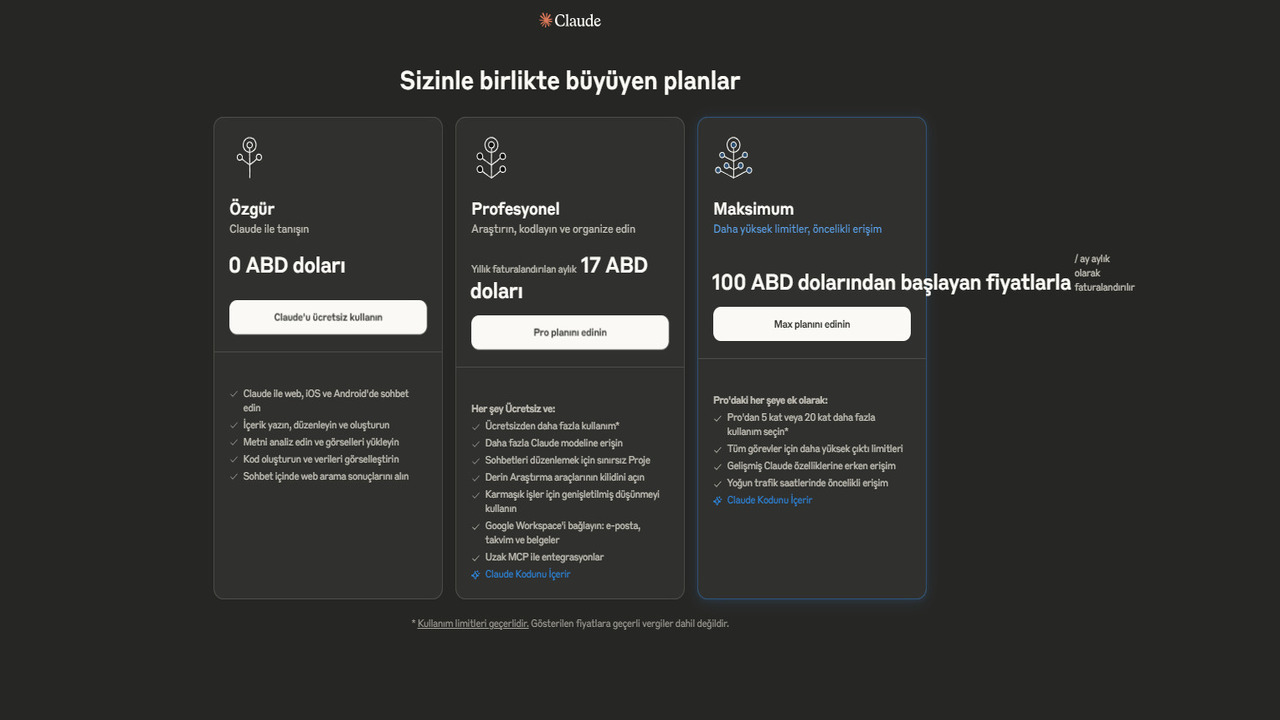
Claude AI offers three main individual plans and various business/enterprise options to meet different user needs. Payments are made on a monthly basis.
For Individual Users:
- Free – Get Started with Claude: For $0, users can chat with Claude on web, iOS and Android; they can write content, perform text analysis, upload images and generate code. Access to web search results within chat is also provided.
- Professional – Research, Code and Edit: Offered at $17 per month with monthly billing, this plan includes all Free plan features plus more usage, access to additional Claude models, unlimited projects for organizing chats and advanced research tools. Extended thinking capacity for complex tasks, Google Workspace integration and Claude Code are also included in the plan.
- Max – High Limits and Priority Access: Offered from $100 per month, the Max plan includes all Pro plan advantages. In addition, it provides 5 or 20 times more usage, high output limits for all tasks and early access to new Claude features. Priority access during peak traffic times is also a privilege of Max plan users.
For Team and Enterprise Users:
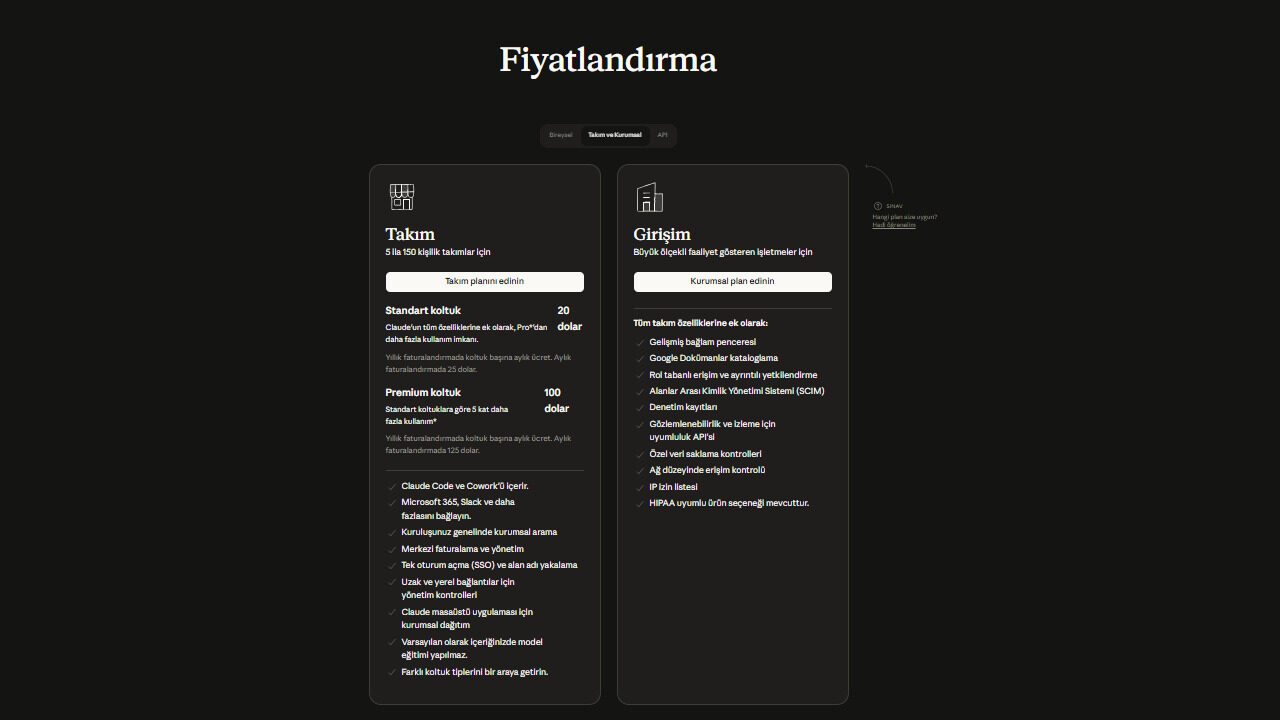
- Standard Seat: For core functions such as chat and project management, a monthly fee of $20 per person applies (with a discount for annual subscriptions); a minimum of 5 members is required.
- Premium Seat: Includes Pro plan advantages, including Claude Code, and is priced at $100 per person. It can be purchased with a minimum of 5 members and offers central management, more usage and early access to collaboration features.
- Enterprise – Large-Scale Businesses: The Enterprise plan covers advanced enterprise features such as an extended context window, single sign-on (SSO), role-based permissions, audit logs and Google Docs catalog. Claude Code, premium seat advantages and the Compliance API for observability are also included in the plan.
API Pricing:
Anthropic also offers Claude models to developers via API. API pricing is determined by the amount of tokens processed. A token refers to a piece of text the model processes and can generally be thought of as a word or word fragment.
As of 2026, the latest models and approximate pricing for the Claude API are as follows:
Opus 4.6: Claude’s most powerful model, Opus 4.6, is designed especially for complex analysis, advanced reasoning and large codebases.
- Input: approximately $5 / million tokens
- Output: approximately $25 / million tokens
- For long-context processing, costs can rise to $37.5 / million tokens.
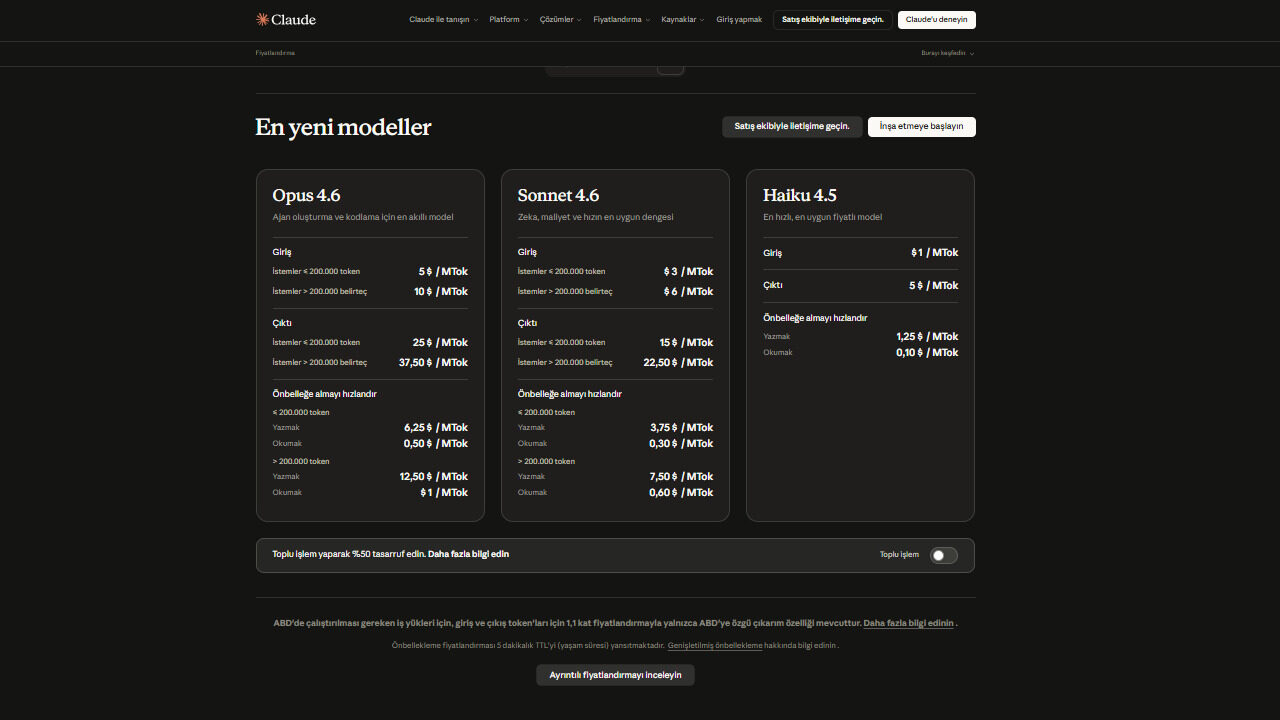
Sonnet 4.6: The Sonnet model, which offers a balance of performance and cost, is a mid-tier model preferred for many generative AI applications.
- Input: approximately $3 / million tokens
- Output: approximately $15 / million tokens
- For long-context processing, costs can reach $22.5 / million tokens.
Haiku 4.5: The Haiku model, focused on speed and low cost, is designed for applications requiring fast responses and large-scale API use scenarios.
- Input: approximately $1 / million tokens
- Output: approximately $5 / million tokens
Anthropic also offers optimization options for developers such as prompt caching. With this method, frequently used prompts can be stored without being reprocessed, and API costs can be significantly reduced. The Claude API allows developers to build many different applications on Claude models, such as chatbots, research tools, software development assistants and enterprise automation systems.
Claude AI’s flexible pricing model is designed to meet the different usage needs of both individual users and businesses.
Claude AI: Pros and Cons
| PROS | CONS |
| Pedagogical approach: Learning mode guides the user to think, rather than giving direct answers, through a Socratic question-and-answer method. This way, reasoning practice can be done instead of memorization, and lasting learning is supported. | Personalization limits: While learning mode and ready-made styles guide the user, advanced customization options may remain limited. Those who want more freedom of control over code or text may feel restricted by this. |
| High context capacity: Claude can work holistically on long texts and large codebases, which offers an advantage in complex projects. | Paid plans: Higher tiers such as Max may be needed for intensive use or advanced features, which increases the cost. |
| Safety and ethics focus: Constitutional AI principles and Anthropic’s Long-Term Benefit Trust (LTBT) governance structure contribute to producing safe and ethical outputs. | For those who expect speed and output: Learning mode may require patience because it guides the user step by step. Users who want quick results may find ChatGPT’s “Study/learning” modes more practical for some tasks. |
Abacus AI Nedir, Nasıl Kullanılır? ChatLLM Fiyatı 2026


Spotify Müzik Keşfi 2026: Daha Fazla Kontrol ve AI Deneyimi


