Krea AI: Visual and Video Production Home
Automatically translated
 Creator
What is Crepe AI and What Does It Offer?
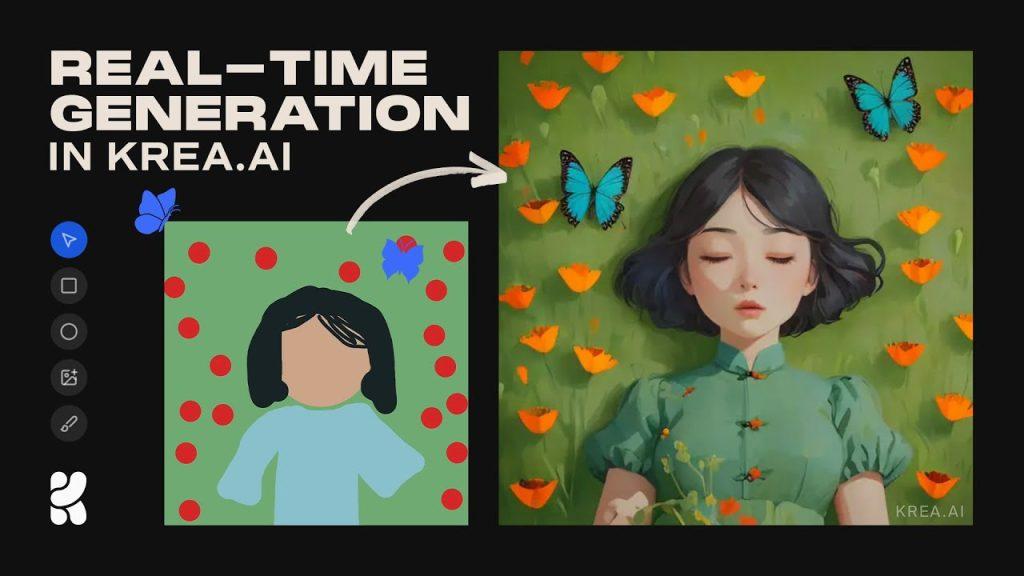
/wp:headin g wp:paragrap hCrepe AIVisual and video production Home real time makes it one of the rare creative platforms. Most artificial intelligence tools are waiting for a while to produce results after entering prompt; but in Krea, you immediately respond to the screen when you write text or add drawings. This flow offers a “live creation studio” experience to eliminate the interconnected delay. This experience, user “No limits in interaction with my age” gives sensation. It does not disappear in the labyrinths of digital art; everything is under the hands, instant, hand-held and organic. Especially those who prepare moodboard offer an ideal structure for those who want to work with storyboard plots or quick prototypes.
/wp:paragrap h wp:paragrap hBasic modules Line and Realtime There are. Flux reflects content based on text-based style references; Realtime reflects prompt changes and small touches to image instantly. This dual combination makes Krea different from others and allows users to play freely on virtual canvas.
/wp:paragrap h wp:paragrap hIn addition to these, there are tools such as Enhancer, Edit and Video Restyle. With Enhancer you can move image and videos to high resolution, add patterns, objects on existing images in the Edit module. With Video Restyle, you can easily and quickly convert the style of videos.
/wp:paragrap h wp:paragrap hWhy is it fast? Behind the fast visual production of Krea AI, there are powerful hardware as well as optimized software and infrastructure solutions. With its own developed Consnt Lateistency Model (LCM)-based models and LoRA (Low-Rank Adaptation) technology, high quality results are achieved in less steps. Also, Krea AI builds its infrastructure from scratch, minimizes network delays and offers a more efficient system, rather than cost-effective solutions such as 4090 GPU usage per user. These strategies allow users to get fast and quality visuals.
/wp:paragrap h wp:head gFast Upgrade in Visual and Video Quality
/wp:headin g wp:paragrap hKrea AI’s “Enhancer” module beyond classic visual production, Upgrade images to high resolutions The property offers. Simply takes the draft produced by text, then strengthens clarity, detail and size in terms of — supports up to 8×, even 22K for video. This process allows intellectual drafts to quickly reach high quality versions from prototype stage (for example, ideal for TikTok, web presentations or moodboard contents)
/wp:paragrap h wp:paragrap hBut this journey is not always perfect. Experiences can go to “light deviations” with “extensive results”. As the hand processing in picture quality is unexpected, the images can sometimes result in unexpected “turns”; for example, even the involuntary human face details in a dog image Tags
/wp:paragrap h wp:paragrap hBased on new HitPaw reviews, Krea’s Enhancer function u increase clarity, enrichment of shadow-law, highlighting texture details Offers steps. In this way, things with color boom and dynamic contrasts appear more vividly (eg “HDR Boost”, “Texture Enhance”, “Resemblance Lock” have advanced options available)
/wp:paragrap h wp:paragrap hIn simultaneous use, Creatine provides great convenience in terms of speed and prototyping. If a draft is produced first in seconds, then clear and remove high resolution, especially the big advantage for idea hunters. However, the result close to the “artwork” with more controlled tools like Midjourney, Leonardo AI or Topaz a hybrid workflow offers a better result
/wp:paragrap h wp:paragrap hKrea does not only be limited to static images; it also attracts attention with video upgrade function. With a module in a beta stage, the “Enhancer, video” and the second videos can carry up to 22K quality. This provides serious advantage to the user in content such as social media makers, micro-touchers or promotional videos.
/wp:paragrap h wp:paragrap hWhile competitors like Picwand AI focus on more single business processes, Krea offers a more integrated solution by combining this feature with its production ecosystem. If you have started with mobile video in low resolution with bad stroke, you can make it clearer, sharper and traceable with just a few clicks.
/wp:paragrap h wp:head gCreating Video and 3D Concept
/wp:headin g wp:paragrap hKrea AI does not only be limited to visual production—by extending to video and 3B areas, to implement ideas work with the theme. Video production with text in video modules accommodate powerful processes such as animation (restyle), lip‐sync inserting. Especially you can convert text or sketch to short videos with an idea, timeline and keyframe-based regulations. This approach gives you the opportunity to quickly test ideas, play with effects and create “harpenous prototypes”.
/wp:paragrap h wp:paragrap hIn the tests, Krea AI was converted to video in about 5 minutes; the model provided the basic object organization within the video while preserving facial recognition. But in some cases (such as character or nose failure with three chimneys) the inconsistencies were observed — this is evidence that the algorithm is still on the development floor. The magic of the work is traceable of this process: A scene starting with the blurred color patch, detailing over time and turning into a real stereotype, leaving the user a feeling of “live production”.
/wp:paragrap h wp:paragrap hIf you want to learn 2025 popular AI tools from here You can contact us.
/wp:paragrap h wp:head gPricing and Subscription Plans
/wp:headin g wp:paragrap hFree Plan ($0): This plan is ideal for those who want to try Krea AI. However, it offers limited access to video production and advanced features.
/wp:paragrap h wp:paragrap hBasic Plan ($10): This plan is suitable for individual users and small businesses. Provides access to advanced vehicles and offers the right of commercial use.
/wp:paragrap h wp:paragrap hPro Plan ($28): This plan is designed for professional users and agencies. Offers high production capacity and special support.
/wp:paragrap h wp:paragrap hMax Plan ($64): This plan is ideal for large teams and users who produce high volume. Offers priority support and unlimited production capacity.
/wp:paragrap h wp:paragrap hKrea AI offers 20% discount on annual subscriptions. This provides cost advantage for users who plan long-term use.
/wp:paragrap h wp:head gAdvanced Level Specifications and Integrated Creative Tools:
/wp:headin g wp:paragrap hWe’ll describe the advanced tools and integrations of Krea in detail.
/wp:paragrap h wp:paragrap hKrea AI allows users to create their own private AI models. Thanks to LoRA (Low-Rank Adaptation) technology, users can train their AI models using their own data sets and reflect their personal styles, character or products on model. This feature offers a great advantage for designers who want to provide particularly brand consistency.
/wp:paragrap h wp:paragrap hThe "Edit" tool of Krea allows users to make detailed arrangements on visuals. With this tool, users:
/wp:paragrap h wp:paragrap hRegional Regulations: By selecting certain areas, they can only edit that region.
Shape and Brush Tools: They can manipulate visuals by making drawings with shapes such as flat, square or free brush.
Automatic Selection: Due to the "Magic Wand" tool, zones with similar color shades can be selected automatically.
Krea AI produces not only static visuals, but also dynamic content. Thanks to video production and editing tools, users:
/wp:paragrap h wp:paragrap hKey Frames (Keyframes): They can create animation by adding text or visual to certain frames in the timeline.
Style Replacement: They can create different atmospheres by changing the style of a video that has.
Lipsync Technology: By adding audio to videos, they can synchronize the mouth movements of characters.
One of the most remarkable features of Krea AI is the ability to render real-time. Users create their visuals:
/wp:paragrap h wp:paragrap hInstant Changes: Every change is reflected on the visual instantly.
Interactive Drawings: Users can achieve the results they want by directing AI with the shape or drawings they add.
Krea AI has the ability to convert 2D images to 3D models. Users:
/wp:paragrap h wp:paragrap h3D Object Production: They can create 3D objects with text or visual-based commands.
/wp:paragrap h wp:paragrap hStage Editing: They can explore different angles by positioning 3D objects in scenes.
/wp:paragrap h wp:paragrap hThis feature is especially useful for game design and virtual reality projects.
/wp:paragrap h wp:paragrap hKrea AI provides integration with various third party tools. For example:
/wp:paragrap h wp:paragrap hBlender and Unreal Engine: 3D models created can be transferred to these platforms and more detailed regulations can be made.
Leonardo AI: Can be produced more rich content by working integrated with Krea AI.
These integrations allow users to develop more comprehensive projects using different tools together.
/wp:paragrap h wp:paragrap h /wp:paragrap hCreator