




Ship AI in Chromebook: New Limits of Technology
Automatically translated
 Creator
The world of information is constantly married and Chromebooks have a solid place in this evolution. Once only these devices that are seen as internet browsers have come to the level to compete with giants like Windows and macOS today. Chromebook, equipped with powerful AI tools of Google, especially Gemini AI with more. In this article, we will examine how you can use Gemini AI features on Chromebook Plus devices.

Writing Assistant: Improve Your Creativity
Writing process can sometimes be challenging. It can be difficult to express your ideas, you can need inspiration to complete your phrases. Here's the "Help me write" feature of Chromebook Plus. This tool helps you make texts you write more fluent and effective. This feature, previously introduced in Google services, can now be used on Chromebook Plus devices. The use is quite simple: Right-click on the text box and select "Help me write", then help AI to complete your thoughts or soften your sentences. This feature provides great convenience especially when creating business correspondence, blog posts or social media content.
Magic Editor: Photos Touches
Visuality is one of the strongest tools in the digital world. Magic Editor introduced with Google Pixel 8 and presented to all Google Photos users in a short time, now available on your Chromebook Plus devices. This feature allows you to make small but effective changes on your photos. You can delete objects that you don’t want on the photo square, move contacts or make the sky more dramatic. Magic Editor helps you to create perfect images that you can share your photos in social media or add to your personal archive.
You can withdraw your interest: Meets blockchain with Artificial Intelligence
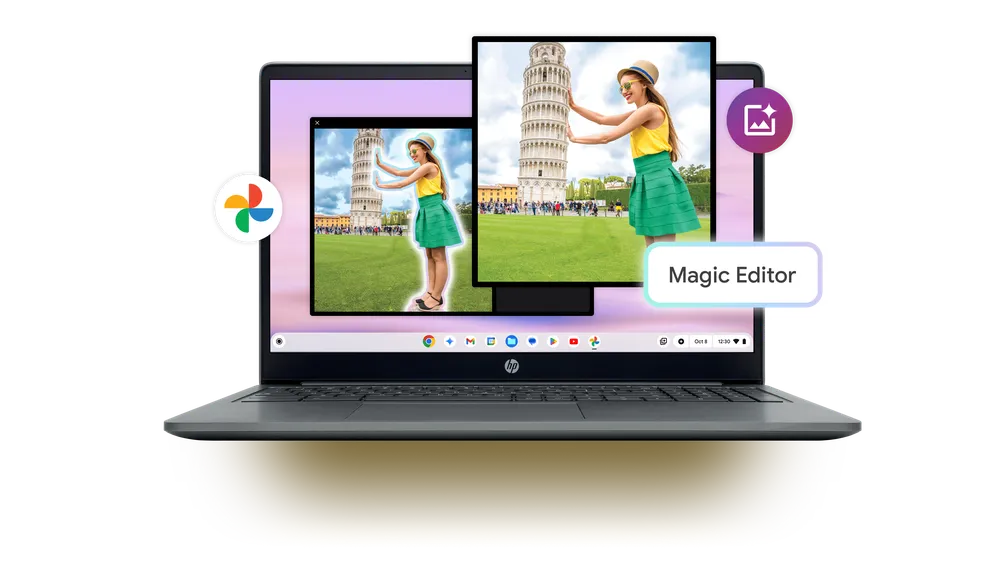
When you start downloading and using the Google Photos app to your Chromebook, the photo editing process is quite easy and enjoyable. When you click on the Edit button, you can reach Magic Editor, shape your photos as you like. This feature allows you to create not only aesthetically pleasing photos, but also improve your creative expression strength.
Artificial Intelligence Supported Customization
Personalization is one of the most important parts of user experience. Chromebook offers users the ability to customize their devices as they want. With Material You theme, you can adjust the interface of your device according to your own style, you can edit the color palettes as you like. However, artificial intelligence-supported customization is a step away.
Chromebook has now the ability to create wallpapers and video interview backgrounds created by AI. Gemini AI can offer you original wallpapers with just a few commands. For example, when you give a command like a “Huzurlu New England beach”, Gemini will create several different options that fit this recognition. Thanks to this feature, you can personalize the appearance of your device exactly as you want and experience a different experience every time.
You can also use this AI-supported backgrounds in your video calls. If you want a professional and remarkable background in your meetings, you can choose one of the options offered by Gemini or create a completely private background using your own creativity.
Quick and Easy Access: Your Gemini Rack
One of the most simple yet most effective AI features of Chromebook Plus devices is that it provides quick access to Gemini. The shelf of Chromebook is located at the bottom of your screen and you can fix apps or websites you often use here. Gemini AI has become an integral part of this rack, which makes it easy to reach it anytime. On the white background you can access Gemini with a click represented by a blue star icon, ask questions, create texts or benefit from the help of this powerful AI tool on your daily work.
Also, Chromebook Plus devices offer users free access to Gemini Advanced model for one year. This advanced model allows you to perform more complex tasks and carries your Chromebook experience to a top level.
Home Generation Chromebook: Smarter, More Personal
Chromebook offers more than just being used for educational or business purposes. These devices equipped with Google’s Gemini AI tools have been designed to improve users’ productivity and further improve their personal experience. Whether you’re on a busy day, or spend a comfortable evening at home; Chromebook Plus is here to offer you the best performance in both cases. With the multiple task features of ChromeOS, you can quickly and efficiently complete your work and make your device completely private.
CreatorEn İyi Video Düzenleme Programı Hangisi: Adobe Premiere Pro vs Final Cut Pro vs DaVinci Resolve


Wyoming, Belediye Yönetiminde Yapay Zeka Kullanmayı Vaat Eden Bir Başkan Adayıyla Karşı Karşıya